
 Bitaigen Research
 OKX (formerly OKEx) – A Comprehensive Guide to Registration, Verification, and Buying USDT
OKX is one of the most popular exchanges in the Chinese‑speaking community. Many users find its interface relatively friendly; for example, deposit and withdrawal processing times tend to be a little faster than those of some competitors. This article walks you through registration, identity verification, and the C2C (peer‑to‑peer) purchase of USDT on OKX, providing a step‑by‑step tutorial that can be followed by newcomers worldwide.
After completing registration and identity verification on OKX, you can use the C2C marketplace to buy USDT with fiat currency. The whole workflow includes downloading the mobile app, filling out personal information, uploading identity documents, completing facial recognition, and finally selecting a seller and making a payment.
From a practical standpoint, we meticulously outline the complete path from downloading and installing the app, creating an account, passing the KYC (Know‑Your‑Customer) check, to buying USDT on the C2C market. Each step is accompanied by screenshots and key tips to help beginners get started quickly while avoiding common pitfalls. Later sections will also touch on fund‑management techniques, so we recommend reading the entire guide for the best possible experience.
---
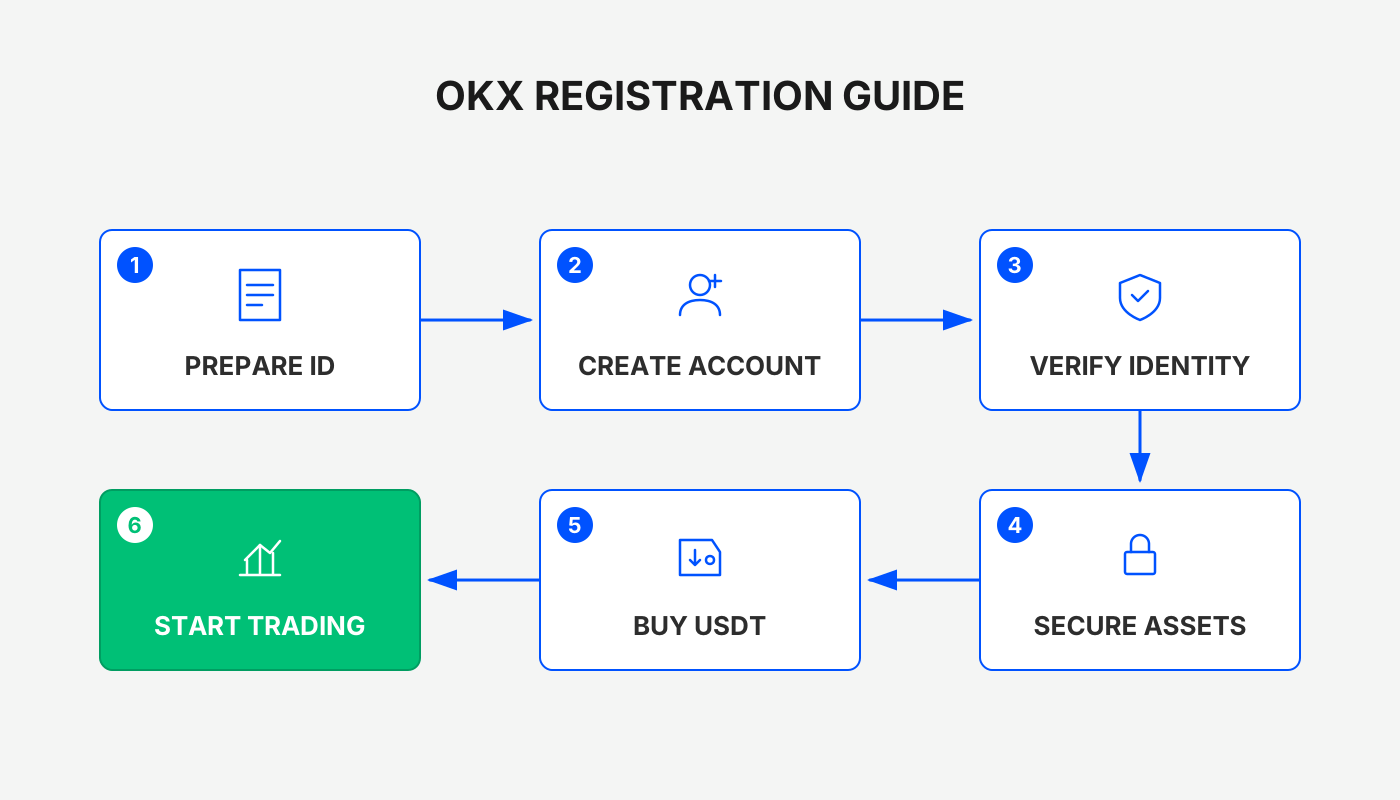
Step 1 – Register a New User
- Download the OKX App: Use the link provided below to install the application.
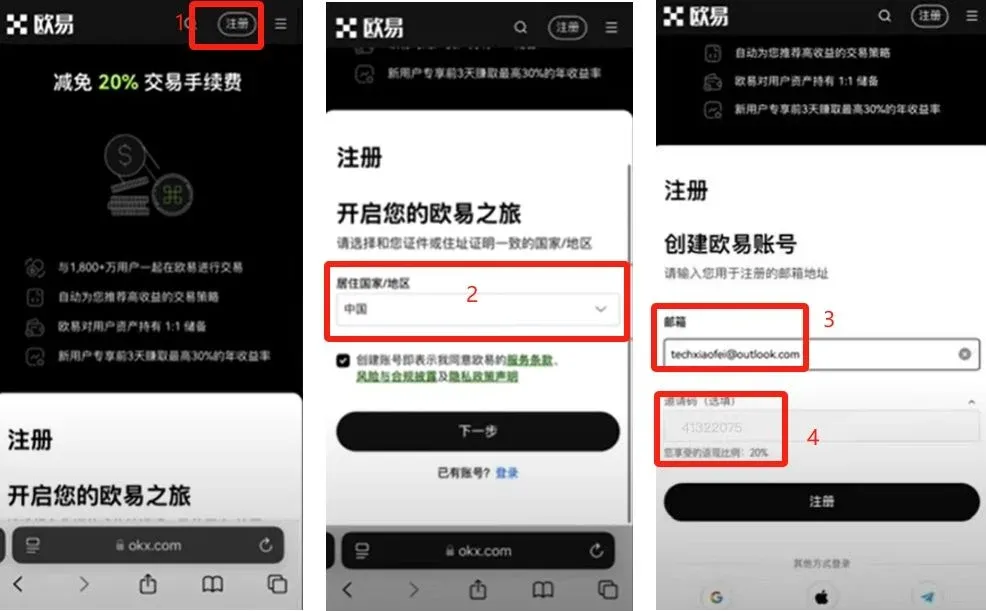
- Enter an Invitation Code: On the registration screen, input the invitation code `B2345` to claim a reward of up to 50 USDT.
Tip: The invitation code must be entered during registration in order to receive the bonus.
Recommended Environment
- It is advisable to use a VPN and switch to an IP address located in Taiwan or South Korea. Avoid IPs from Hong Kong, the United States, Canada, or Singapore, as they may trigger regional restrictions.
- Open the official registration URL in your mobile browser: https://www.okx.com/zh-hans/join/B2345. The link automatically fills in the invitation code and gives you a 20 % fee rebate on subsequent trades.
Fill in Registration Details
- Select Country/Region of residence as China (or the country that issued your identification document). This choice is not limited by your IP address.
- We recommend using an overseas email service such as Gmail or Outlook for the account registration.
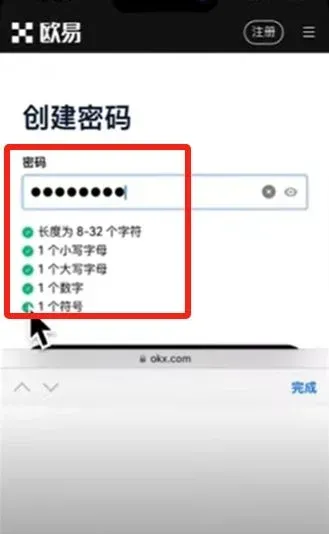
Set a Strong Password
- The password must satisfy the platform’s strength requirements. A green check mark will appear next to each satisfied criterion.
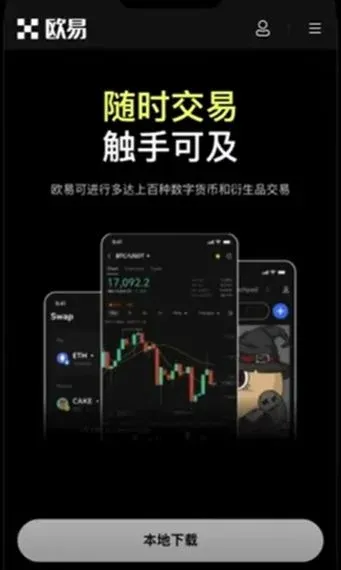
After completing the steps above, you will be taken to the OKX home screen, as illustrated below, confirming that registration was successful.
---
Step 2 – Identity Verification (KYC)
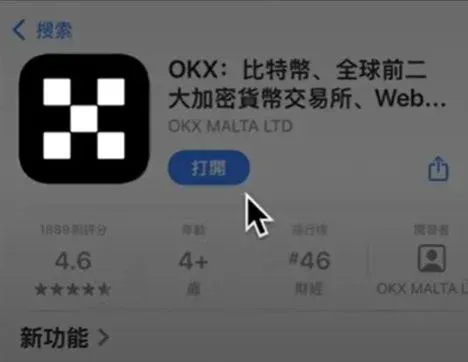
- Download the OKX App
- iOS users: Search for “OKX” in the App Store. If the app is blocked in your region, you can purchase a Taiwanese Apple ID on Taobao (search for “Taiwan Apple”) and use it to download the app.
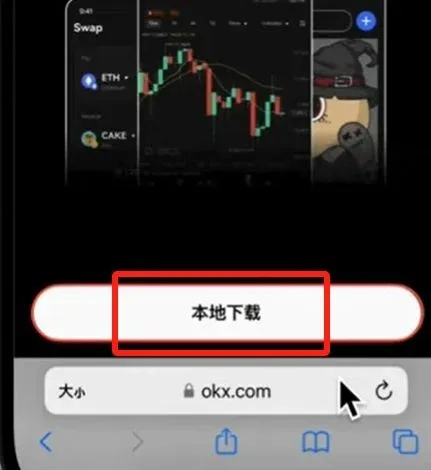
- Android users: Click the direct download link below to obtain the APK file.
- Log In to Your Account
- After installation, open the app and sign in with the email address and password you created earlier.
- Enter the Verification Flow
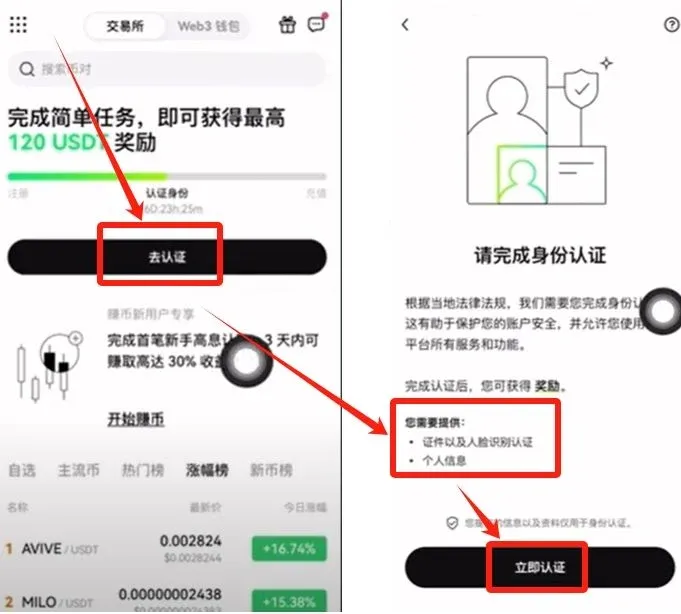
- Tap [Go to verification] → [Start verification] on the home page. The system will prompt you to upload identification documents and complete a facial‑recognition check.
- Choose the Document Type
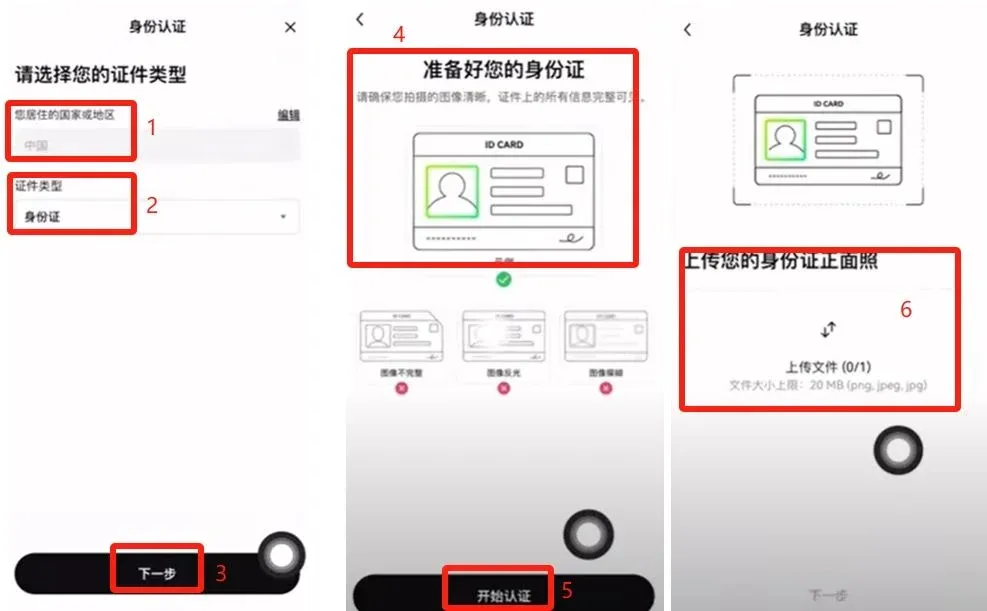
- The default country is China, but you can change it to reflect your actual nationality.
- Document types offered are National ID Card or Passport; this guide uses the National ID Card as an example.
- Upload clear, legible photos of the front and back of the ID.
- Complete Facial Recognition
- Follow the on‑screen prompts to shake your head, open your mouth, blink, etc. Once the algorithm verifies the live video, the KYC process is finished.
---
Step 3 – Buying USDT via the C2C Marketplace
After successful verification you can start trading. Return to the home screen and tap [C2C Buy] to open the fiat‑to‑crypto purchase interface.
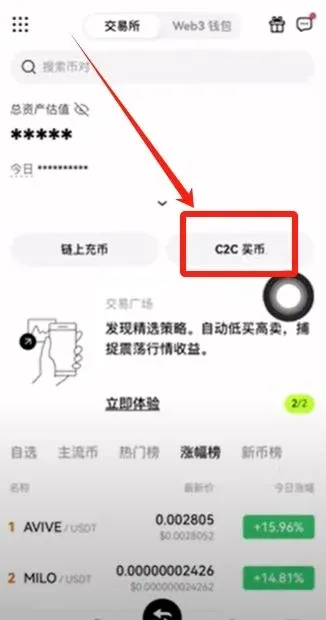
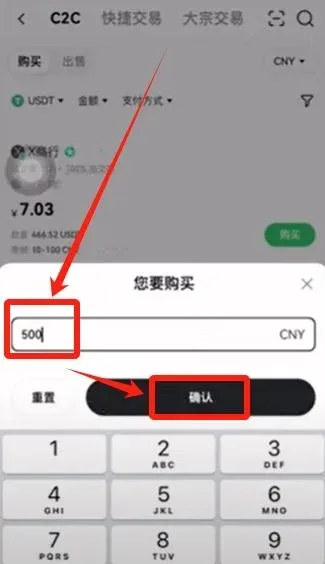
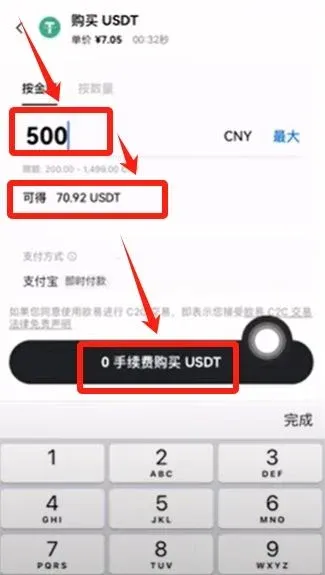
1. Choose the Cryptocurrency and Amount
- Select USDT as the target coin.
- Enter the amount you wish to spend in USD (the guide uses $500 as an example) and tap [Confirm].
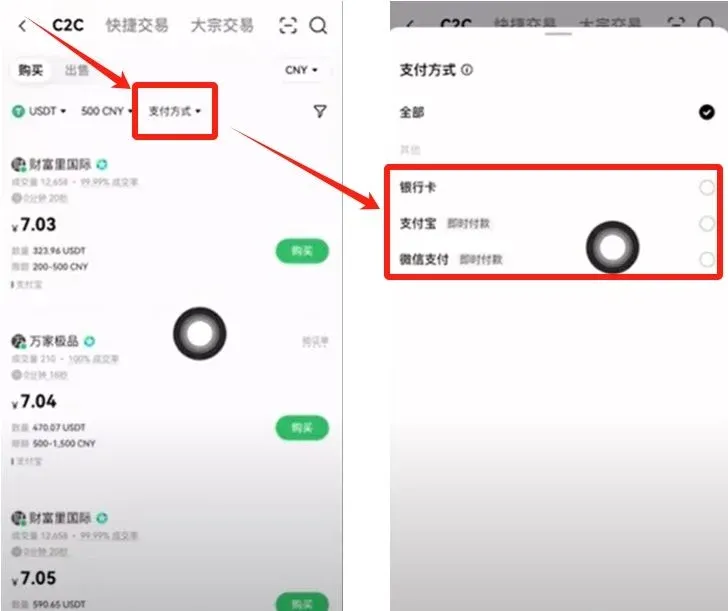
2. Pick a Payment Method
- Payment options include Bank Transfer (SEPA or SWIFT), credit/debit card, PayPal, and other local e‑wallets. Choose the method that best matches your location and preferences.
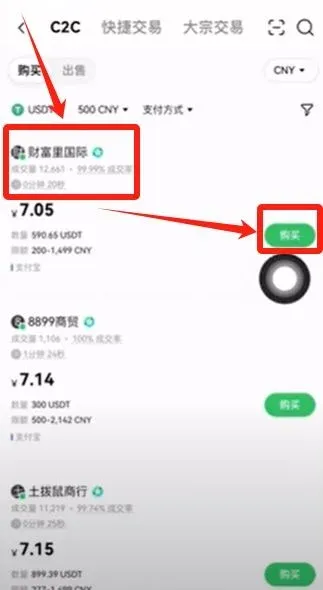
3. Filter the Sellers
- The platform will display a list of sellers who meet your criteria. It is advisable to pick sellers with high transaction volume and a strong positive‑feedback rating (e.g., “Fortune International”, 12 000 completed trades, 99.99 % positive feedback).
4. Confirm the Order
- Re‑enter the purchase amount if prompted. The system will automatically calculate the corresponding amount of USDT (e.g., paying $500 yields 70.92 USDT). Click [Buy USDT – 0 % fee].
5. Complete the Payment
- Tap [Get payment details]. Follow the seller’s instructions to transfer the funds via the chosen method (bank transfer, PayPal, etc.).
- After you have sent the money, press [I have paid]. The seller will then confirm receipt and release the USDT to your wallet.
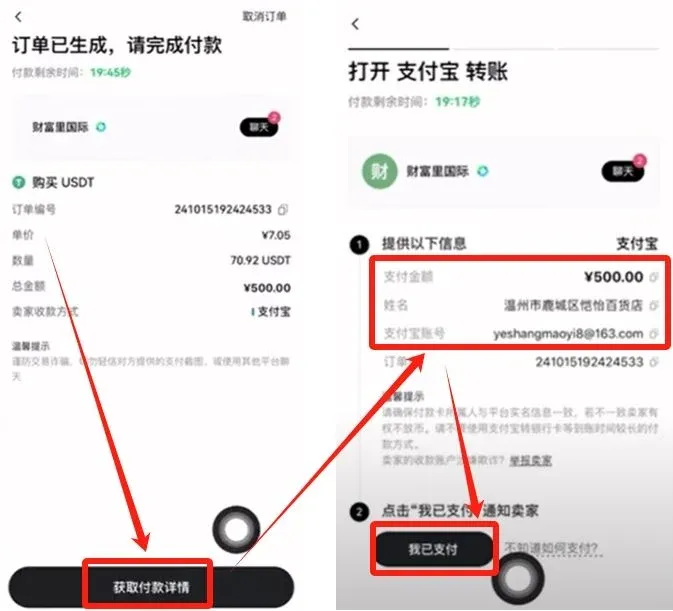
Platform Protection: When you place an order, the seller’s USDT is automatically frozen by OKX. If the seller fails to release the tokens after you have paid, OKX customer support will mediate based on your payment proof and may penalize the non‑compliant seller. This mechanism helps safeguard user funds.
---
Additional Notes for Global Users
- Fiat on‑ramps: While the example above uses USD, users in Europe can use SEPA transfers, and users elsewhere may rely on SWIFT or local e‑wallets supported by the chosen seller.
- U.S. Residents: The global OKX platform is not available to most U.S. customers due to regulatory restrictions. U.S. users should consider Binance.US or another U.S.-licensed exchange for similar C2C services.
- Tax Considerations: Cryptocurrency transactions may be taxable in your jurisdiction. Keep records of purchases, sales, and any fees incurred, and consult a local tax professional to ensure compliance with applicable tax laws.
---
Summary
You have now seen the complete end‑to‑end process for registering a new OKX account, completing identity verification, and purchasing USDT via the C2C marketplace. For more advanced tips—such as managing multiple wallets, setting up stop‑loss orders, or using the futures and options modules—feel free to explore historical articles from Bitaigen (比特根) or follow the related links provided below. Thank you for reading, and happy trading!
Related Reading
- OKX Crypto Guide: User‑Friendly Entry for Beginners
- Register OKX USDT Wallet & Transfer USDT via TRON‑TRC20
- OKX: Register, Verify, Buy USDT & Bitcoin, Withdraw Fiat
💡 Register on Binance with referral code B2345 for the maximum trading fee discount. See Binance complete guide.



