
 Bitaigen Research
 What is the imToken wallet? In June, the download count of crypto wallets reached 3.5 million, and active users grew 110 % year‑over‑year.
The imToken wallet is a mobile digital‑asset management tool that supports multi‑chain assets and offers functions such as asset storage, transfers, market alerts, and DApp browsing.
From the perspective of the Bitaigen editorial team, we will give you a comprehensive overview of the core features and usage tips of the imToken wallet. This article delves into its multi‑chain support, private‑key security, market‑alert capabilities, and highlights potential risks and best practices you may encounter during real‑world operation, helping you make wiser decisions in digital‑asset management.
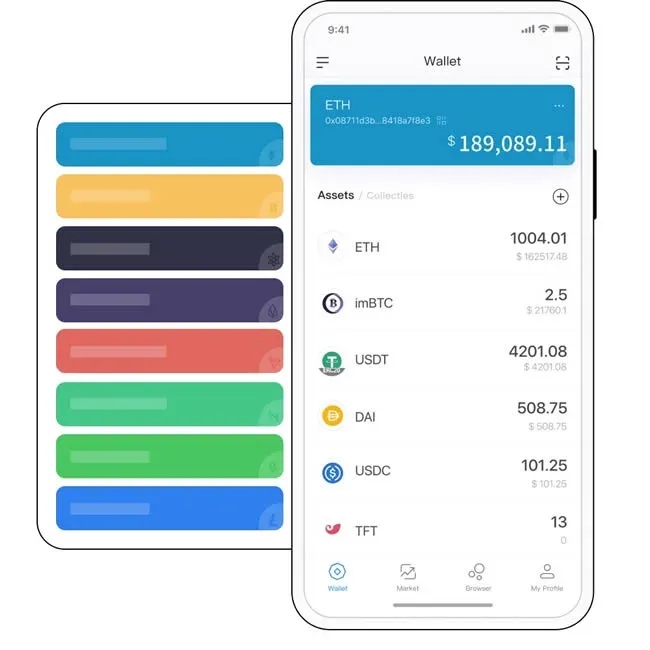
What is imToken wallet?
- imToken is a globally leading blockchain digital‑asset management application that supports a wide range of chains, including BTC, ETH, ATOM, EOS, TRX, CKB, BCH, LTC, KSM, DOT, FIL, XTZ, and many others. It also embeds a decentralized token‑swap engine and an open DApp browser, delivering trustworthy asset‑management services to millions of users.
- As a smart digital wallet, imToken implements a one‑stop account‑finance model, allowing users to complete receipt, payment, and other operations entirely within the app.
- Core functions include: asset management, local private‑key storage, clear‑at‑a‑glance portfolio view, support for multiple wallet types, easy import/export, mnemonic‑phrase backup to prevent loss, and multi‑signature anti‑theft mechanisms.
- The app can also monitor real‑time price data from major global exchanges and push price‑alert notifications, industry news, and technical updates, helping users discover investment opportunities from multiple angles.
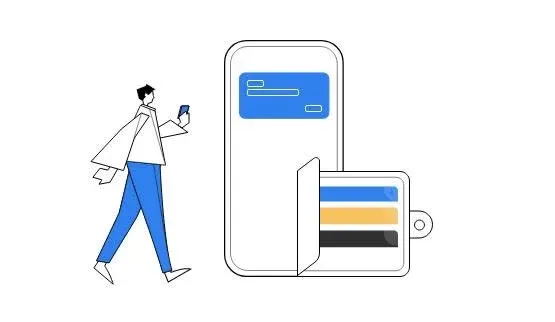
Precautions When Using imToken wallet
- The password you set when creating a wallet is also the transaction password; if you lose it, it cannot be recovered. You can only reset it using the securely stored mnemonic phrase.
- Transaction fees depend on the miner fee (`gas * gas price`). Miners prioritize transactions with reasonable `gas` and a higher `gas price`.
- Before deleting a wallet, be absolutely sure you have completed a backup; deleting without a backup makes recovery impossible.
- In addition to `keystore` files and mnemonic phrases, plain‑text private keys can also be imported, but because of their low security, this method is generally discouraged.
- When sending Ethereum or ERC‑20 tokens, the wallet must hold enough ETH to cover the miner fee.
- imToken currently supports only ETH and ERC‑20 tokens (such as EOS, DGD, SNT, QTUM); it does not support ETC, BTC, ZCASH, BTS, SC, and other chains.
- Private key = mnemonic phrase + keystore + password. The mnemonic phrase is the sole credential for wallet recovery; write it down by hand and store it in a secure place. Avoid screenshots, photographs, or transmitting it over the internet (e‑mail, chat apps, etc.).
- When importing a mnemonic phrase, the default derivation path is `m/44'/60'/0'/0/0`. Changing the path will generate different wallet addresses, so record the path information to prevent address mismatches.
Software Overview
imToken App is a blockchain‑asset management tool aimed at professional investors, offering a rich set of on‑chain products and wealth‑management strategies with an intelligent and user‑friendly interface.
Key Features
- A stable and reliable investment environment with secure system operation.
- Scientifically designed wealth‑management plans tailored to user needs.
- A brand‑new lightweight wallet upgrade built on imToken 1.0, praised for its mobile experience.
- Provides blockchain users with a safer, more streamlined, and feature‑rich asset‑management solution.
Advantages of the Software
1. Transfer & Receipt – Simple and Efficient
- The lightweight wallet does not require syncing the full blockchain, making it fast and convenient.
- The UI is friendly and operations are straightforward.
2. Digital‑Asset Market Tracking & Alerts
- Syncs price data from exchanges such as Coinbase, Bittrex, Kraken, Poloniex, Binance, and others.
- Supports price‑alert notifications to help users seize market timing.
3. One‑Stop Asset Management
- “One‑click add” for Ethereum and ERC‑20 assets (ETH, DGD, EOS, etc.).
- Real‑time tracking of transaction activity and balance changes.
4. Self‑Custody of Private Keys, Secure Management
- Private keys are encrypted and stored within the phone’s sandboxed file system.
- Multiple backup strategies are offered to prevent loss or theft.
5. DApp Browser & Interaction
- Built‑in decentralized application (DApp) browser supports platforms such as Candy Bar, ENS, HyperDragon, Gnosis, and more.
Highlights
- Transaction security with support for multiple cryptocurrencies on mobile devices.
- Real‑time industry news feeds facilitate market analysis.
- Complete transaction details enhance transparency in wealth management.
Related Information
- Cloud backup support ensures that information is never lost.
- Facial‑recognition login boosts account security.
- A wide range of supported coins meets diverse investment needs.
Software Evaluation
- Supports multi‑chain assets such as ETH, BTC, EOS, and provides secure, convenient decentralized token‑swap functionality.
- Real‑time market price tracking enables efficient personal digital‑asset allocation, and the app supports import/export for various wallet types.
The above constitutes a complete analysis of “What is the imToken wallet? What should you pay attention to when using the imToken wallet?” For more detailed information about imToken, please follow Bitaigen (比特根) and its related sections.
Please note: Cryptocurrency gains may be taxable in your local jurisdiction. Always consult a tax professional to understand your obligations.
For U.S. residents: When accessing exchange services, use Binance.US rather than the global Binance platform. All fiat transactions should be conducted via USD, SEPA, or SWIFT channels where applicable.
Related Reading
- Korbit Bitcoin Exchange Review 2024 – Volume, Fees & Pairs
- imToken Wallet Asset Safety: Multi‑Layer Security Explained
- LEND to AAVE Migration Guide with imToken Wallet
💡 Register on Binance with referral code B2345 for the maximum trading fee discount. See Binance complete guide.



