
 Bitaigen Research
 BTTC Cross‑Chain Bridge offers three asset‑receiving methods: Manual Receive, Auto Receive, and Auto Receive with Gas Top‑Up. Each mode has its own procedural steps and fee‑settlement logic, allowing users to pick the option that best matches their familiarity with on‑chain interactions and their gas‑budget preferences.

In a multi‑chain Web3 landscape, the free flow of assets and data is essential for achieving a truly decentralized network. BitTorrent Chain (BTTC), a high‑throughput scaling solution designed for inter‑chain operability, has become a core infrastructure component of the TRON ecosystem. Thanks to its innovative cross‑chain architecture, BTTC provides reliable bridging support for decentralized applications.
As of 2025, the BTTC ecosystem has attracted over 14 million unique addresses, processed more than 290 million transactions, and deployed over 7.6 million smart contracts. Daily transaction volume and gas consumption continue to rise, underscoring the network’s activity level, growth potential, and its value as a connector between the TRON ecosystem and the broader multi‑chain world.
The BTTC Bridge currently supports cross‑chain transfers of assets such as BTT, TRX, JST, NFTs, SUN, USDD, WIN, and others, offering bidirectional bridges between TRON, Ethereum, and BNB Chain. The core flow of a cross‑chain transfer consists of three stages:
- Asset Transfer (Source Network → BTTC): Lock the asset on the source chain and move it into the BTTC network.
- Cross‑Chain Bridging (BTTC → Destination Network): Execute a cross‑chain instruction on BTTC that forwards the asset to the target chain.
- Final Reception (Destination Network): The user claims and uses the asset on the destination chain.
Below, we walk through the TRON Network → BSC Network route and detail the complete steps for each of the three receiving modes.
In this article we systematically break down the three receiving options of the BTTC Cross‑Chain Bridge, dissecting the manual, automatic, and automatic‑plus‑gas workflows together with their fee‑settlement mechanisms. This guide helps users quickly get started according to their own needs and fully leverage BTTC’s multi‑chain interoperability advantages.
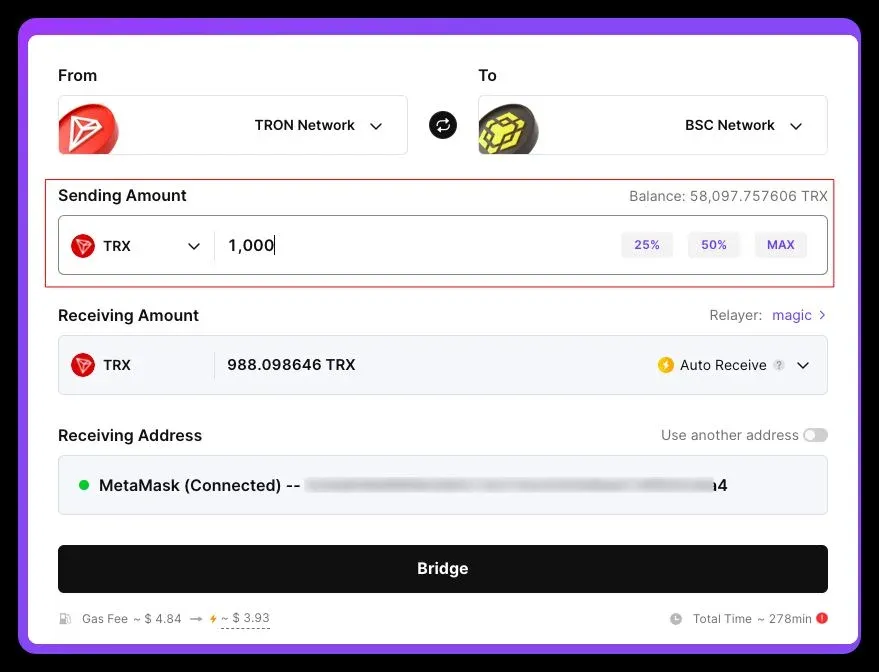
1. Fill in Basic Information
- Connect Wallet: In the “From” and “To” dropdown menus, select TRON Network as the source chain and BSC Network as the destination chain.
- Receiving Address: By default the address of the connected wallet is populated. If you wish to use a different address, click “Use another address” and type it in manually—double‑check for accuracy because once a transaction is submitted it cannot be reversed.
- Transfer Amount: Choose the token in the “Sending Amount” field and enter the quantity. The interface will instantly display an estimated amount that will arrive on the destination chain.
2. Manual Receive Mode
In this mode the user performs all on‑chain steps themselves, which is ideal for those who are comfortable with the destination‑chain workflow. Ensure that the destination‑chain address holds enough native tokens to cover gas fees.
• Initiate Bridge (TRON → BTTC)
Switch the receiving method to Manual Receive and click “Bridge”. The page will show an estimated arrival time and the gas cost required on the destination chain. After confirming, grant the necessary token allowance.
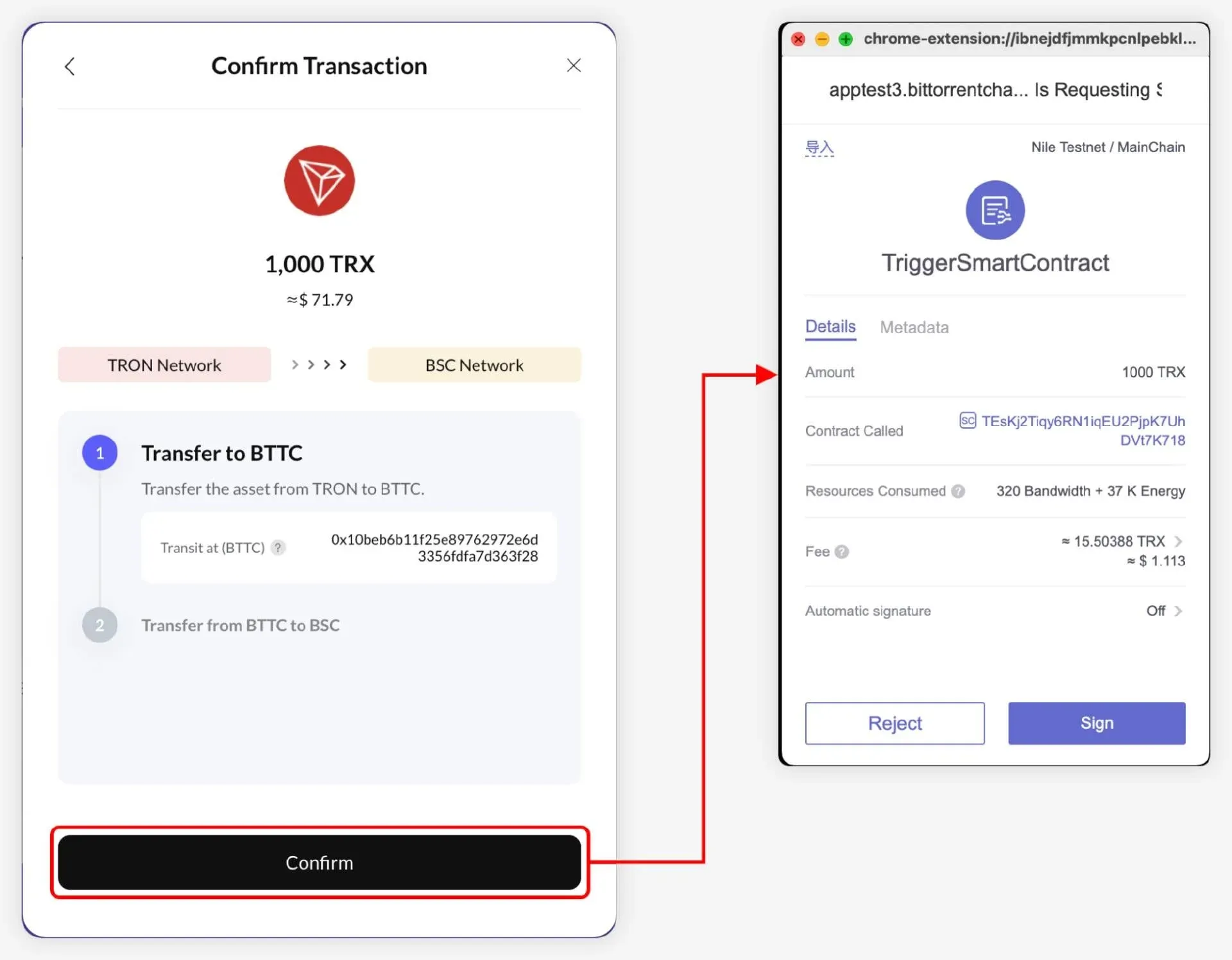
• Asset Arrives on BTTC and Triggers Cross‑Chain (BTTC → BSC)
When the assets reach the BTTC address, a notification appears in the upper‑right corner of the UI. Click “Process” to view details. After verifying the information, authorize the wallet on the BTTC network to complete the cross‑chain step.
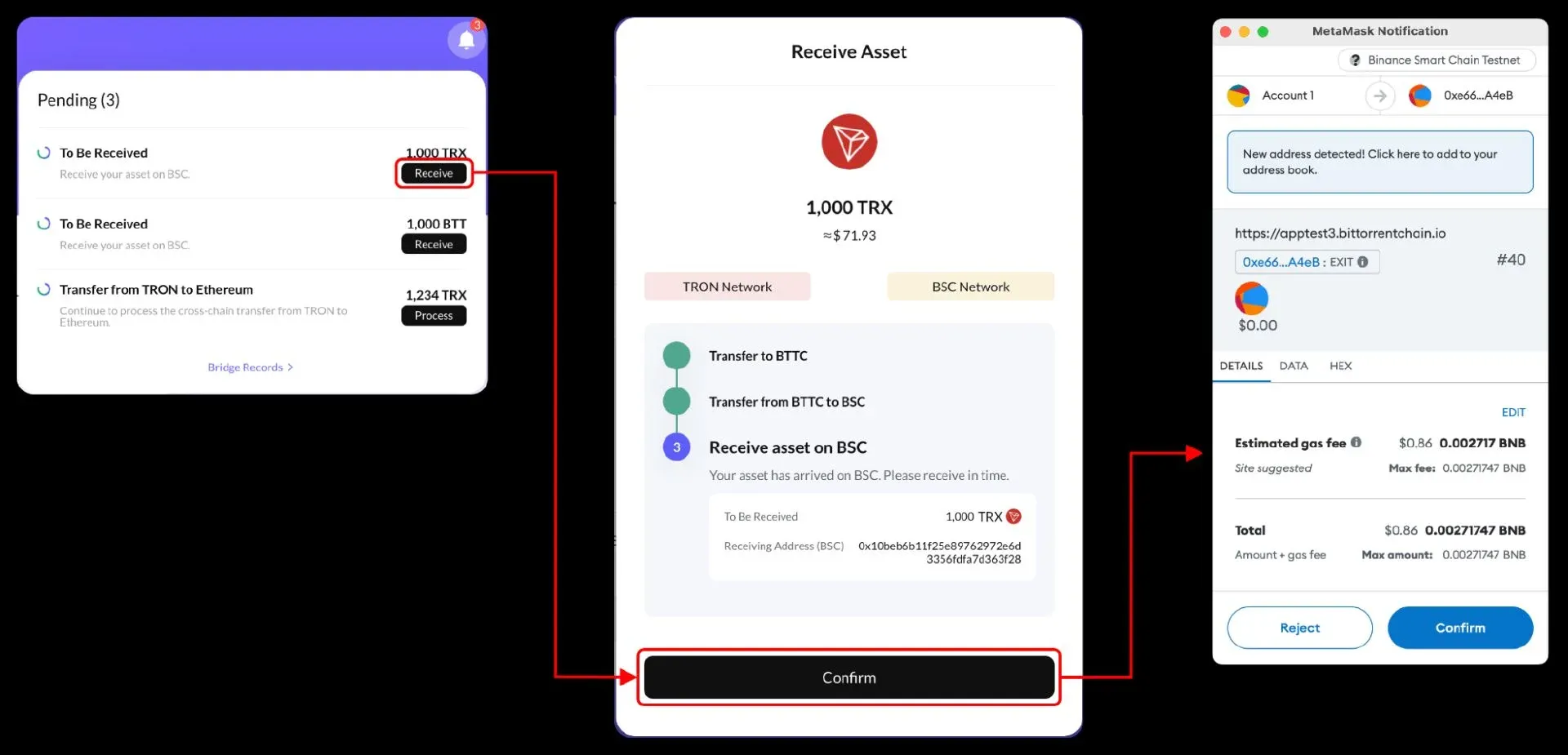
• Wait for the Cross‑Chain Transaction to Finalize
The system again shows an estimated arrival time and the fee for the cross‑chain hop. Under normal conditions the whole process takes ≈ 30 minutes, but network congestion can extend this duration; the exact time depends on real‑time on‑chain status.
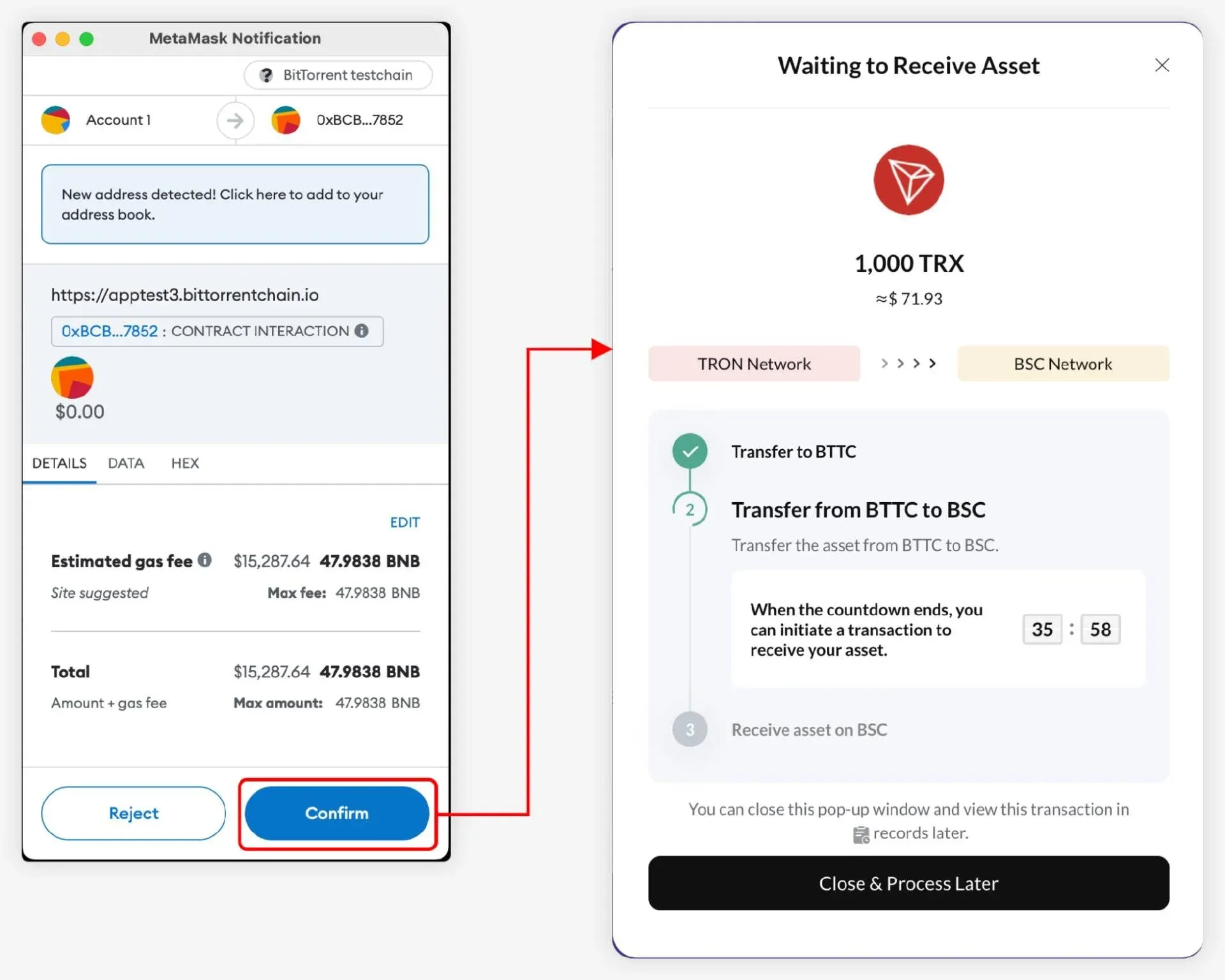
• Receive Asset on Destination Chain
Once the bridge succeeds, a notification pops up in the upper‑right corner. Click “Receive”, sign the transaction in your wallet, and the assets will be deposited into your BSC address.
3. Auto Receive Mode
This mode leverages a decentralized Relayer to automatically perform the destination‑chain receive step. The user only needs to complete the first two transactions (TRON → BTTC and BTTC → BSC); the Relayer handles the remainder and deducts its service fee directly from the bridged assets.
• Initiate Bridge (TRON → BTTC)
After filling in the basic information, switch the receiving method to Auto Receive. The platform will list real‑time quotes from various Relayers. Users can view the estimated arrival time and gas cost on the interaction page, then confirm and authorize.
• Asset Arrives on BTTC and Triggers Cross‑Chain (BTTC → BSC)
The steps mirror those in the manual mode: once the assets land on BTTC, open the “Process” page, verify the details, and authorize the cross‑chain transfer on BTTC. Expected duration remains around 30 minutes, subject to network conditions.
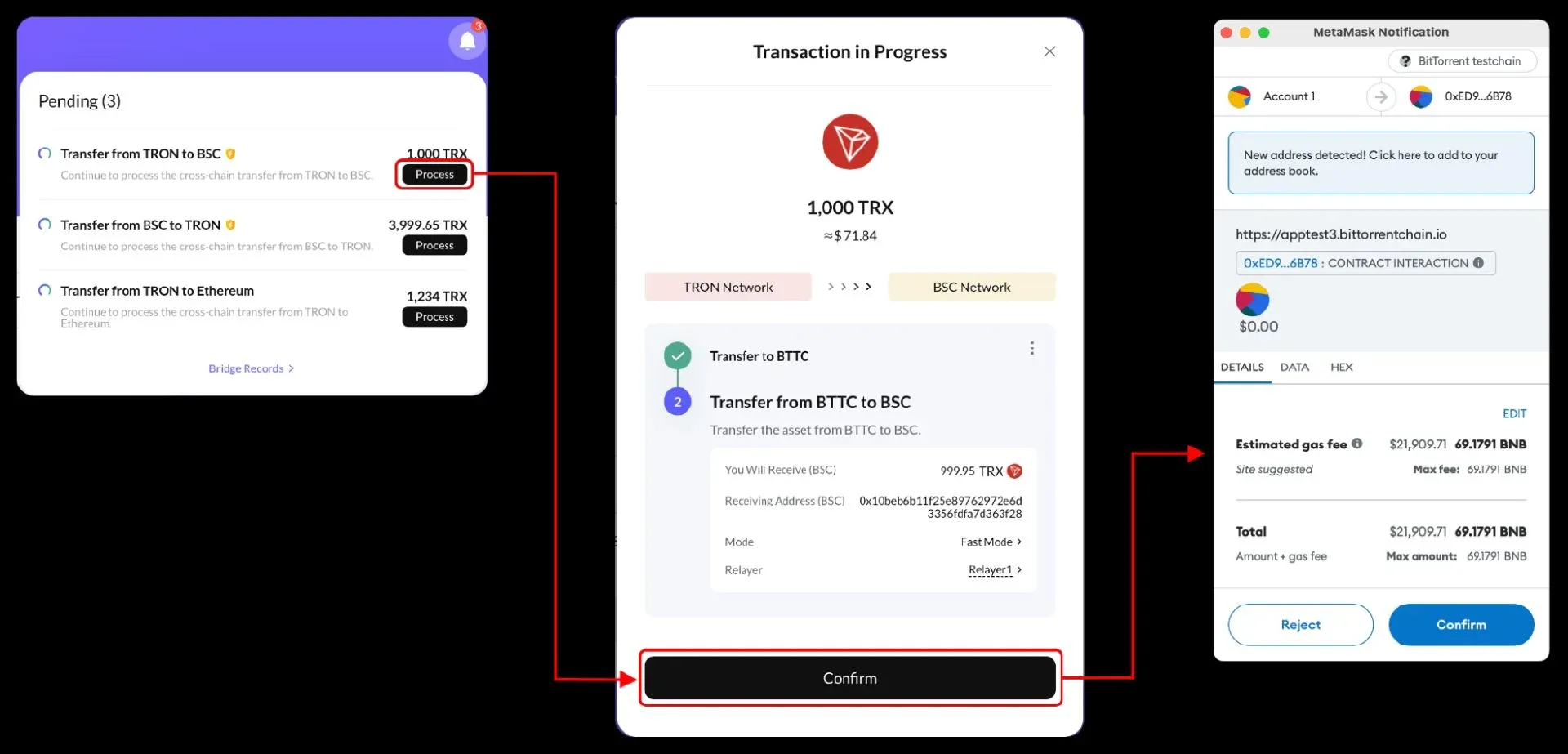
• Automatic Reception
The selected Relayer automatically executes the Receive operation on BSC, deducts its service fee, and the net amount appears directly in the user’s BSC wallet—no further action required.
4. Auto Receive + Gas Top‑Up
Building on the Auto Receive flow, this option also sends a small amount of the destination‑chain’s native gas token to the receiving address, enabling the user to interact with on‑chain services immediately after the bridge completes.
• Initiate Bridge (TRON → BTTC)
Choose Auto Receive + Gas Top Up, pick a suitable Relayer, review the quoted time and total cost (which now includes the gas top‑up amount), and authorize the transaction.
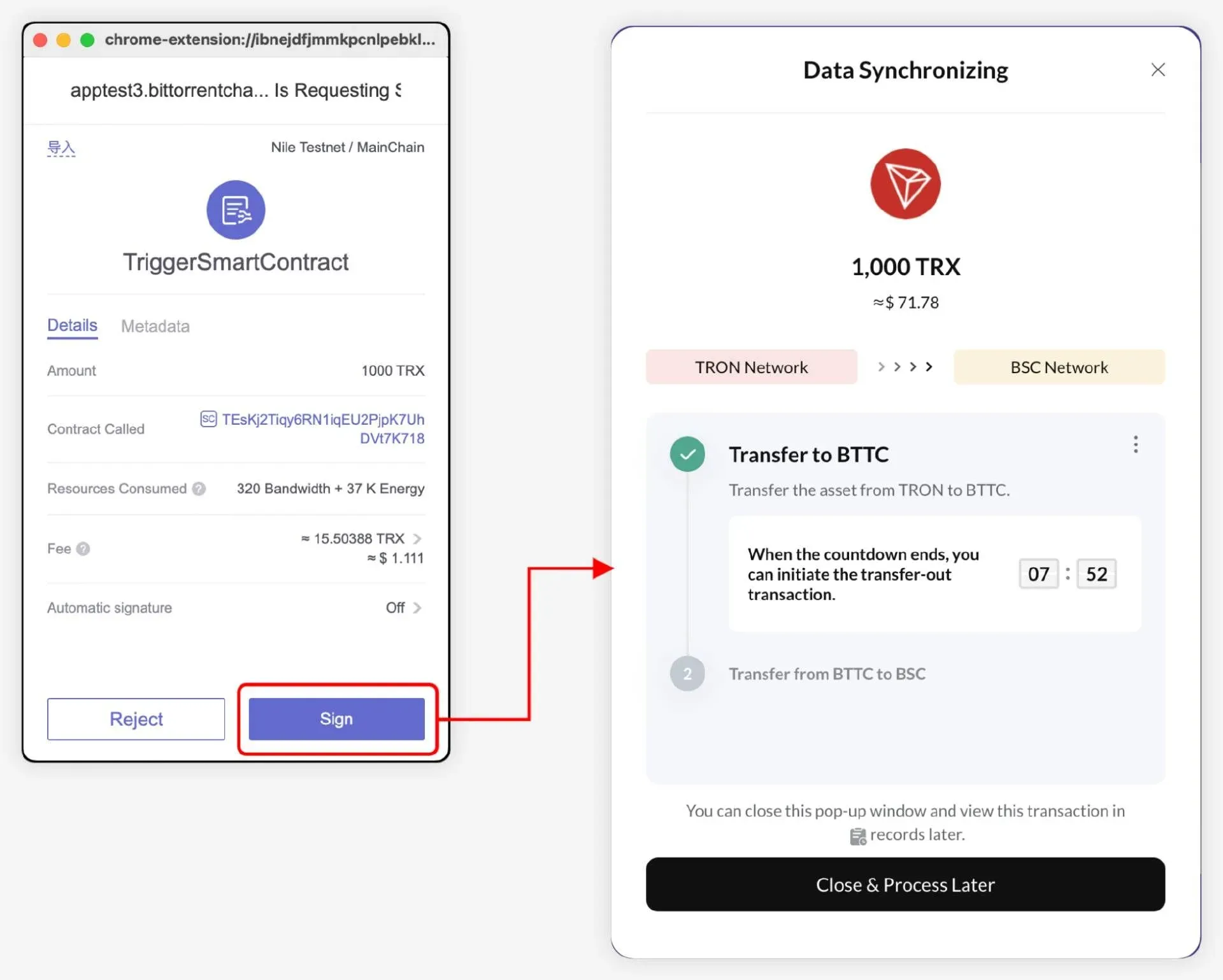
• Asset Arrives on BTTC and Triggers Cross‑Chain (BTTC → BSC)
When the assets reach BTTC, open the “Process” page, confirm the information, and authorize the transfer to BSC. The cross‑chain latency remains roughly 30 minutes, though it can vary with network congestion.
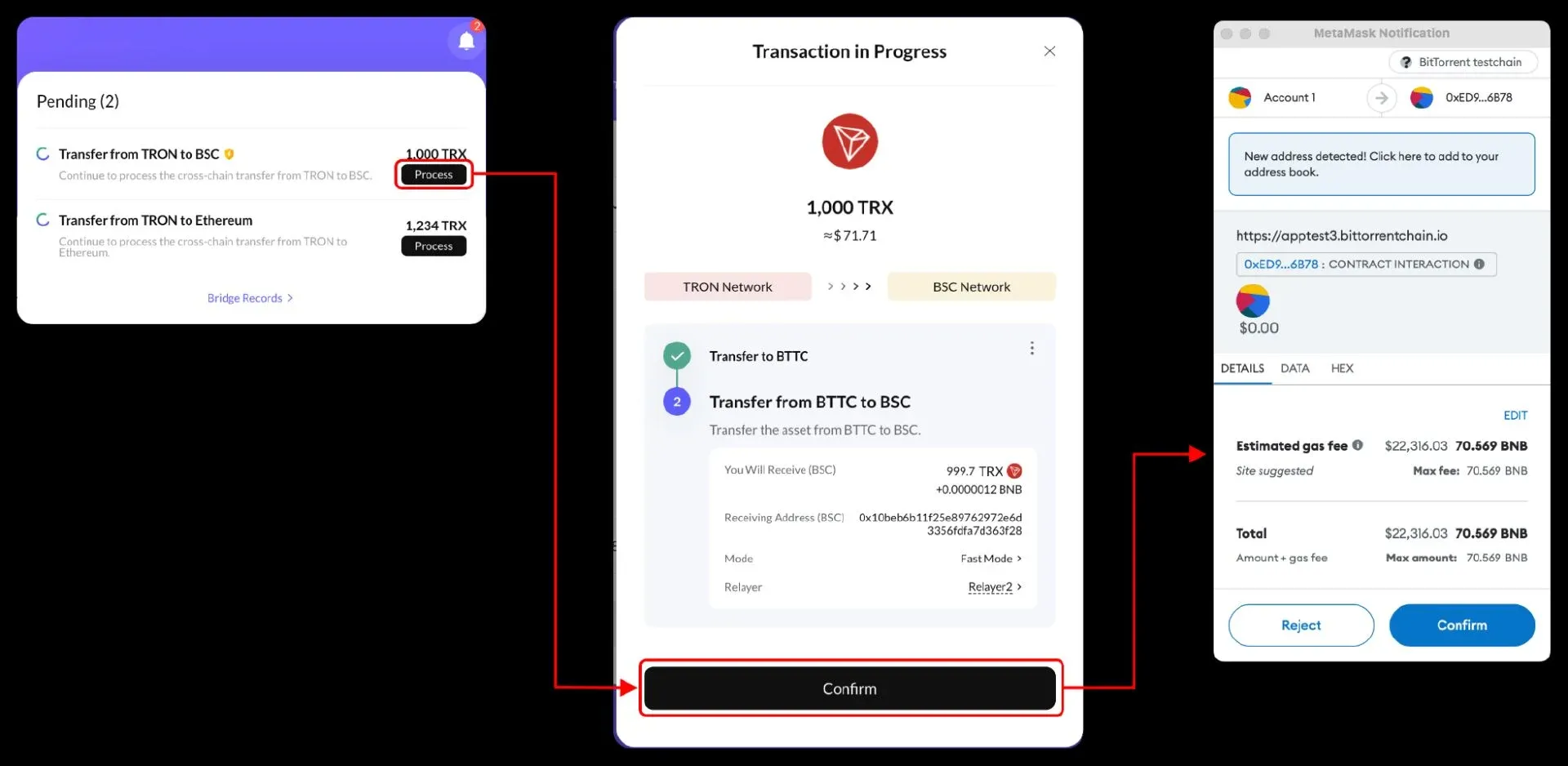
• Automatic Reception and Gas Delivery
After the Relayer completes the Receive step on BSC, it not only deducts its service fee but also transfers a modest amount of BSC’s native gas token (BNB) to the destination address. This small top‑up lets the user start swapping, staking, or interacting with dApps without first acquiring gas separately.
5. Viewing Transaction History
All cross‑chain operations are logged in the Bridge Records section. The page presents transparent, searchable entries that include transaction hashes, asset types, status, and timestamps.
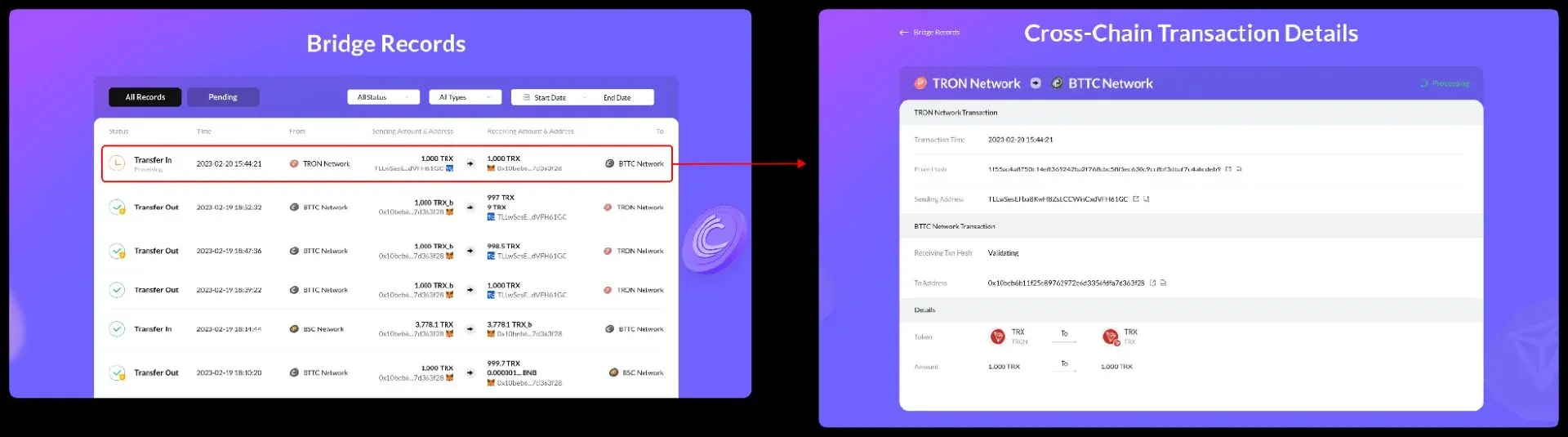
Through the BTTC Cross‑Chain Bridge, users can move assets freely across a heterogeneous multi‑chain environment. Visit the official portal at https://app.bt.io/bridge to start your first cross‑chain transfer with BTT, TRX, USDD, or other supported tokens and experience the trillion‑dollar liquidity that the TRON ecosystem and the broader blockchain universe have to offer.
Note for Global Users: When converting crypto to fiat, the most common channels are USD transfers via SEPA (for Euro‑zone residents) or SWIFT for international wires. U.S. residents should use Binance.US or other regulated U.S. platforms for any fiat on‑ramp/off‑ramp activities.
Tax Disclaimer: Crypto‑related gains may be subject to taxation in your jurisdiction. Please consult a qualified tax professional to understand your obligations.
*This full‑process analysis of the BTTC Bridge receiving functions—Manual Receive, Auto Receive, and Auto Receive + Gas Top‑Up—has been compiled by the editorial team at Bitaigen. We hope it proves useful for your cross‑chain endeavors.*
Related Reading
- MegaETH Ecosystem 2026: DeFi, NFTs, Games & Cross‑Chain
- Symbiosis & Uniswap v4 Hooks: Atomic Swaps for Crypto 2025
- Enso: Blockchain Shortcut for Cross‑Chain Interaction
💡 Register on Binance with referral code B2345 for the maximum trading fee discount. See Binance complete guide.



