
 Bitaigen Research
 Our Bitaigen editorial team will guide you from a practical standpoint to quickly understand dYdX, a leading decentralized derivatives platform. This article focuses on the layout of the margin page and the position‑opening workflow, helping beginners clarify their thoughts and lower the entry barrier. If you want to safely complete your first margin trade on dYdX, keep reading for the full guide.
When it comes to the dYdX exchange, many investors may already have heard of it. It is the world’s first decentralized digital‑asset derivatives trading platform and is regarded as a key driver of the rapid growth of futures DEXs and the broader decentralized derivatives market. dYdX currently offers five categories of products: perpetual contracts, margin trading, leveraged trading, spot trading, and lending. In addition, the platform has issued its own token, DYDX, which is primarily used for governance of the dYdX protocol and for fee discounts. Below we provide a detailed walkthrough of how to use the dYdX exchange.
How to trade on the DYDX exchange?
This guide concentrates on demonstrating how to open a position on the Margin tab, helping you complete your first margin trade on dYdX.
Opening a Position
Although the “Trade” tab is dYdX’s most powerful trading entry point, the Margin tab offers a more intuitive interface for margin‑position operations. The following explains the meaning of each field in this tab:
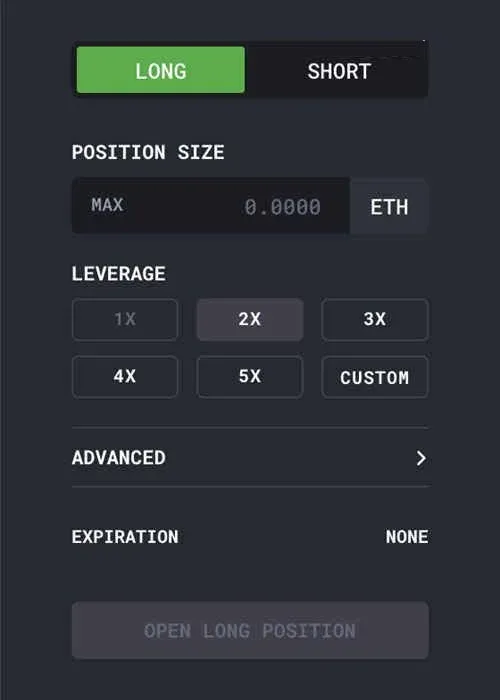
- Position Direction (Long/Short): Selecting the direction is the first step in opening any position. If the underlying asset price rises, a long position profits; if the price falls, a short position profits.
- Position Size: The total amount or contract quantity you wish to open.
- Leverage: Leverage determines how large a position you can borrow. The higher the leverage, the less margin you need and the more funds you borrow; consequently, both gains and losses are amplified, and liquidation risk rises.
Before opening a position, your main wallet must hold enough margin. For example, if you want to open a 5× leveraged long position on the ETH‑DAI market with a size of 1.0000 ETH, the required margin is 0.2 ETH, so your account must contain at least 0.2 ETH to place the order.
After configuring the parameters, additional fields appear, providing detailed information about the position. Pay special attention to the following two items:
- Margin Deposit / Trade Amount: In margin mode, a position is split into “Margin Deposit” (your own equity) and “Borrowed/Trade Amount” (funds borrowed via leverage). When you open a position on the margin page, your maximum loss will not exceed the margin deposit amount.
- Liquidation Price: Leveraged trading magnifies market exposure and also raises liquidation risk. Each position has a collateral (positive balance) and a debt (negative balance) ratio, known as the Collateral Ratio. If the collateral ratio falls below the liquidation threshold set by dYdX, the system automatically liquidates the position, selling collateral until the debt reaches zero, and charges a 5 % liquidation fee. dYdX’s liquidation process is open‑source and transparent; anyone can participate to earn liquidation fees. See the documentation on running liquidation bots for details.
- Interest Rate: Positions accrue interest based on market rates. A positive rate means you earn interest; a negative rate means you pay interest. Rates fluctuate with supply and demand and can be viewed in real time on the market page.
- Fees / Fee Amount: dYdX uses a maker‑taker fee model, and all trades settle on‑chain with the platform covering 100 % of the gas costs. For the exact fee structure, refer to the official documentation.
- Expiration: For U.S. users, regulatory requirements set a 28‑day expiration for margin trades. If this applies to you, close the position before expiration. Upon expiration, the system zeros out the debt in a manner similar to liquidation but with lower fees (1 %‑5 %). See the relevant notes for more information.
After confirming that all fields are correct, click the Open Position button and sign the wallet pop‑up (no gas payment required). The system will notify you that the position has been successfully created.
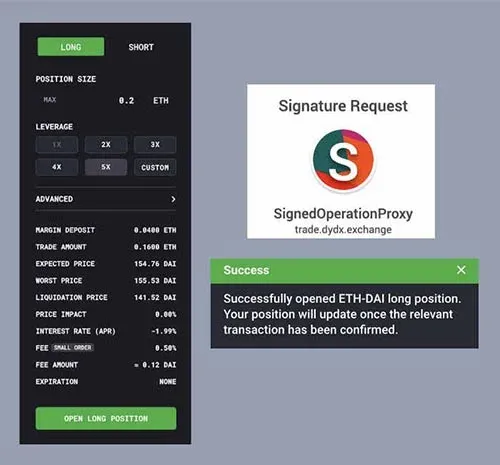
Congratulations, you have opened your first position on dYdX. Once the transaction is confirmed on the blockchain, the position page will display the latest data in real time.
Understanding Your Open Positions
At the bottom of the trading page, the Positions tab lists all open (unsettled) positions. Click any row to expand it and view more details.

Key information visible after expansion includes:
- PNL: The total profit or loss realized after closing the position. PNL already accounts for fees and other costs; it may appear slightly negative when the position is first opened.
- Profit/Loss Calculation Method: dYdX calculates PNL based on value rather than quantity. For example, if you go long with 1 ETH valued at 100 DAI and later close at 2 ETH valued at 400 DAI, the profit is 300 %.
- Stop‑Loss/Index: The platform allows you to set a stop‑loss order for each position. When the market price reaches the set threshold, the system automatically closes the position to prevent further loss. Hovering over the “Stop‑Loss/Index” column reveals an “Add Stop‑Loss” button; clicking it lets you edit or cancel the stop‑loss order. Only one stop‑loss order can exist per position at any time, and when triggered it fully closes that position.
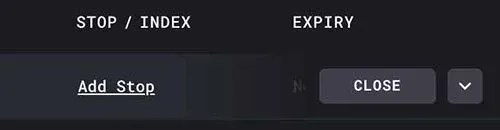
The index price is sourced from on‑chain oracles that aggregate multiple data feeds, reducing the risk of flash crashes on a single exchange. All liquidations and stop‑losses are based on this index.
Closing a Position
To close a position, simply hover over the desired row; a Close button appears on the right side of the row. Clicking it opens a pop‑up where you can manually enter the amount to close, or hit MAX to close the entire position in one click.
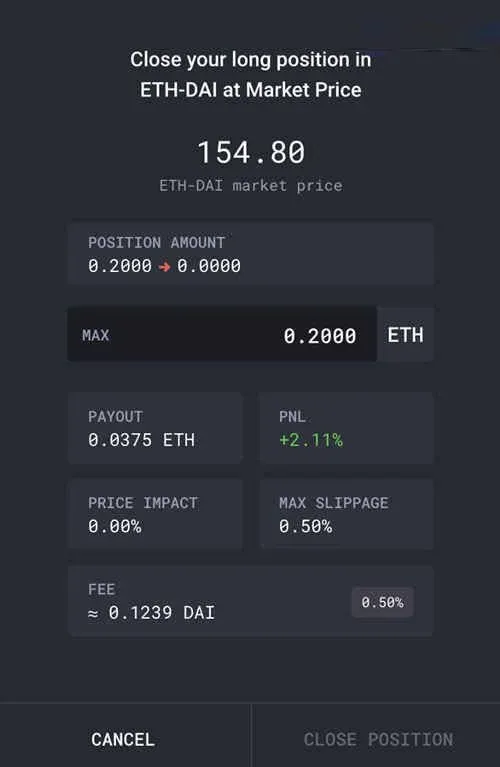
After filling in the desired amount, click Close, sign the order (again, no gas required), and the system will confirm a successful closure. Once the blockchain confirms the transaction, the position disappears from the “Positions” list.
When you manually close a position, any remaining assets are automatically transferred back to your main wallet. If a position is forced closed due to liquidation, expiration, or a stop‑loss order, you will need to withdraw the funds manually.

Withdrawing Funds
For positions that have been closed, expired, or liquidated, the system does not automatically move the remaining assets to the main wallet. In this case, hover over the corresponding row and click the Withdraw button on the right; the system will prompt you to send a withdrawal transaction that returns the leftover funds to your main wallet.

Hovering over that area reveals the “Withdraw” button.
At this point, you have mastered the workflow of opening, managing, and closing positions via the Margin tab. The next guide will cover the more powerful Trade tab.
DYDX Exchange Fee Overview
dYdX uses a maker‑taker fee model to calculate trading costs. Orders are classified into two categories:
- Maker Orders: Orders that do not execute immediately and sit on the order book, providing liquidity.
- Taker Orders: Orders that match existing maker orders instantly, consuming order‑book liquidity.
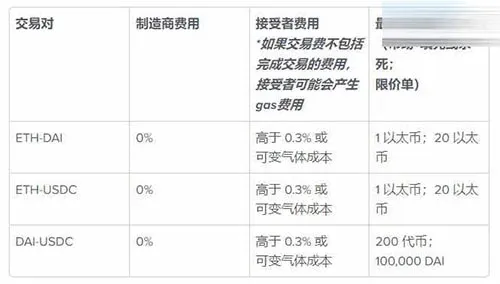
To keep gas costs low, dYdX charges relatively higher fees on small orders; maker orders are often fee‑free or receive rebates, encouraging users to place limit orders that add liquidity.
Note on Fiat and Taxation
When converting crypto gains to fiat, users can typically use USD via SEPA or SWIFT transfers, depending on their jurisdiction. U.S. residents must transact through Binance.US rather than the global Binance platform. Additionally, crypto trading profits may be taxable in your local jurisdiction; consult a tax professional to understand your obligations.
This completes the “How to trade on the DYDX exchange? Detailed DYDX usage tutorial.” For more resources, downloads, and usage guides related to dYdX, follow Bitaigen’s (比特根) publications.
💡 Register on Binance with referral code B2345 for the maximum trading fee discount. See Binance complete guide.



