
 Bitaigen Research
 When investing in cryptocurrencies, many people use centralized exchanges such as Binance, but the term “decentralized exchange” (DEX) is also frequently heard. What exactly is a decentralized exchange? What are the differences and precautions when using one?
This article uses Binance Wallet + Uniswap as an example to demonstrate the complete on‑chain process of buying and selling cryptocurrencies.
Warning: Cryptocurrencies are high‑risk assets. The platforms and tokens mentioned in this article are provided solely for educational purposes and do not constitute investment advice. Before using any platform or token, please assess the risks yourself and proceed with caution. *Note: Crypto gains may be taxable in your jurisdiction; consult a tax professional for guidance.*
From a hands‑on perspective, we will fully demonstrate how to connect Binance Wallet to Uniswap and complete on‑chain trades. The article provides a detailed analysis of the DEX concept, its advantages, and operational key points, helping newcomers get started quickly while avoiding common pitfalls. Worth a thorough read—check it out now.
What Is a Decentralized Exchange?
A decentralized exchange (DEX) is the opposite of a centralized exchange (CEX).
Centralized exchanges are operated by companies—such as Binance, Coinbase, Bybit, etc.—and constitute services provided by a single organization.
A decentralized exchange, on the other hand, is executed automatically by smart contracts; even if the organization that launched the DEX were to shut down, users could continue to use the contracts.
DEXs have no central authority managing them; all transaction records are stored on the blockchain.
Pros and Cons of Decentralized Exchanges
Key characteristics of DEXs:
- No account registration required (any wallet works)
- No KYC (identity verification)
- All trades happen on‑chain
- A wide variety of tokens can be traded
Each characteristic has its own advantages and disadvantages:
- High privacy: No KYC needed; simply own a wallet and you can connect and trade.
- Transaction cost and speed: All operations occur on‑chain, which is usually slower and requires higher gas fees. The workflow is more cumbersome and the user interface is generally less polished.
- Low listing barrier: Anyone can list a token on a DEX, which can lead to scam tokens or projects that allow buying but not selling—extra vigilance is required.
- Smart‑contract security risk: DEXs rely on smart contracts; if a contract contains a vulnerability, assets may be stolen by hackers. Such incidents are not uncommon.
Despite these limitations, many users still choose DEXs for reasons such as:
- Wanting to trade tokens not listed on CEXs: Some smaller tokens have no centralized market pair and can only be bought or sold via a DEX.
- Reluctance to provide personal information: Centralized exchanges often require ID documents, address verification, etc. If you have privacy concerns but still want to trade, a DEX is a viable alternative.
Common Decentralized Exchanges
Different blockchains host different DEXs. Below is a non‑exhaustive list of well‑known platforms (provided for educational reference only; assess risks yourself before using):
| Exchange | Primary supported chains | Notes |
|---|---|---|
| Uniswap | Ethereum, Arbitrum, Optimism, Polygon, Base, BSC | Industry leader; deployed on multiple Layer 2 solutions |
| PancakeSwap | BNB Smart Chain (BSC), Base, Solana, Arbitrum | Native to BSC, expanded to multi‑chain |
| Jupiter | Solana | Largest DEX aggregator in the Solana ecosystem |
| Curve | Ethereum, Polygon, Arbitrum, Fantom, etc. | Focuses on stablecoin swaps (USDT, USDC, DAI) with low fees |
| Aerodrome | Base | — |
| Orca | Solana | One of the main DEXs in Solana |
| SushiSwap | Ethereum, Arbitrum, Polygon, Gnosis, etc. (30+ chains) | Early Uniswap fork, now a multi‑chain DeFi platform |
| Raydium | Solana | Veteran Solana DEX offering liquidity mining and IDOs |
| Meteora | Solana | Another major liquidity protocol on Solana |
| dYdX | dYdX Chain (Cosmos SDK), Ethereum (legacy) | Decentralized derivatives exchange focusing on perpetual contracts |
In addition, newer or niche DEXs such as Aster, Hyperliquid, gmgn, etc., also exist.
Below we walk through a practical example to show how to use a decentralized exchange.
DEX Tutorial: Preparations
Before using a DEX, you need to prepare:
- The correct exchange URL (to avoid phishing sites)
- A cold wallet or hot wallet
- A sufficient amount of the native chain token for gas fees: ETH for Ethereum‑based DEXs, BNB for BSC‑based DEXs, and so on.
In this guide we use Binance Wallet as the example wallet and Uniswap as the example DEX, demonstrating how to purchase UNI with USDT.
If you do not yet have a Binance account, you can register via the link below and download the app, following the video tutorial for registration.
Important for U.S. residents: Use Binance.US instead of the global Binance platform.
- Binance official registration (global): https://accounts.binance.com/register?ref=B2345 (copy the link into your browser)
- Binance Android app download: https://www.bitaigen.com/binance/download
DEX Tutorial: Setting Up the Wallet and Gas Fees
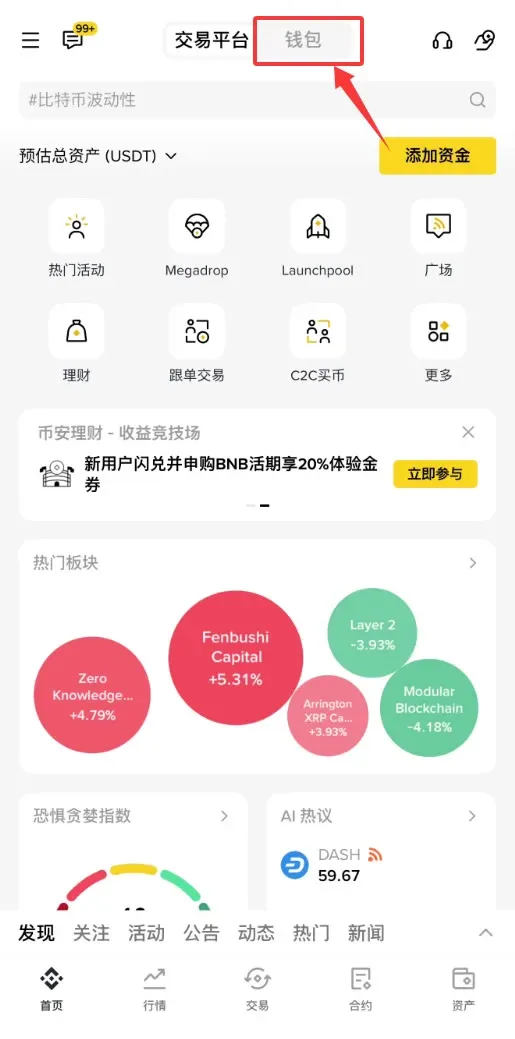
- Open the Binance app (use the official registration link above and the official download link). Switch to 【Wallet】 at the top:
- Follow the app prompts to create a wallet; the process is the same as a regular wallet creation, so we will not repeat the steps here. For detailed instructions, refer to “What Is Binance Web3 Wallet?” and “Binance Wallet: Creation, Deposit, Withdrawal, and In‑Wallet Trading Tutorial”.
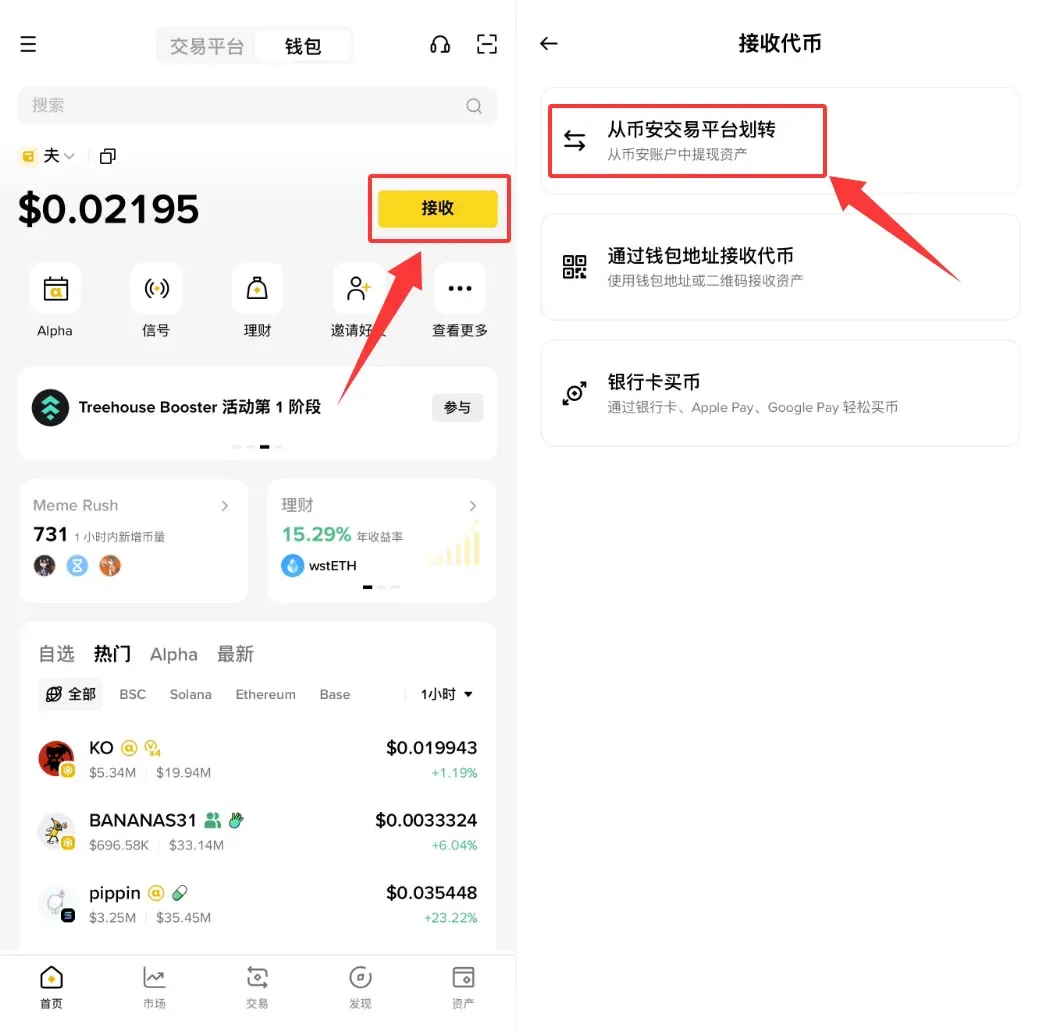
- To trade on Uniswap you will need a small amount of ETH for gas. First, purchase ETH on Binance’s spot market, then in the wallet select 【Receive】 > 【Transfer from Binance Spot】 to move the ETH into your wallet:
- Likewise, transfer a sufficient amount of USDT that you intend to trade.
Note: Uniswap operates on the Ethereum network, so when transferring ETH and USDT be sure to select the Ethereum chain; do not mistakenly send assets to BSC or another chain.
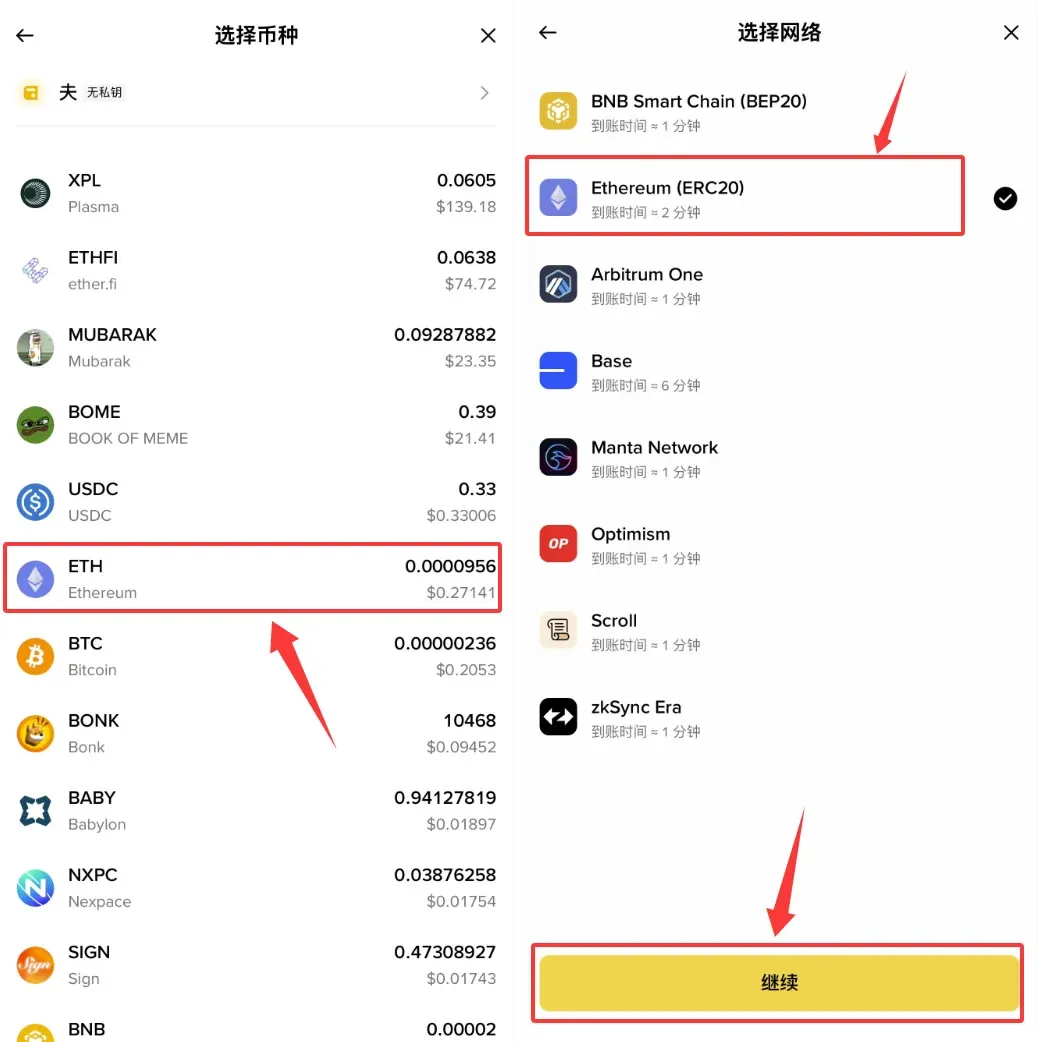
Once the wallet is created and assets have been transferred via the Ethereum chain, you are ready to start using a DEX.
DEX Tutorial: Connecting to the DEX
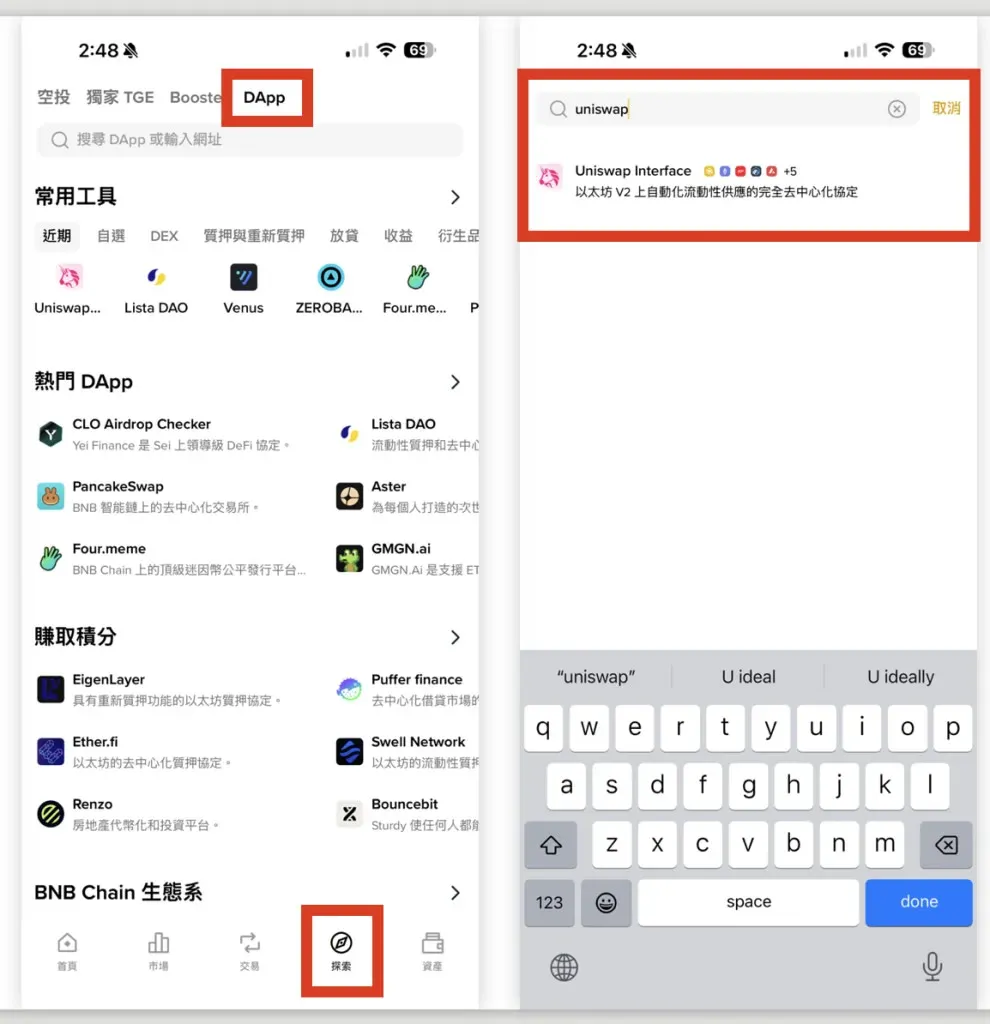
In Binance Wallet, go to 【Explore】 > 【DApp】, and type Uniswap into the search bar:
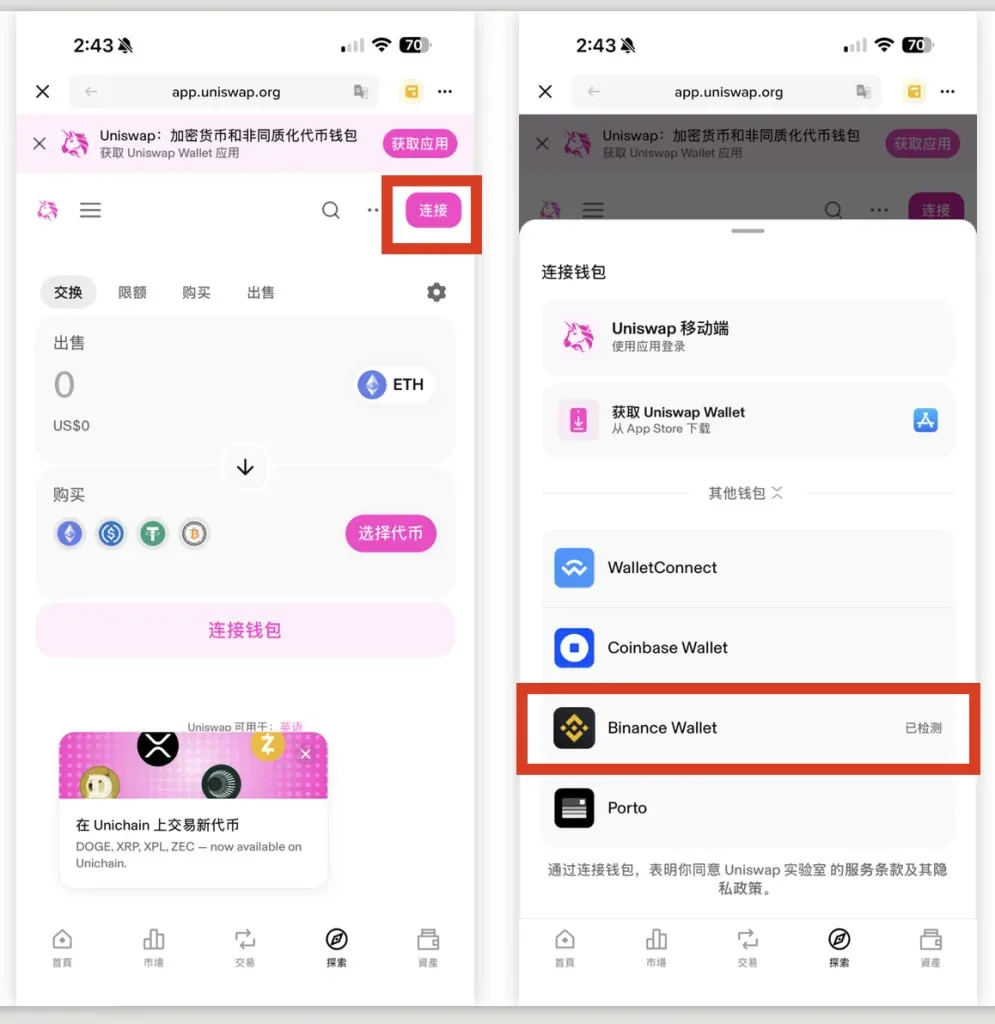
After the Uniswap page loads, click the 【Connect】 button at the top‑right and select Binance Wallet to establish the connection:
When the connection succeeds, your wallet balance will appear in the top‑right corner, indicating that the DEX has successfully read your wallet information and you can proceed to trade.
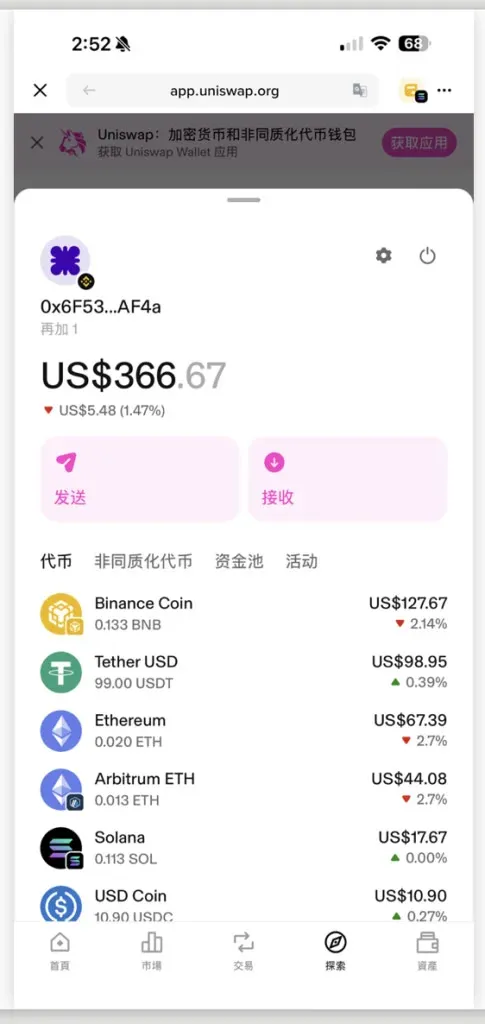
Compared with a centralized exchange, a DEX only requires you to connect a wallet—no account registration or KYC is needed. This is the fundamental distinction between the two.
DEX Tutorial: Executing a Trade
On the 【Swap】 screen, select Sell USDT → Buy UNI (example only). Enter a sell amount of 99 USDT; the interface will display an estimated receipt of about 11.6 UNI:
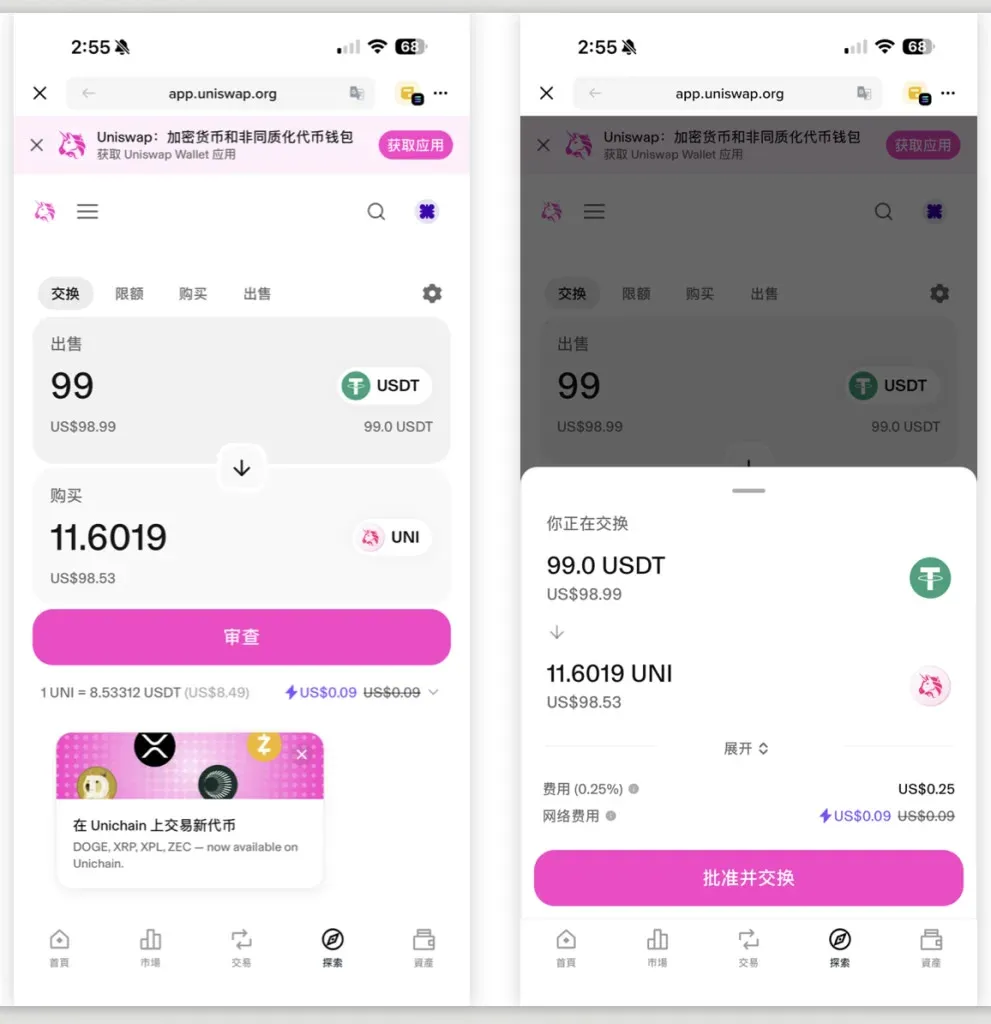
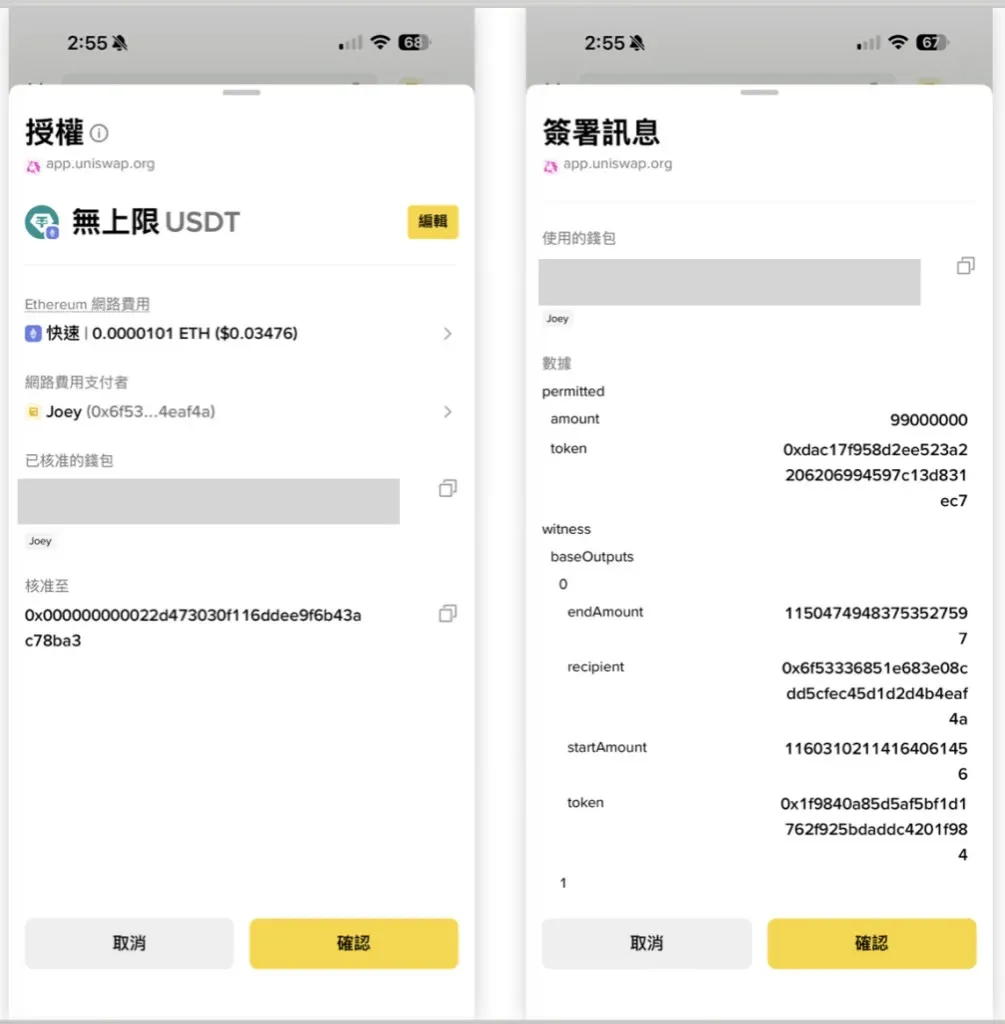
Click 【Review】 > 【Approve & Swap】. A confirmation window will appear, asking you to authorize the Uniswap smart contract to perform the token swap. Confirming completes the approval:
- Always verify the contract address before approving, to avoid granting permission to a malicious contract.
On the same confirmation screen you can also see the Ethereum network fee, i.e., the gas cost that will be deducted from the ETH you previously deposited.
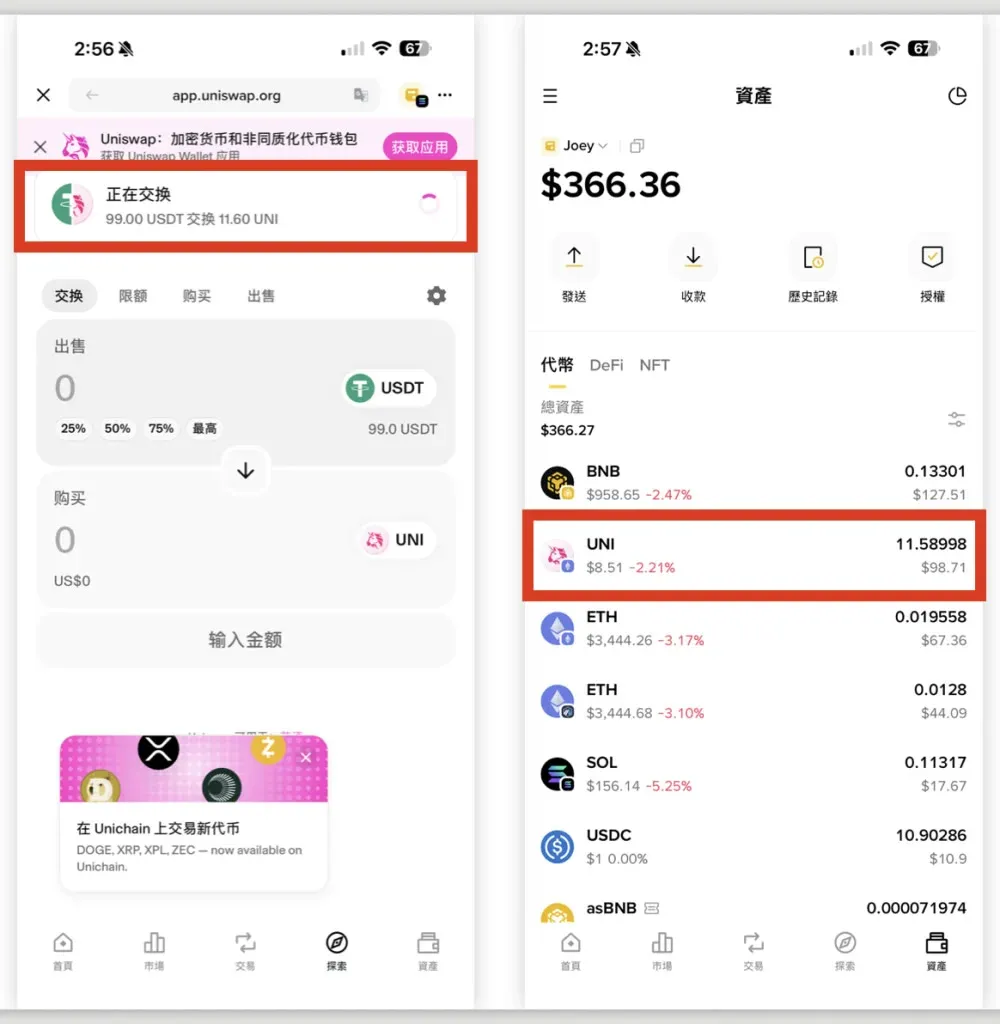
After approval, Uniswap executes the contract, converting your USDT into UNI. Once the transaction is finalized, you can view the received 11.589 UNI on the 【Assets】 page of Binance Wallet:
Brief recap of the workflow:
- Connect Binance Wallet to Uniswap
- Set the trading pair (USDT → UNI in this example)
- Approve the contract and pay the required ETH gas fee
- Transaction completes; assets appear in your wallet
Important Considerations When Using DEXs
- Because anyone can list a token on a DEX, there is no centralized vetting. Scam tokens or counterfeit projects may appear. Always double‑check the token’s contract address before trading.
- Although a DEX does not carry the risk of a single entity going bankrupt, the underlying smart contracts may contain bugs or backdoors, making it a high‑risk activity.
- Ensure you understand what contract approval means; inadvertently granting permission to a malicious contract can result in loss of funds.
The above constitutes the complete step‑by‑step guide titled “How to Use a Decentralized Exchange? Binance Wallet + Uniswap Crypto Trading”. For more beginner tutorials on Binance Wallet, follow Bitaigen (比特根) and its related sections.
💡 Register on Binance with referral code B2345 for the maximum trading fee discount. See Binance complete guide.



