
 Bitaigen Research
In this article we compile a step‑by‑step guide for users preparing to join HECO mining. By outlining the version requirements, download locations, and chain‑selection procedures for mainstream apps such as TokenPocket and BitKeep, we help you get your wallet ready quickly while avoiding common pitfalls. If you want a smooth start with mining, keep reading.
1. Wallet apps that support HECO
The Huobi Eco Chain (HECO) can currently be accessed through the following mobile applications:
TokenPocket
- Be sure to install the latest version (Android 1.1.5, iOS 3.1.2 Test Flight).
- Download link: https://www.tokenpocket.pro/
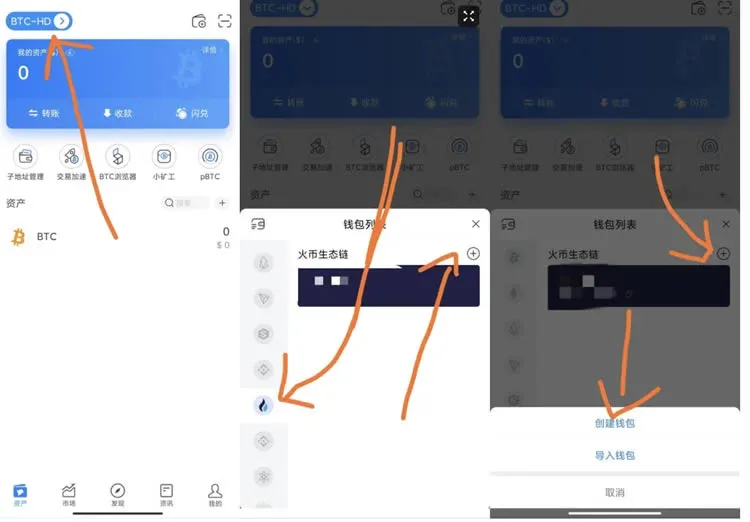
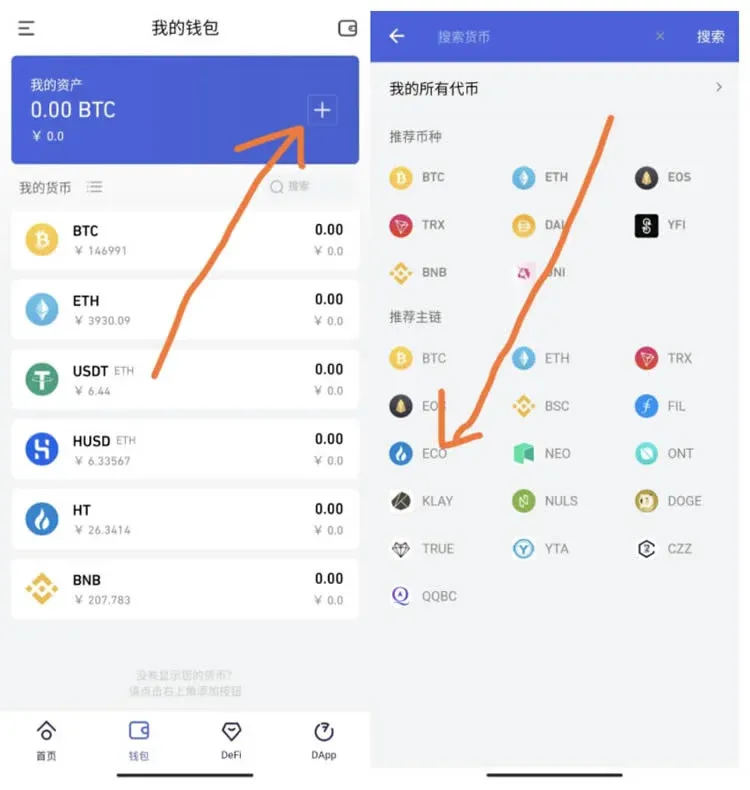
- After launching the app you may choose “Create New Wallet” or “Import Wallet”; on the chain‑selection screen tick Huobi Eco Chain.
BitKeep
- The most recent version is also required (Android 4.6.7).
- Download link: https://bitkeep.org/
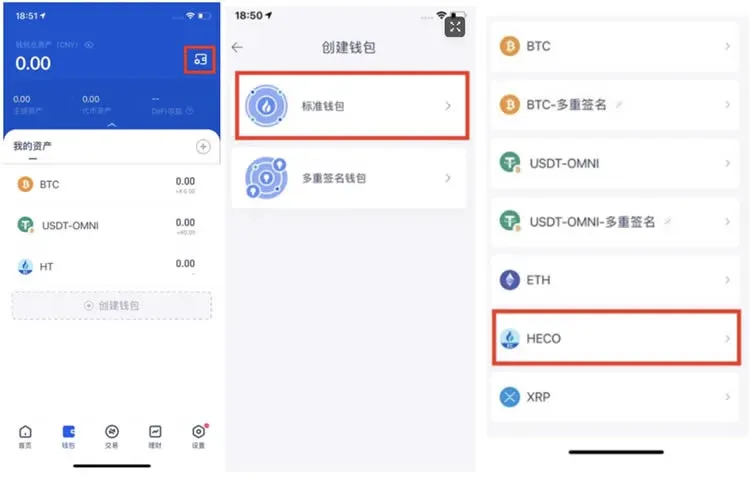
Huobi Wallet App (still in private beta)
- Download link: https://www.huobiwallet.com/zh/
- For the official tutorial, click the “Click here to navigate” button.
2. Configuring HECO on a desktop Ethereum wallet
We recommend using MetaMask; the setup process for other Ethereum‑compatible browser extensions follows a similar pattern. Once you add a custom network once, the HECO mainnet will be available for use on your PC.

MetaMask (fox wallet)
- Download link: https://metamask.io/
Steps to add a custom network:
| Parameter | Value to enter |
|---|---|
| Network name (any name you prefer for easy identification) | `HECO Mainnet` |
| New RPC URL | `https://http-mainnet.hecochain.com` |
| Chain ID | `128` |
| Currency symbol | `HT` |
| Block explorer URL (originally labeled “Explorer Manager URL”) | `https://scan.hecochain.com` |
An example of the filled‑out form:
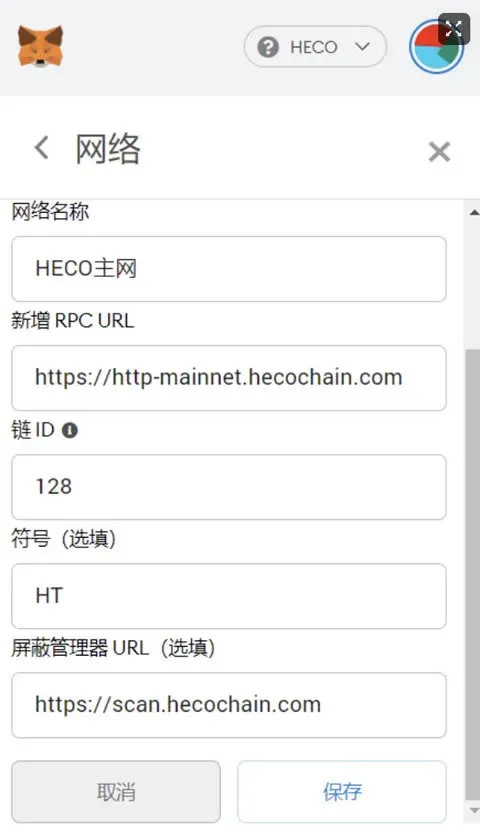
After clicking Save, the HECO mainnet will appear in MetaMask’s network dropdown and can be selected for transactions.
4. Switching the wallet network
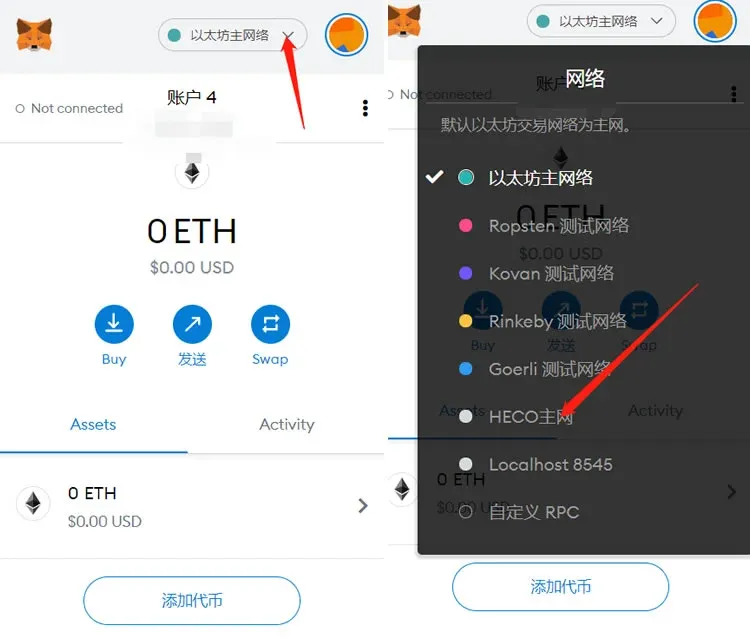
Once the custom network has been added, you must switch to the HECO Mainnet whenever you interact with DeFi platforms or DApps built on the Huobi Eco Chain. The procedure is:
- In MetaMask’s main screen, click the dropdown arrow next to the currently displayed network (it defaults to Ethereum Mainnet).
- Choose the previously added HECO Mainnet from the list.
---
Conclusion: First download a mobile or desktop wallet that supports HECO, then add the HECO mainnet parameters within the wallet. After completing these steps, your Huobi HECO wallet will be fully configured and ready for use. For additional details on HECO wallet configuration, follow other related articles published by Bitaigen (比特根).
*Note*: Crypto transactions may generate taxable events in many jurisdictions. Users should consult local tax regulations and consider professional advice when reporting gains or losses, especially when converting to fiat currencies such as USD via SEPA or SWIFT transfers. U.S. residents should use Binance.US or other regulated platforms for fiat on‑ramps.
Related Reading
- Transfer USDT from TokenPocket to OKX (TRC‑20/ERC‑20)
- Transfer TokenPocket Funds to OKX (OKEx) Safely
- TokenPocket: Install, Wallet Setup & Cross‑Chain DApp Guide
💡 Register on Binance with referral code B2345 for the maximum trading fee discount. See Binance complete guide.



