
 Bitaigen Research
 How to Buy Bitcoin (BTC) on the Binance App
Bitcoin (BTC) is widely regarded as “digital gold” in the cryptocurrency world, and its role as a store of value and investment asset is increasingly recognized by mainstream institutions and investors. If you want to purchase Bitcoin on the Binance platform, you only need to complete four steps: account registration, fiat deposit, USDT conversion, and spot purchase. Following these steps lets you hold BTC safely and quickly.
How does the Binance App let you buy Bitcoin? After registering on the Binance App and completing KYC, first use the C2C market or the “Instant Buy” feature to convert your fiat (e.g., USD via SEPA or SWIFT) into USDT. Then go to the spot‑trading page, select the BTC/USDT pair, and place either a limit order or a market order to acquire Bitcoin.
In this article we walk you through the entire process of investing in Bitcoin via the Binance App—from account registration and fiat deposit to USDT conversion and spot purchase. Each step is illustrated with screenshots and includes risk warnings to help newcomers get started quickly while avoiding common pitfalls. Continue reading for detailed instructions.
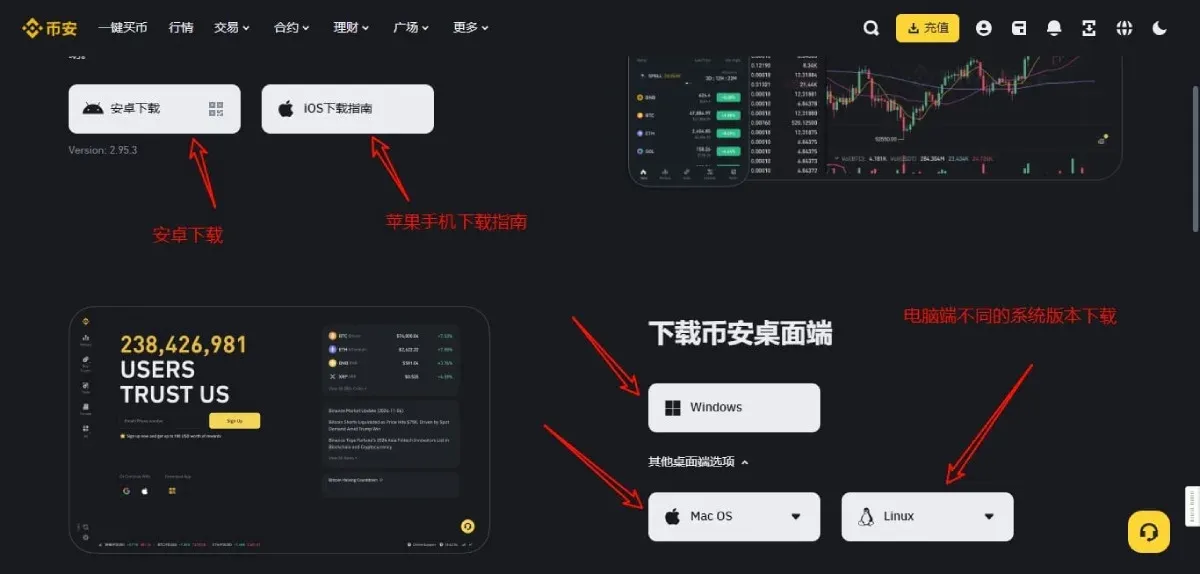
Download the Binance App and Register an Account
Before you tap “Buy,” preparing properly is essential for risk mitigation.
- Understand Bitcoin correctly: Bitcoin is a high‑risk asset with volatile price swings. Assess your personal risk tolerance before investing, and avoid over‑leveraging or borrowing to fund a full purchase.
- Download the official Binance App: Always use the link provided on the Binance website (binance.com) or search for “Binance” in the iOS App Store or Google Play Store. This prevents phishing or counterfeit applications.
Registration link and download URLs
- Binance official registration: `https://accounts.binance.com/register?ref=B2345` (copy into your browser)
- Android Binance App download: `https://www.bitaigen.com/binance/download`
- Referral code: `B2345` (automatically refunds 20 % of trading fees)
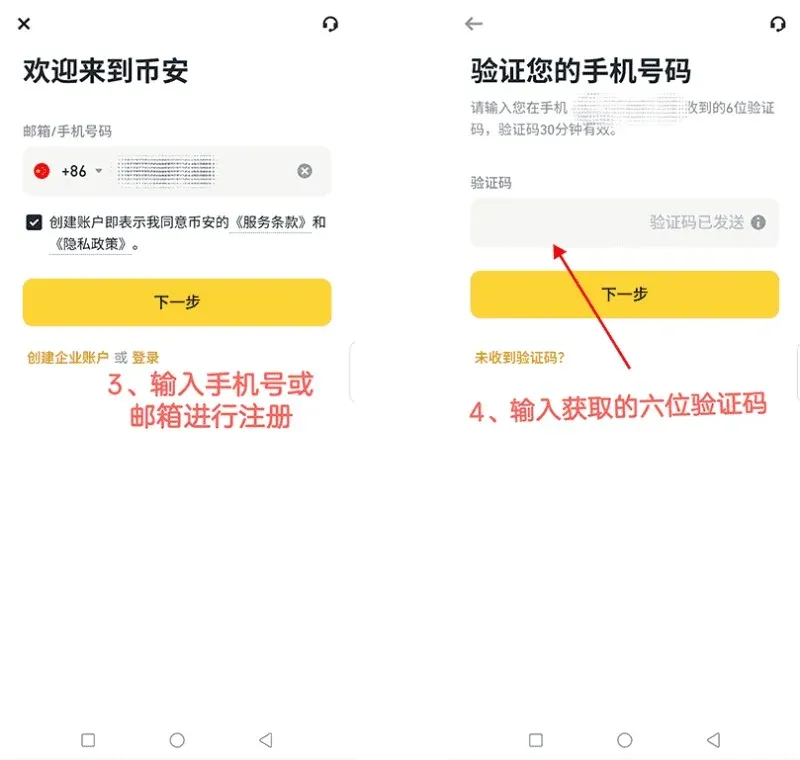
Complete Account Registration and Security Settings
- Register – You can sign up quickly with a mobile phone number or an email address.
- Identity verification (KYC) – Upload a government‑issued ID (passport or national ID) and complete facial recognition. This raises your account security tier and unlocks higher trading and withdrawal limits.
- Strengthen account security – Enable Two‑Factor Authentication (2FA) (Google Authenticator, Authy, etc.) to add a physical lock on login and withdrawals.
For a step‑by‑step tutorial, refer to the links and videos embedded in the original article.
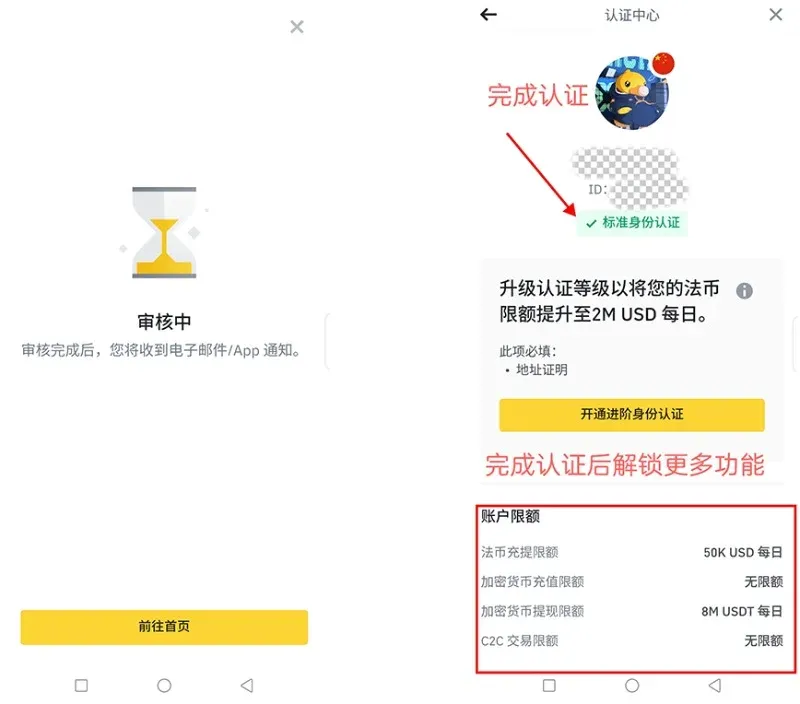
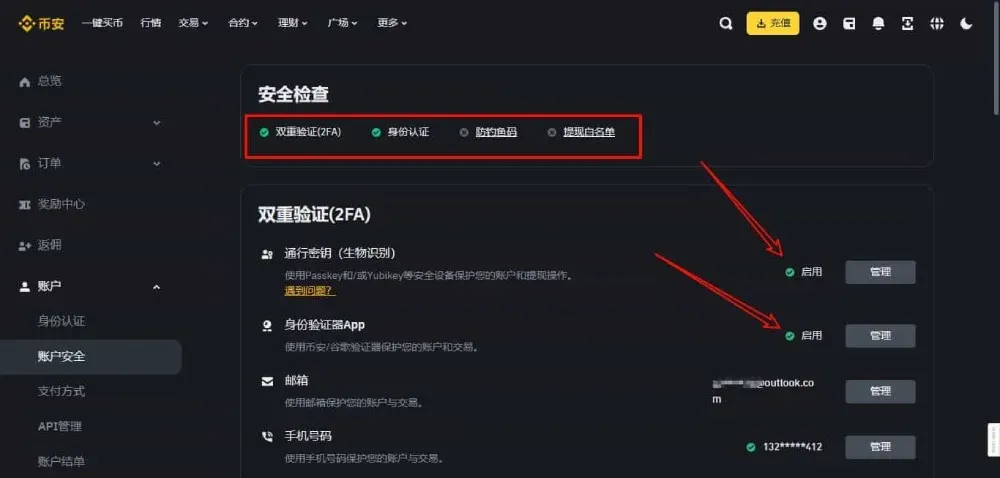
Step‑by‑Step Guide to Buying Bitcoin on the Binance App
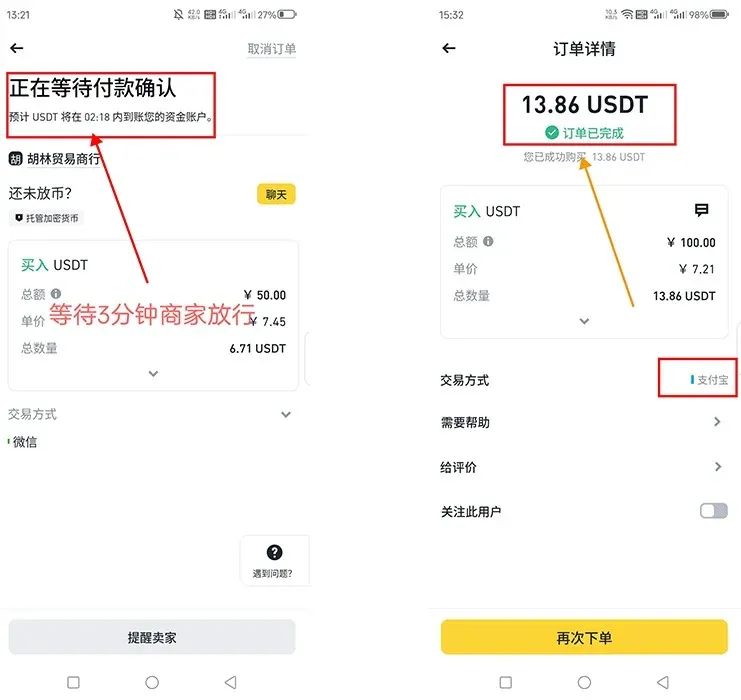
1. C2C (Customer‑to‑Customer) Trading
- Navigate to the “C2C Trading” section and select a seller offering USDT.
- Pay the seller in fiat (e.g., USD via bank transfer, SEPA, or SWIFT). Once the seller confirms receipt, the USDT will be released to your spot wallet.
- Choose merchants with high reputation scores and large transaction volumes. Binance’s escrow service secures the funds, providing additional safety.
2. Instant (Quick) Buy
- From the app’s home screen tap “Buy” → “Instant Buy.”
- Enter the amount of fiat you wish to spend (e.g., USD). The system automatically calculates the corresponding USDT amount and matches you with a seller.
- Multiple payment methods are supported, and the whole flow is integrated, making it ideal for beginners who want a fast deposit.
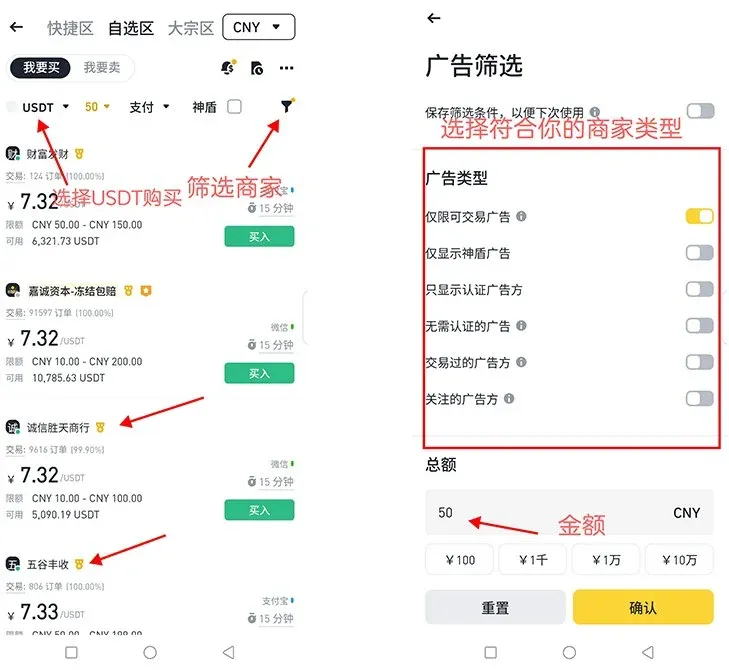
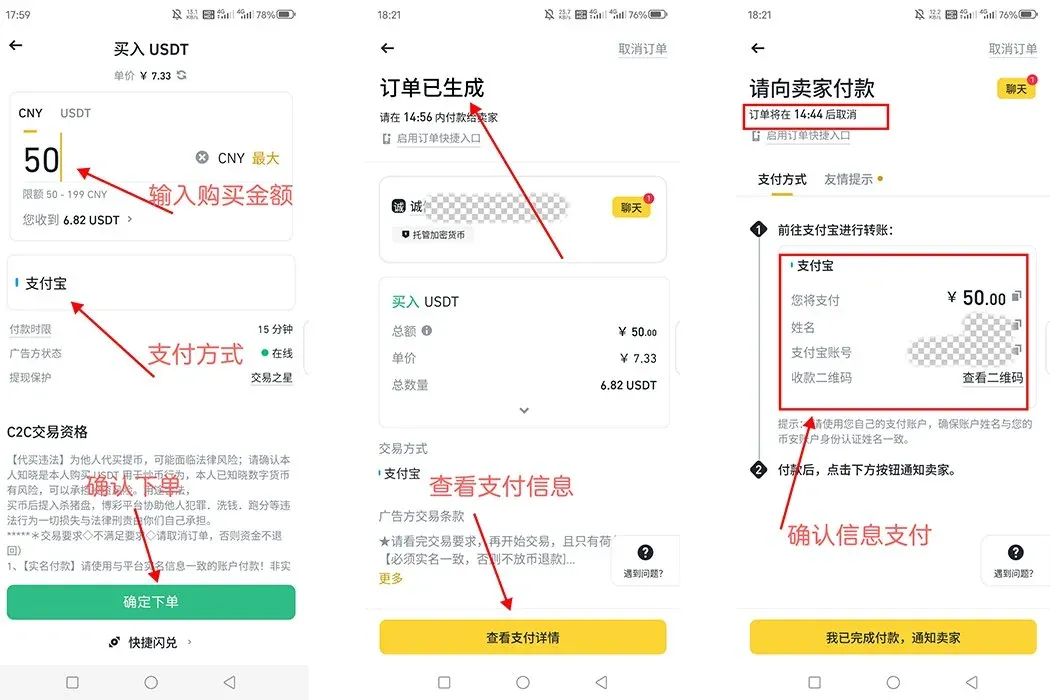
3. Convert USDT to BTC
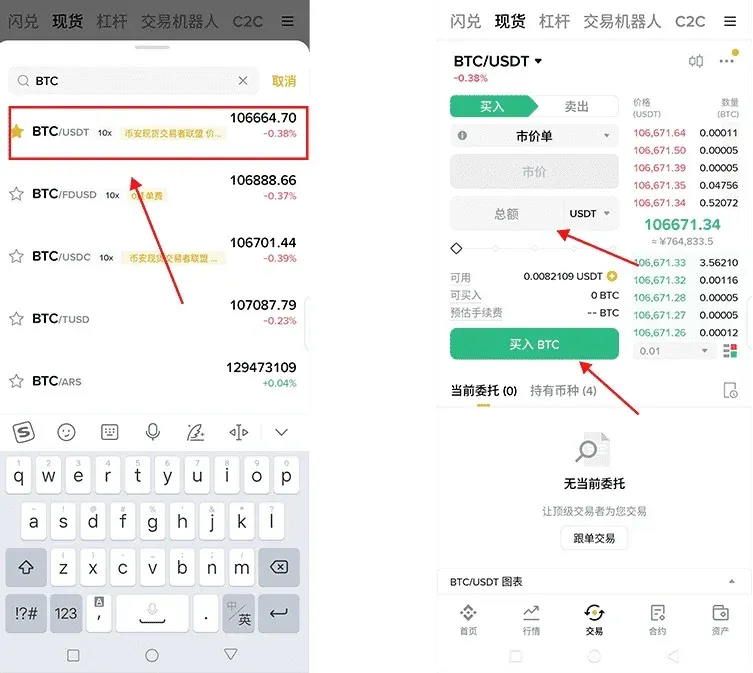
- After your account holds USDT, tap “Trade” → “Spot Trading.”
- In the search bar type BTC/USDT and open the corresponding trading pair.
- Limit order (recommended) – In the “Buy” section, set your target price and the amount of BTC you wish to purchase. The order will execute automatically when the market reaches your price, giving you cost control.
- Market order – If you want immediate execution, choose a market order, specify either the amount of USDT to spend or the BTC quantity, and the system will fill the trade at the best available price instantly.
Bitcoin (BTC) Briefly Surpasses Google in Market Capitalization
Recently, Bitcoin’s market cap briefly exceeded that of Google (Alphabet), attracting worldwide media attention. This milestone underscores Bitcoin’s growing influence in the digital‑asset arena and reflects institutional confidence in its long‑term outlook.
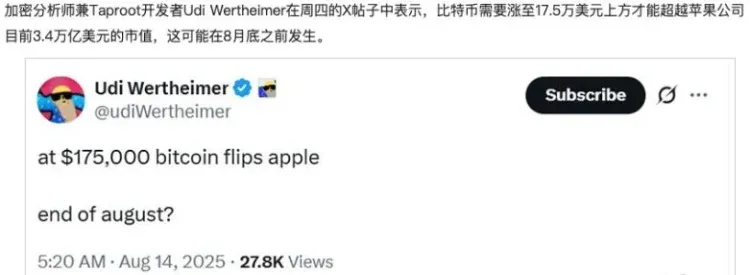
In 2025, Bitcoin crossed the $2 trillion market‑cap threshold, marking its transition from a speculative instrument to a more stable long‑term investment vehicle. Its decentralized nature and global payment potential are steadily raising its stature within traditional finance. Although price volatility remains pronounced, continued participation by large institutions is expected to boost market acceptance further.
Summary
Using the Binance App, investors can complete a full closed‑loop process: account registration, fiat deposit, USDT conversion, and spot purchase of BTC. The workflow is streamlined and user‑friendly. Bitcoin’s brief overtaking of Google’s market cap further demonstrates its impact on the global financial landscape. If you plan to enter the Bitcoin investment space, Binance (or Binance.US for U.S. residents) provides a reliable entry point.
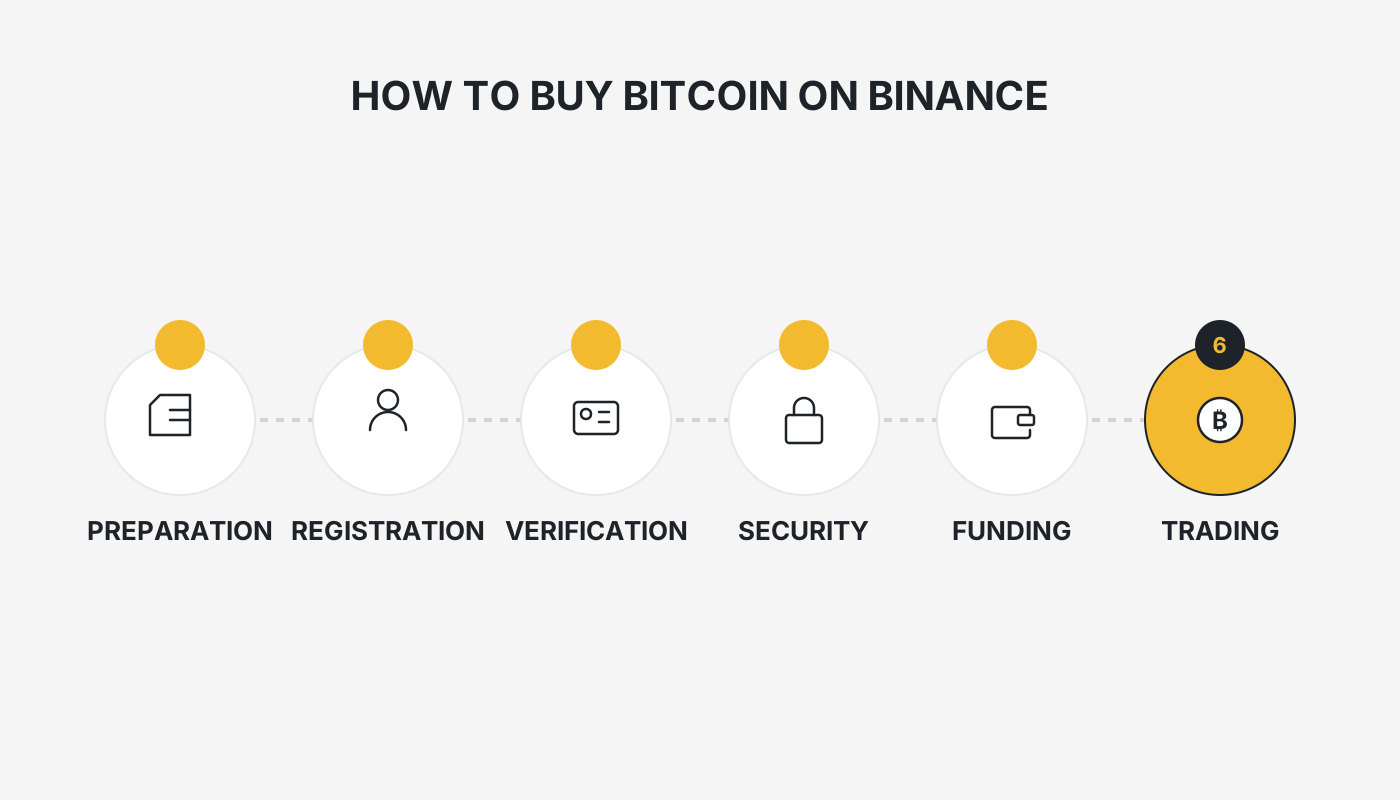
Investment Process Overview: Preparation (knowledge + App download + KYC) → Deposit (C2C or Instant Buy to obtain USDT) → Trade (spot market: use USDT to buy BTC) → Management (storage / dollar‑cost averaging / continuous learning)
Tax reminder: Cryptocurrency gains may be taxable in your jurisdiction. Consult a qualified tax professional to understand your local reporting obligations.
This concludes the guide. For more practical content on buying Bitcoin with Binance, search for Bitaigen or continue reading the articles linked below. Thank you for following and supporting Bitaigen!
Related Reading
- How to Buy Bitcoin: Step‑by‑Step Guide for Beginners (2024)
- Bitcoin Spot vs Contract Trading: Key Differences Explained
- Buy Bitcoin Spot: How to Own Real BTC Without Derivatives
💡 Register on Binance with referral code B2345 for the maximum trading fee discount. See Binance complete guide.



