
 Bitaigen Research
 Our Bitaigen editorial team systematically dissects the core principles and practical points of Binance grid trading, deeply analyzes its applicable scenarios and potential risks, and provides a complete step‑by‑step guide from creating the first grid to parameter tuning, helping newcomers avoid common pitfalls in automated strategies and get up to speed quickly.
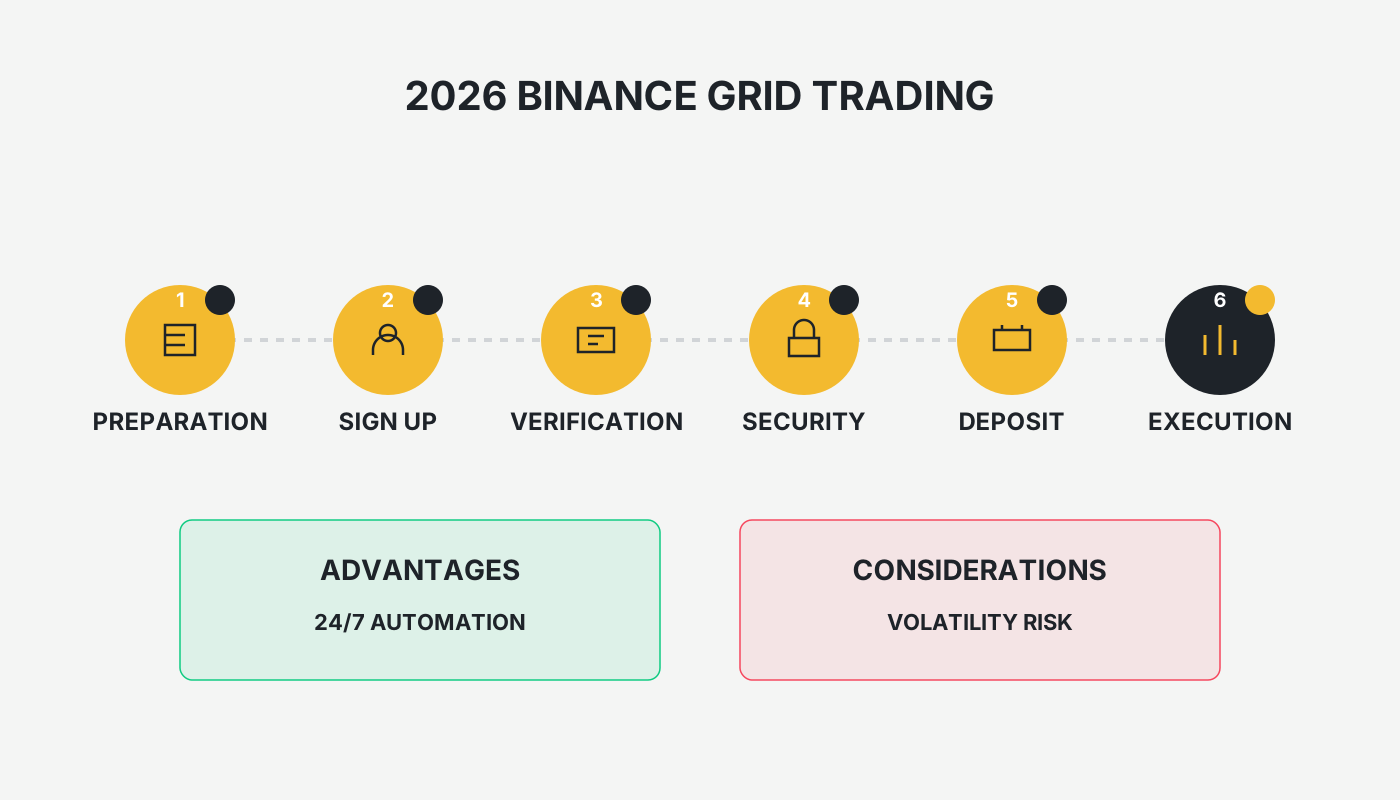
2026 Binance Grid Trading Guide: What Is Grid Trading? Binance Grid Trading Tutorial and Pros & Cons Analysis
Grid trading is an automated strategy that divides a price range into a series of “grids.” When the price drops one grid, the system automatically buys; when the price rises one grid, it automatically sells. The method works on spot or futures markets and can run 24 hours unattended.
Grid trading is a term you’ll hear repeatedly after entering the cryptocurrency market, and many wonder whether it truly “makes money without risk.” This article systematically explains the principles, advantages, and disadvantages of grid trading, and uses Binance spot grids as a concrete example. We walk you through creating your first grid, share commonly used parameters, handy tips, and typical mistakes to avoid.

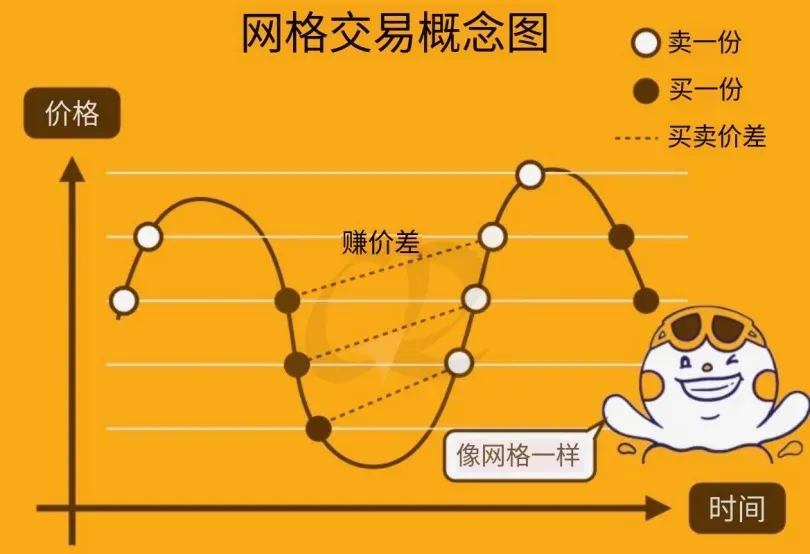
Grid Trading Concept Diagram
Assume you want to buy at 20 USDT and sell at 30 USDT for the same token. The traditional approach is to place a buy order first, wait for it to fill, and then manually place a sell order. If your buy order fills while you’re sleeping, you might miss the chance to place the sell order; the price could jump to 35 USDT, then retreat back to 20 USDT, causing you to lose the intended profit.
Grid trading lets you pre‑set multiple buy and sell price levels; the system monitors the market and executes automatically, eliminating human error. Even if you want a multi‑layer strategy such as buy 20 → sell 25 → sell 30 → buy 25 → sell 30, you can achieve it with a single configuration.
What Is Grid Trading
Buying and Selling According to Price
The heart of grid trading is to split a target price interval into a number of “grids.” When the price drops one grid, a predetermined amount is bought; when it rises one grid, the same amount is sold. The “buy‑one‑sell‑one” loop captures the price‑difference profit between adjacent grids.
Example: Divide the 20‑30 USDT interval into three price points: 20, 25, and 30.
- When the price falls to 20 USDT, buy 1 unit.
- When the price climbs back to 25 USDT, sell that 1 unit, then immediately buy 1 unit again.
- When the price reaches 30 USDT, sell the second unit.
Repeating this cycle adheres strictly to the preset prices and removes emotional influence.
Automated Buying & Selling, No Need to Watch the Charts
Most crypto exchanges now package the above logic into a grid‑trading bot. You only need to set the price range, the number of grids, and a few detailed parameters, and the bot will perform 24 hour automatic buying and selling, freeing you from constant screen‑watching.
Real‑World Operation Example
Suppose you allocate 1,000 USDT to a grid with an upper bound of 30 USDT, a lower bound of 20 USDT, and 2 grids (i.e., price points 20, 25, 30). When the grid is created, the system calculates 1,000 ÷ 20 = 50 units per grid. As the price moves, the bot will automatically execute the corresponding trades as shown below.
| Price | Action | Profit This Step |
|---|---|---|
| 20 | Buy 5 units | – |
| 25 | Sell 5 units | 5 × 50 = 250 USDT |
| 20 | Buy 5 units again | – |
| 25 | Sell 5 units again | 5 × 50 = 250 USDT |
| 30 | Sell 5 units | (30‑20) × 50 = 500 USDT |
| 25 | Buy 5 units again | – |
| 30 | Sell 5 units again | 5 × 50 = 250 USDT |
If the price keeps falling to 10 USDT, no sell orders are triggered, and the open position incurs a floating loss of (20‑10) × 50 = 500 USDT.
Pros & Cons of Grid Trading
Advantages
- Mitigates emotional swings: Once set, the system follows the price levels strictly, unaffected by fear or greed.
- Saves monitoring time: Trades are executed automatically when price thresholds are hit.
- Fits ranging markets: In a volatile but bounded price corridor, the bot can continuously capture profit from each grid.
Disadvantages
- Low capital efficiency: To protect against price drops, a sizable amount of capital must be reserved. In a strong up‑trend, that capital sits idle.
- Limited profit in trending markets: During a sustained rise or fall, the incremental sell (or buy) orders yield less than a single “buy‑and‑hold‑to‑peak” approach.
- Parameter‑setting steep learning curve: Choosing an appropriate price range, grid count, and arithmetic (linear) vs. geometric spacing requires experience and market judgment.
Binance Grid Trading Tutorial
Step 1: Register & Deposit
- Register on Binance (global platform): <https://accounts.binance.com/register?ref=B2345> (copy the link into your browser).
- For U.S. residents: Use Binance.US (https://www.binance.us) instead of the global site, as the latter is not available in the United States.
- Download the Android app: <https://www.bitaigen.com/binance/download>
Refer to the 2025 Binance guide for a complete walkthrough of deposits, withdrawals, fees, and security best practices.
Tax note: Crypto gains may be taxable in your jurisdiction. Consult a local tax professional to understand reporting obligations for any realized profit or loss.
Step 2: Open the Grid Trading Page
We recommend starting with Spot Grid trading; futures grids involve liquidation risk and should be explored only after you are comfortable with the basics. In the Binance app, navigate to “Trade Bots” → “Spot Grid.” You can choose among three modes: 【AI】, 【Popular】, or 【Manual Creation】.
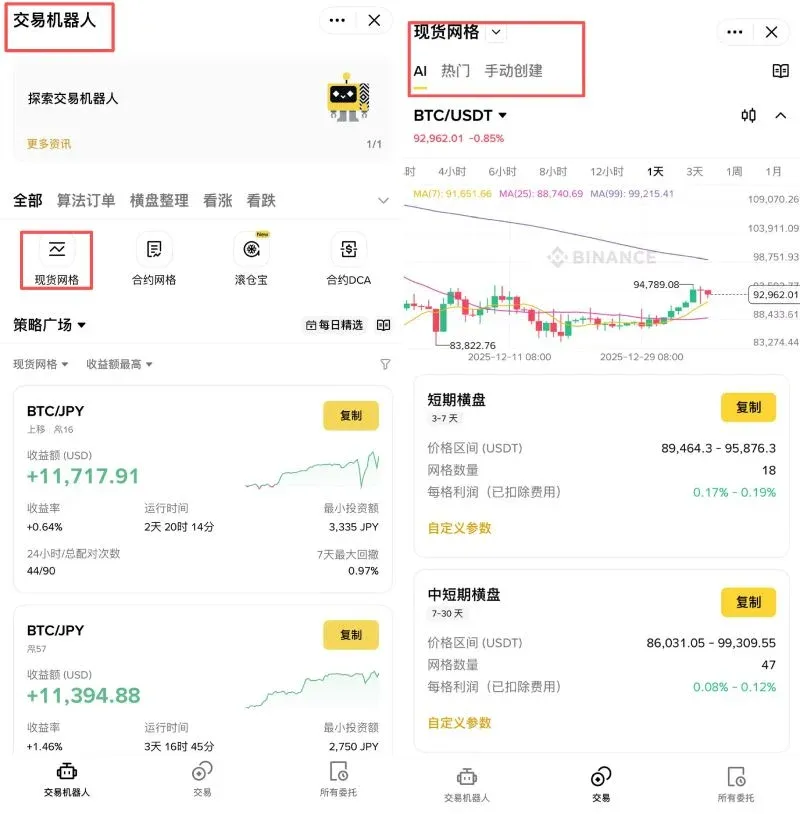
Step 3: Build a Grid Strategy
1. Use AI‑Generated Parameters
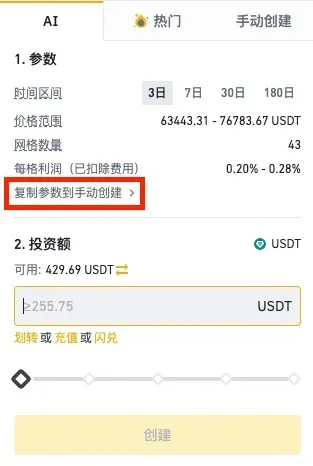
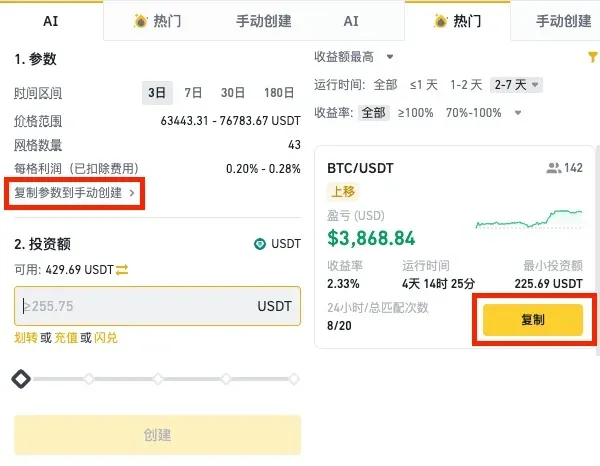
- Tap 【AI】; the system runs technical analysis on the selected trading pair and auto‑generates parameters.
- If you wish to fine‑tune, click 【Copy Parameters to Manual Creation】 and edit them as needed.
2. Use Popular Templates
- Tap 【Popular】; the platform displays community‑favored strategy templates.
- Enter your Investment Amount (e.g., 1,000 USD) in the input box, then press 【Create】.
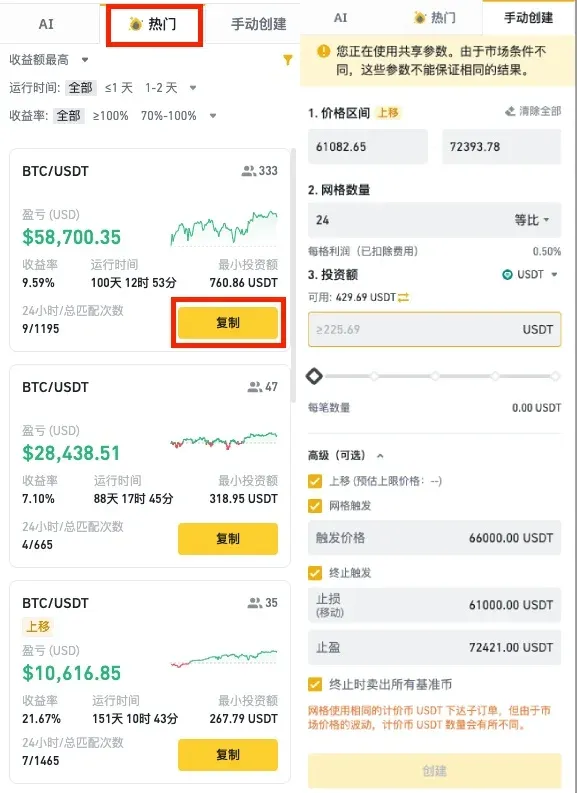
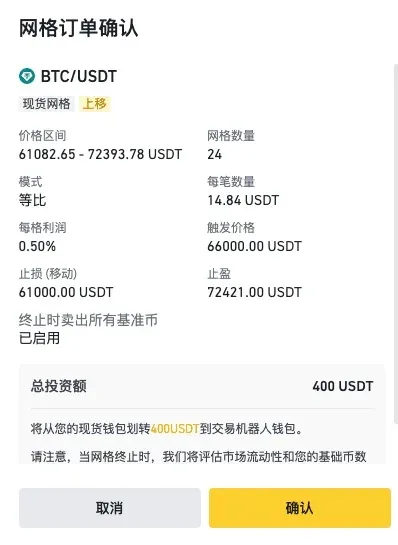
- After reviewing the order details, click 【Confirm】; the bot will place the preset buy and sell orders.
Note: The default spacing is linear (equal‑difference); the option “Sell all base currency on termination” is enabled by default. Tick the risk‑acknowledgement box before hitting 【Confirm】.
3. Manual Creation
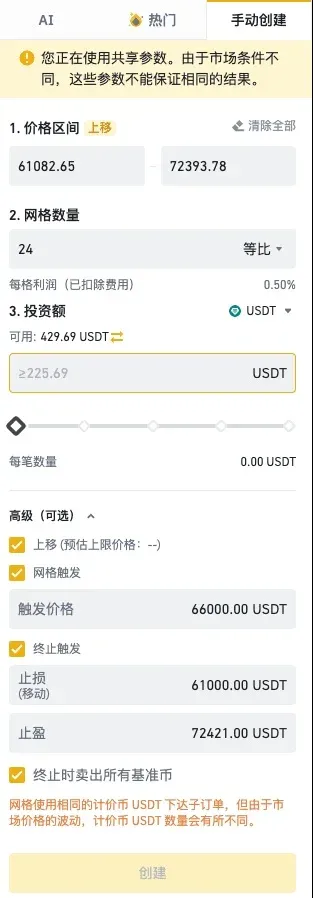
- Tap 【Manual Creation】, choose Linear or Geometric spacing, and fill in the price range, number of grids, quantity per grid, etc.
- Press 【Create】, then review the order summary and click 【Confirm】.

Step 4: Manage an Active Grid
- In the trading interface, tap 【Running】 to view the status of your active grids.
- On the Binance app, go to [Wallet] → [Trade Bots] → [Running Bots] for management.
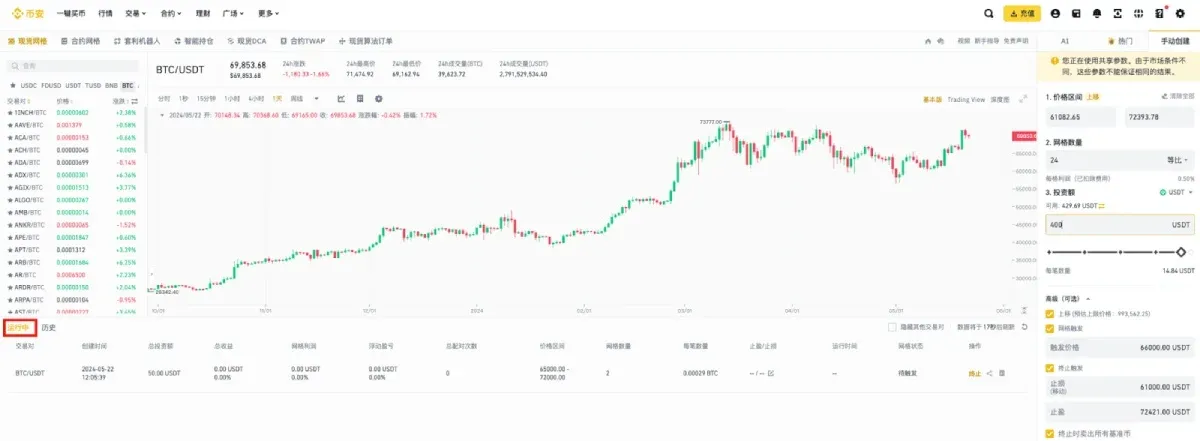
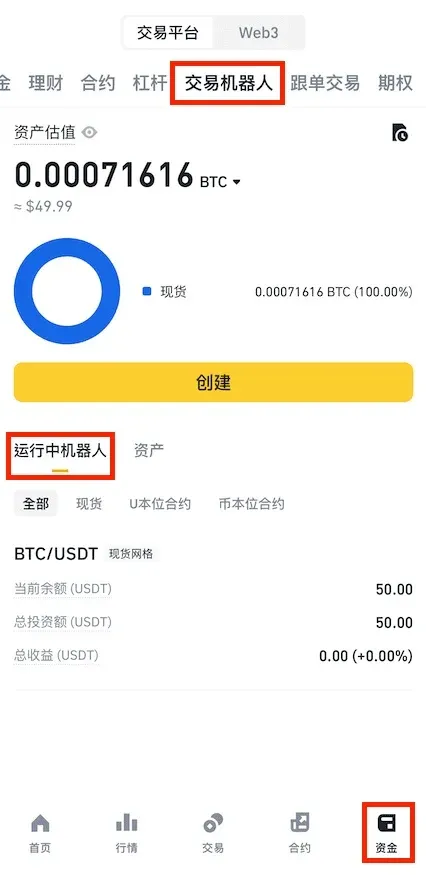
On the All Orders page you can perform the following actions:
- Modify: Adjust advanced settings.
- In‑Progress: Inspect buy‑sell details for each grid level.
- Terminate: Shut down the grid (commonly used for profit‑taking or stop‑loss).
Grid profit is recorded only after a buy‑sell pair is completed; a lone sell order appears as unrealized (floating) profit.
Grid Trading Fees & Liquidity
Fees
The primary cost of grid trading is the transaction fee. Binance spot‑grid fees are identical to regular spot fees: 0.10 % per trade, and the BNB discount does not apply to grid bots. Because a single grid’s profit often hovers around 0.6 %, the fee can represent roughly 16 % of that profit, significantly affecting net returns. If you seek lower costs, compare fee structures of other exchanges, but always weigh fee savings against available liquidity.
Liquidity
Grid arbitrage depends on price movement to trigger both buy and sell legs. Exchanges with deep order books ensure that your grid orders are fully filled. For instance, at a sell level of 30 USDT, a thin market might only fill the order down to 29.8 USDT, eroding the intended margin. Prioritize trading pairs with high daily volume and tight spreads.
Grid Parameters & Practical Tips
Below are five key parameters and how they influence profitability, helping you configure a more sensible grid.
| Parameter | Function | Setting Recommendation |
|---|---|---|
| **Base Currency** | The token whose price defines the grid | Choose a coin that frequently oscillates within your target range, e.g., BTC/USDT, ETH/USDT |
| **Price Range** | Upper and lower bounds of the grid | Decide based on expected holding period; a wider range reduces capital efficiency |
| **Number of Grids** | How many price steps are created | Balance per‑grid profit against fees; aim for ~0.5‑0.6 % profit per grid |
| **Linear / Geometric** | Method of spacing grids | Linear works for relatively stable price intervals; geometric is better for high‑volatility assets. Beginners should start with linear |
| **Out‑of‑Range Handling** | What to do when price breaks the bounds | Common practice: close the grid on an upper‑bound breakout, keep it open or stop‑loss on a lower‑bound breach |
Choosing the Base Currency
The base currency is the asset you are actually buying and selling. In a BTC/USDT grid, BTC is the base; all trades are executed according to BTC’s real‑time price. Select a coin with a history of frequent swings inside your chosen interval.
Defining the Price Range
The size of the range directly affects capital efficiency and profit‑realization speed.
- Wide range (e.g., >10 % of the mid‑price) suits long‑term positions but ties up capital for a longer period.
- Narrow range (e.g., 1‑3 %) fits short‑term volatility, delivering faster profit but requiring higher trade frequency.
Determining the Number of Grids
Within a fixed price interval, more grids mean smaller profit per grid but more execution opportunities. First, calculate the expected net profit per grid after fees, then decide how many grids to create. Example: For a 100‑110 USDT interval, targeting a net per‑grid profit of 0.55 % yields roughly 18 grids (10 ÷ 0.55 ≈ 18).
Linear vs. Geometric
- Linear (equal‑difference): Each grid’s price gap is constant. Best for assets with relatively steady price movement.
- Geometric (equal‑ratio): Gaps are a fixed percentage, expanding as price rises. Useful for highly volatile assets. Back‑testing shows that for “single‑direction” strategies, linear grids often edge out geometric ones in total return.
Handling Breakouts
When price breaches the upper or lower bound, you have two main options:
- Terminate the grid – lock in realized profit or cut losses.
- Keep it running – if you expect the price to revert to the original corridor, you may leave the bot active and wait for the next arbitrage cycle.
Our experience leans toward closing the grid on an upper‑bound breakout, while a lower‑bound breach is evaluated case‑by‑case based on the specific asset’s trend.
Frequently Asked Questions (FAQ)
Q1: What is the underlying mechanism of grid trading?
A: It captures the price‑difference profit by automatically executing a “buy‑one‑sell‑one” cycle within predefined price levels.
Q2: What are the main drawbacks of grid trading?
A: Numerous parameter choices, low capital efficiency, and limited earnings during strong trending markets. To lower the entry barrier, some exchanges provide AI‑generated or popular templates for beginners.
Conclusion
Grid trading automates a buy‑sell strategy around a price corridor, dramatically reducing emotional interference and enabling 24‑hour unattended operation. However, it is not a universal money‑making machine; profitability hinges on ranging market conditions and accurate interval selection. Misjudging the market can still lead to losses or sub‑optimal capital utilization.
This article has detailed the Binance spot‑grid workflow, fee and liquidity considerations, and practical parameter‑setting tips to help you launch a grid quickly while steering clear of common errors. For deeper dives into Binance grid trading, explore earlier Bitaigen (比特根) articles or follow the related links below. Happy trading!
---
*All fiat transactions
Related Reading
- How Binance Futures Grid Trading Works: Step-by-Step Guide
- Binance Login Guide: Access Global & China Sites Securely
- Open OKX Account & Complete KYC – Step-by-Step Guide
💡 Register on Binance with referral code B2345 for the maximum trading fee discount. See Binance complete guide.



