
 Bitaigen Research
 Binance, as a leading global digital‑asset exchange, continuously launches innovative programs to boost user activity. The Alpha Points campaign is one of the most talked‑about initiatives, designed to reward users with points for participating in early‑token offerings and trading on the platform. This guide walks you through, from scratch, how to join the Binance Alpha Points campaign, purchase Alpha tokens, and handle subsequent steps, helping newcomers get started quickly.
We break down the Binance Alpha Points campaign from three angles—platform mechanics, operational flow, and risk warnings. Even first‑time users can, with the help of this article, swiftly complete registration, claim tasks, and buy tokens, saving the time spent on trial and error. To learn the details and master practical tips, keep reading.
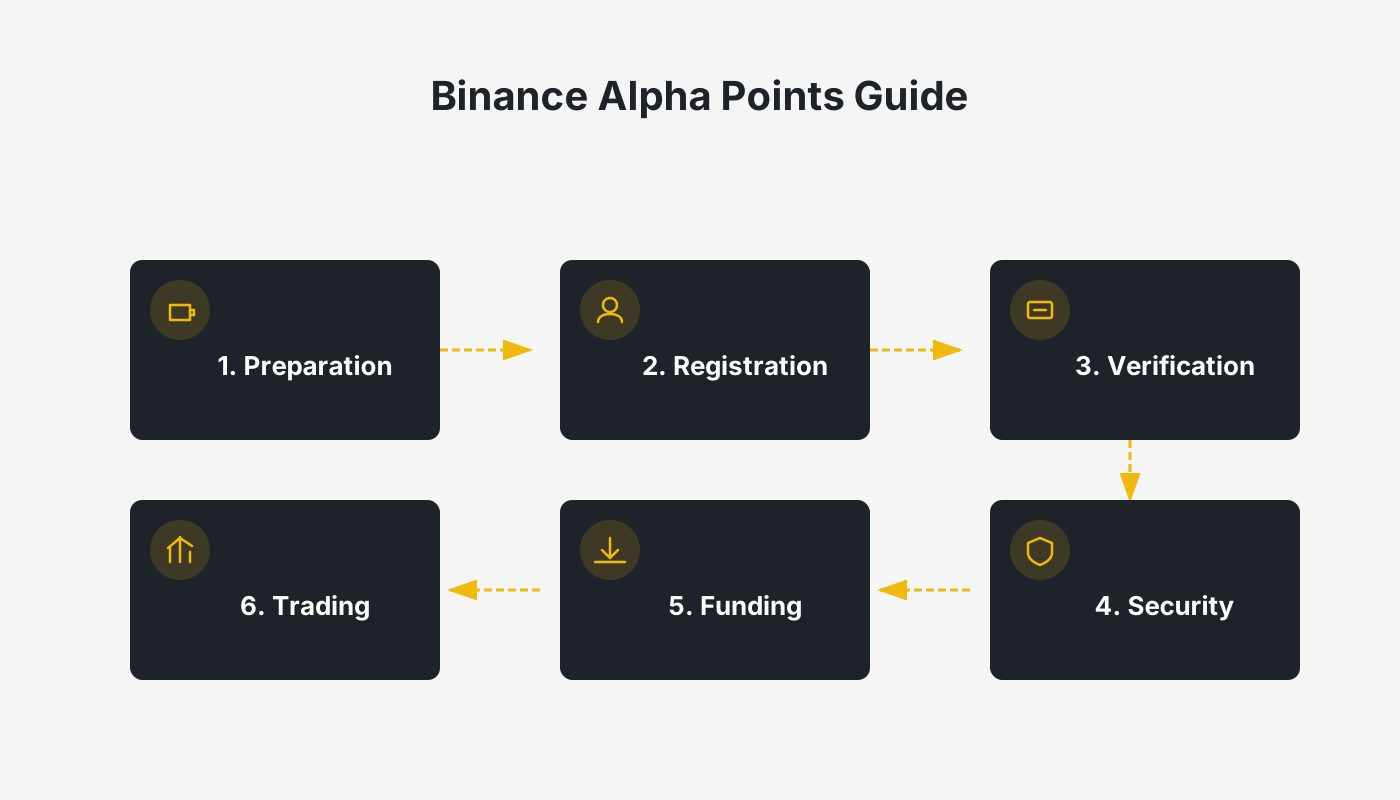
Prerequisites
Before you can take part in the Alpha Points campaign, you need a Binance account. If you haven’t registered yet, follow the links below to create an account and download the official client:
- Binance official registration page (copy the link into your browser)
- Android app download link
A companion tutorial video is also available to guide you through account creation, fiat deposits (via USD, SEPA, or SWIFT), and withdrawals.
Note for U.S. users: The global Binance platform is not available in the United States. Please use Binance.US for all activities if you reside in the U.S.
---
2. Preparing the Binance Web3 Wallet
All Alpha tokens are issued on blockchain networks, so you must have a ready‑to‑use Web3 wallet and hold the native coin of the relevant chain to cover gas fees.
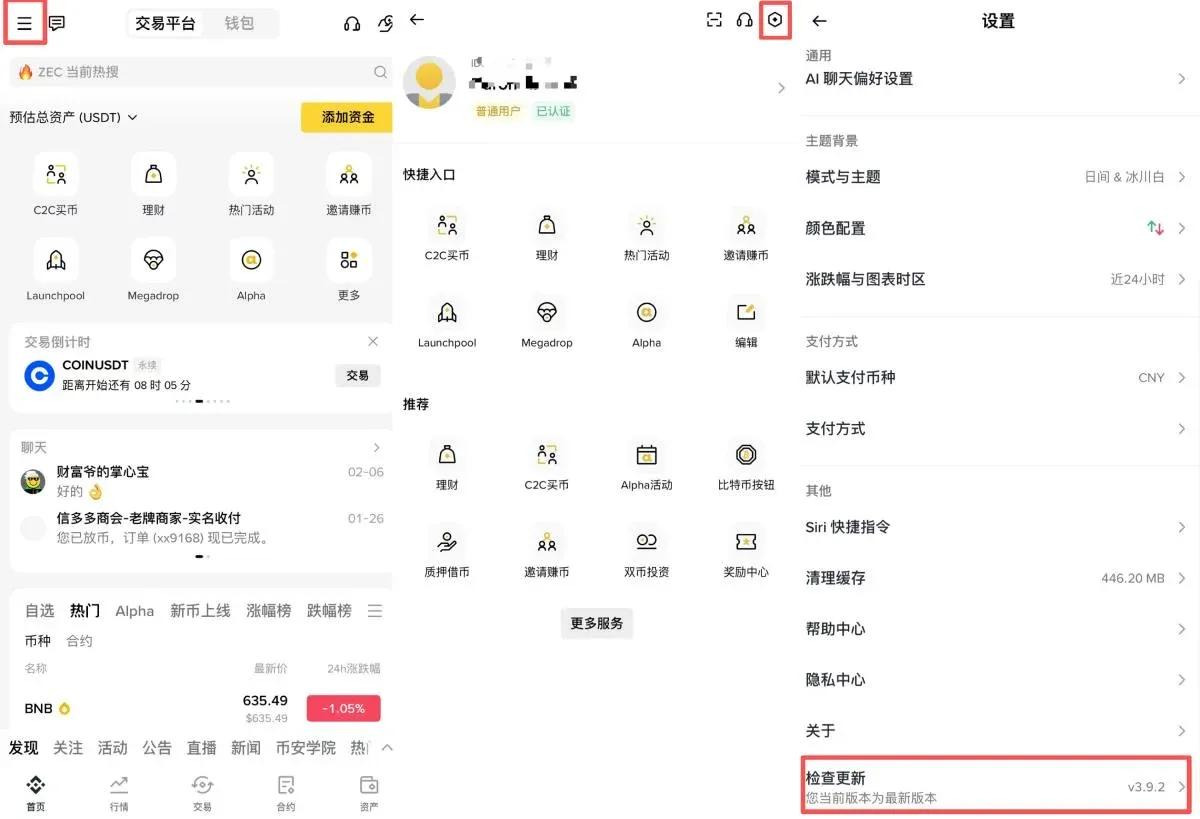
1. Update the client
Make sure your Binance app is updated to version 2.101 or higher. iOS users can manually check for updates in the App Store; Android users can go to the app’s home screen, tap Settings → Check for Updates.
2. Create a Web3 wallet
- Open the logged‑in Binance app.
- Tap the “Wallet” icon in the bottom navigation bar.
- On the wallet page, select “Create Wallet” → “Web3 Wallet.”
- Follow the prompts to set a password and back up the mnemonic phrase. Keep the backup code in a safe place; losing it means losing access to the wallet.
3. Fund preparation
Alpha tokens on different chains require the native token of that chain (e.g., BNB, ETH) to pay transaction fees. Deposit a sufficient balance into your Web3 wallet in advance to ensure smooth purchases and later operations.
---
1. What is Binance Alpha?
Alpha is a module inside the Binance Web3 Wallet that showcases promising early‑stage projects. The platform selects tokens that have active communities, rising market attention, and alignment with industry trends, then offers a Quick Buy feature so users can snap them up within a limited time window, with the potential to list on the main exchange later.
How to participate:
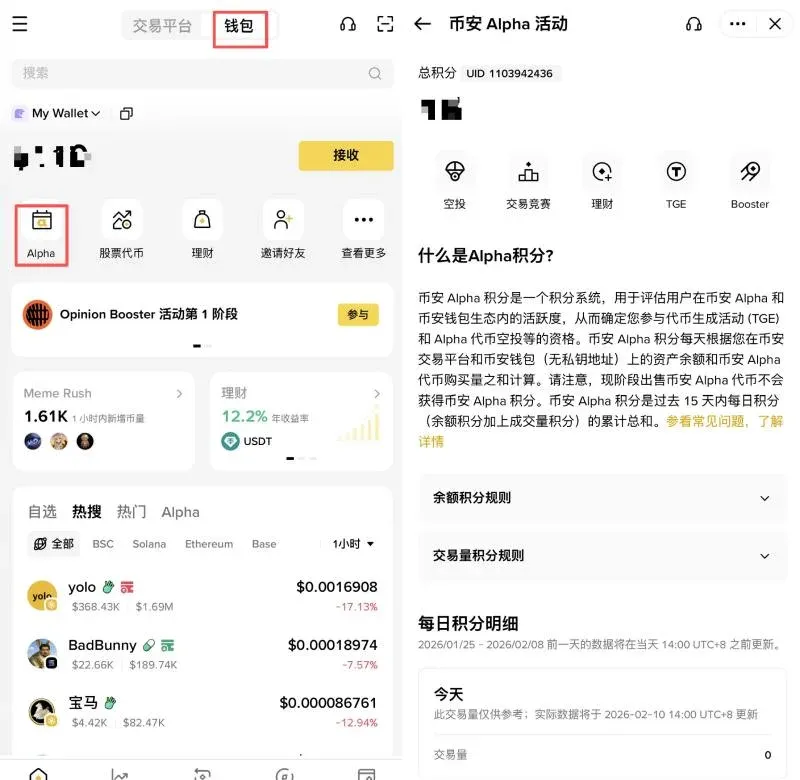
- Open the Web3 Wallet in the Binance app and locate the Binance Alpha entry on the home screen.
- Browse the list of upcoming projects and tap a token you’re interested in to view its detail page.
---
3. Process for Alpha token launch, purchase, and sale
Once your wallet is ready, you can follow the countdown to a token’s launch and trade it.
1. Watch the launch timer
- Go to Wallet → Binance Alpha; the page displays a countdown for the next token.
- When a token is about to launch for the first time, the system shows a friendly reminder to confirm that all pre‑steps are completed.
2. Use Quick Buy
- When the countdown reaches zero and the token is officially live, tap “Quick Buy.”
- Choose the purchase amount and confirm. The system automatically handles slippage and mitigates MEV (miner‑extractable value) impact, ensuring the trade executes smoothly.
3. Selling
The Alpha page does not currently provide a direct “Sell” button. To sell, follow these steps inside the Web3 wallet:
- Switch to the “Trade” tab at the bottom of the wallet.
- Select the token you bought (e.g., KOMA) as the asset to sell, and choose the target receiving token (e.g., BNB or USDT).
- Authorize the token and confirm the trade; make sure the relevant chain has enough gas (e.g., hold BNB for BSC transactions).
---
4. Hands‑on Alpha tutorial
STEP 1 ‑ Boost your trading points
Points are earned from holding points and trading points. Most users receive 2‑3 holding points; the remaining points must be earned through daily trading volume. To earn 14‑19 points in a single day, consider repeatedly executing small trades with a relatively stable Alpha token (e.g., KOGE) to minimize fees and other cost drain.
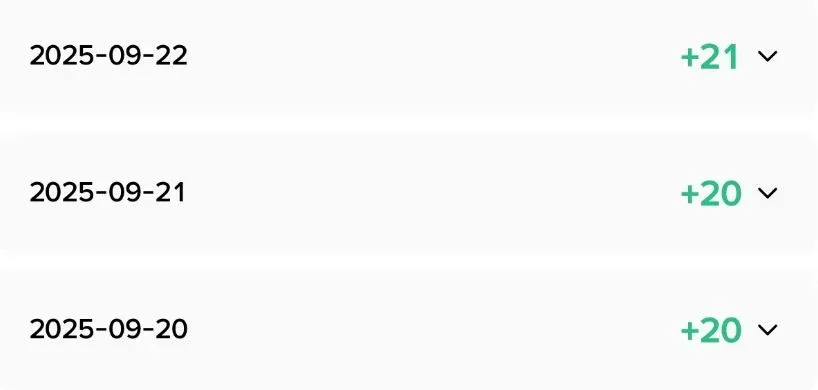
Example: Personal trading‑points accumulation over the past three days (chart omitted).
STEP 2 ‑ Grab the airdrop
Most Alpha airdrops follow a “first‑come‑first‑served” rule, making timing crucial. It’s recommended to enter the claim page 5‑10 minutes before the airdrop starts and complete any required facial recognition or image verification to avoid missing out.
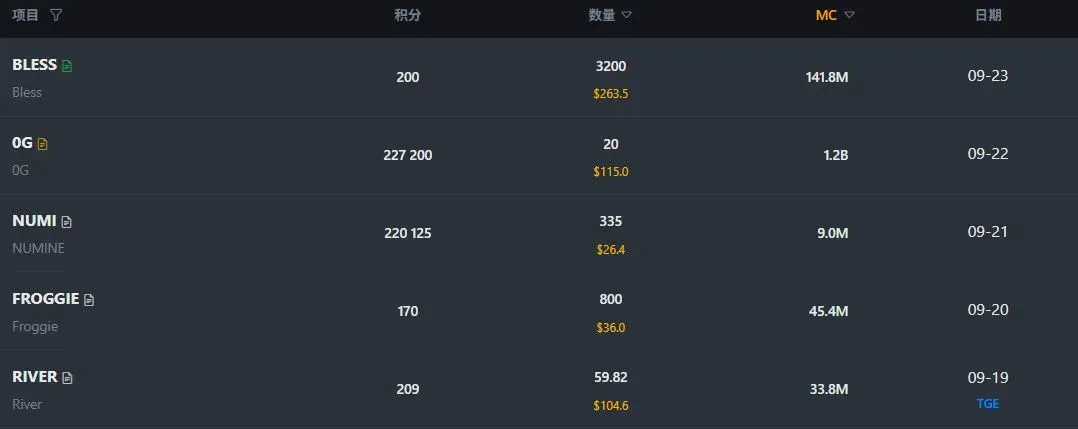
Tip: The table below (chart omitted) shows the points thresholds for the latest five Alpha projects.
STEP 3 ‑ Handle the airdropped tokens
After an airdrop lands in your wallet, you can decide when to sell on the secondary market. For instance, with the recent BLESS airdrop, the community distribution completed that afternoon, circulation remained limited, and the perceived sell pressure was low, so many chose to hold and observe.
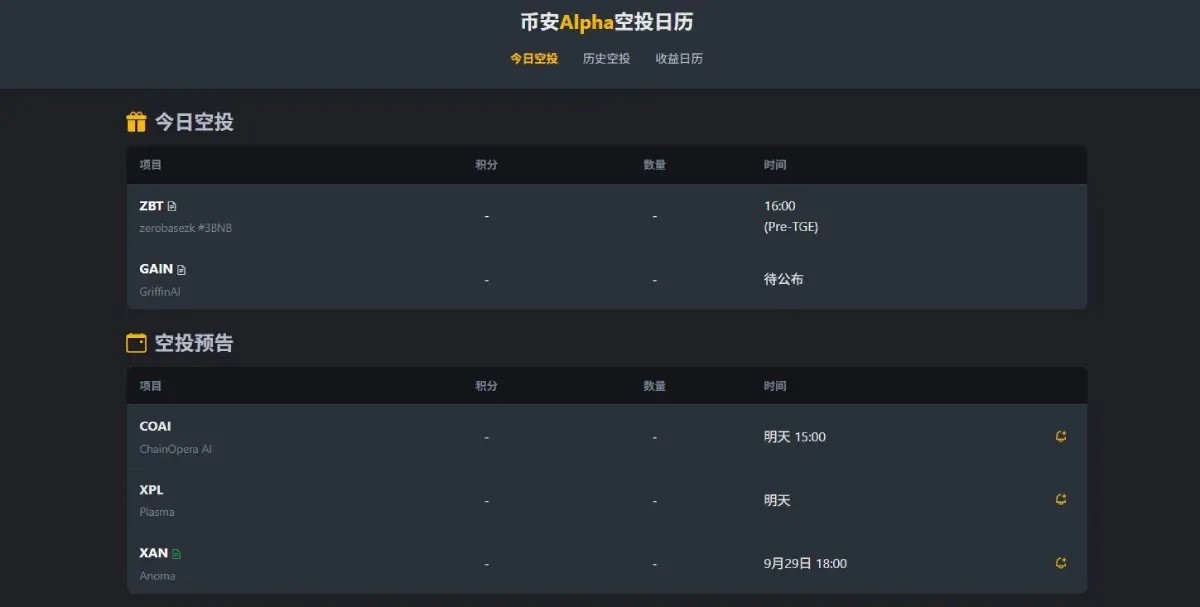
Sources for the latest airdrop info include Binance’s official X (formerly Twitter) account, the Odaily Planet Daily newsletter, and community‑maintained Alpha Airdrop Calendars.
---
5. Advanced Alpha playbooks
1. Trading competitions
Some Alpha projects launch trading competitions where completing a specified trade volume grants extra subsidies, helping offset the cost of daily volume‑building. Access the competition as shown in the screenshots below, pick the target token, and check the minimum trade threshold before 13:00 UTC each day. On the final day of the event, the threshold typically rises sharply.
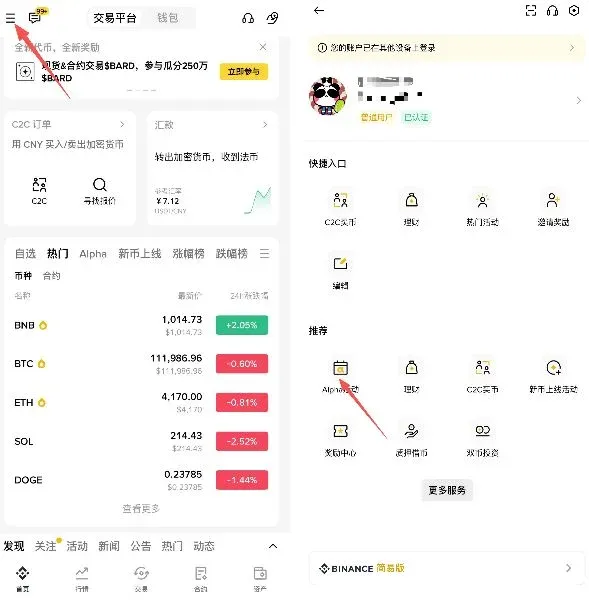
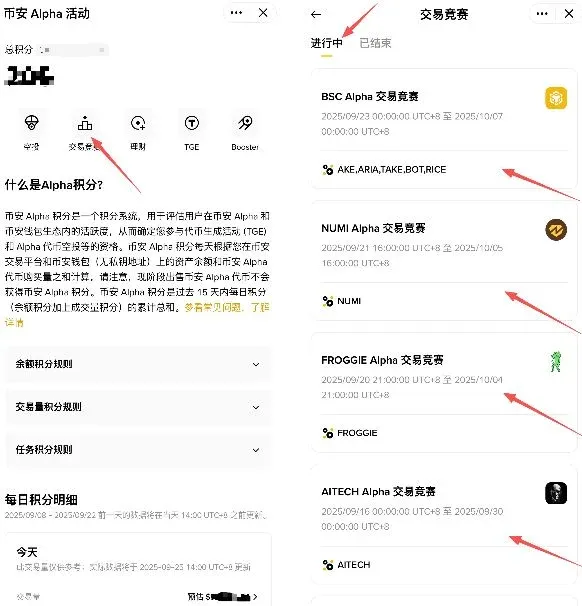
Note: Once you meet the threshold, the reward token will be distributed within 24 hours after the competition ends.
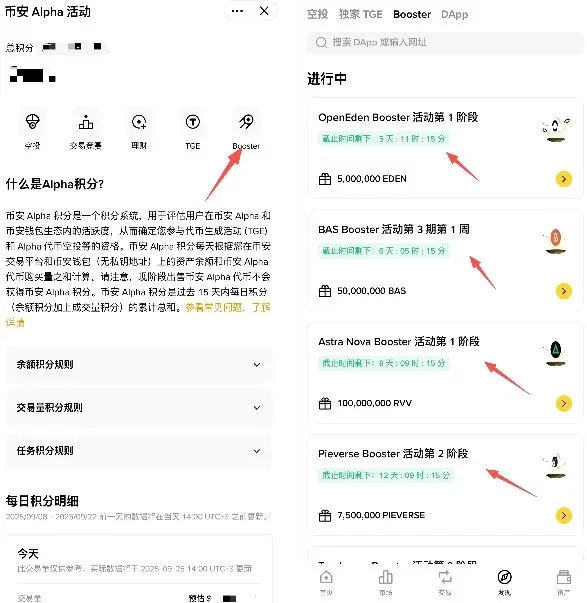
2. Booster missions
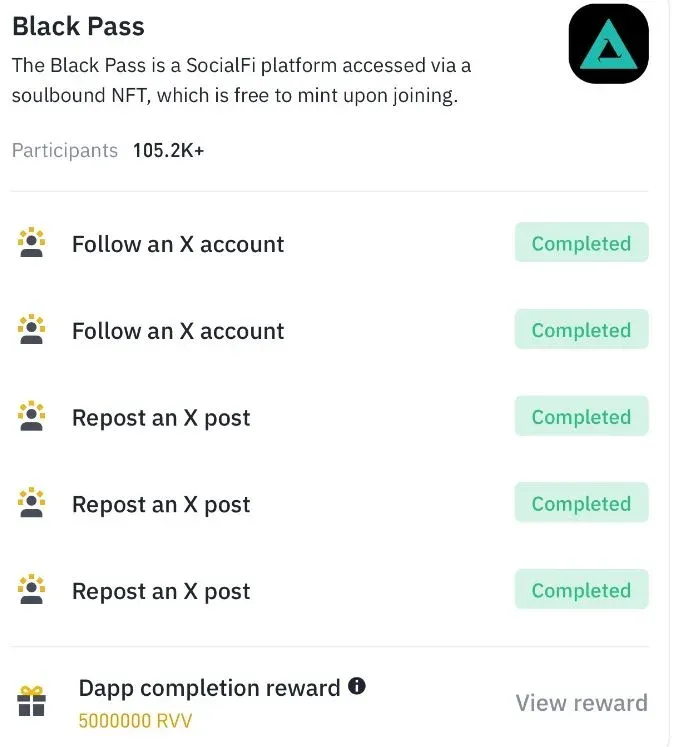
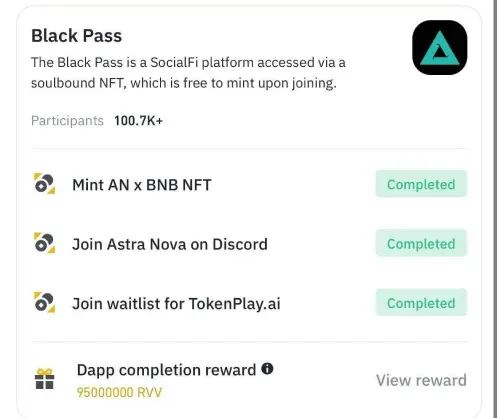
After linking your Binance X account, you can join Booster tasks inside the wallet. Choose low‑difficulty, low‑cost missions—for example, the first phase of the Astra Nova Booster mainly consists of social‑media tasks that consume minimal resources.
---
6. Efficient participation strategies and risk warnings
Fast‑track for newcomers
The first 14 days after registration constitute a “golden window” for earning points. Certain tasks award bonus points during this period, so concentrate on completing the basics to maximize returns.
Cost‑control tips
- Holding points: Maintaining roughly $1,000 USD in your wallet yields a favorable cost‑performance ratio.
- Trading points: Prioritize Alpha tokens with low price volatility (e.g., KOGE) and split orders into powers of two—$2, $4, $8, etc.—to ensure each tier contributes to your point total.
Risk reminders
- Airdrop value is uncertain: Prices of airdropped tokens can swing wildly. Claiming an airdrop consumes points, so weigh the opportunity cost.
- Compliance: Using multiple accounts, rapid device switching, or any “Sybil‑attack” behavior is strictly prohibited and may result in point forfeiture.
Tax disclaimer: Crypto gains, including those from Alpha token sales or airdrops, may be taxable in your jurisdiction. Consult a tax professional to understand your obligations.
---
7. Closing thoughts
By following this guide, you now understand the full workflow—from account creation and Web3‑wallet setup to Alpha token launch, quick‑buy purchase, airdrop claim, and advanced activities. New users only need to ensure three things:
- Update the Binance app to version 2.101 or higher. If you cannot access the Web3 wallet, try upgrading again or switch to the web version.
- Create a Web3 wallet and preload it with the native token of the target chain for gas fees.
- Monitor the Binance Alpha page, and once a token goes live, use Quick Buy to execute your first trade.
From there, manage your costs wisely, respect platform rules, and you’ll gain experience while exploring early‑stage Web3 projects through the Binance Alpha Points campaign. We wish you a smooth journey in the crypto world.
This article detailed “What is the Binance Alpha Points campaign? How can newcomers participate?” For more related information, search Bitaigen (比特根) or read the recommended articles below. Thank you for supporting Bitaigen!
*Translation by AI*
💡 Register on Binance with referral code B2345 for the maximum trading fee discount. See Binance complete guide.



