
 Bitaigen Research
 In Taiwan, the most cost‑effective way to fund Binance is to first purchase USDT on a locally regulated exchange, then transfer it to Binance. This approach yields the lowest overall fees and the best exchange rate, and the same channel can be used when withdrawing funds.
Binance was founded in 2017 and now has more than 270 million users worldwide, making it the largest cryptocurrency exchange by volume and the preferred platform for most people trading digital assets. After registering a Binance account, you still need to fund the platform before you can buy Bitcoin, Ethereum, and other cryptocurrencies.
Funding means transferring fiat currency into the exchange, which is then used to purchase crypto assets—similar to wiring money to an overseas broker when investing in U.S. equities. The following sections introduce the latest Binance funding methods for 2025 and compare exchange rates, fees, and pros/cons across three major channels: credit‑card purchases, Taiwanese exchange funding, and C2C trading.
In this article we have compiled the newest funding routes for Taiwanese users, compared the three ways to acquire USDT, examined exchange‑rate and fee differences, and provided step‑by‑step tutorials to help you transfer funds in 2025 at the lowest possible cost. Continue reading for the complete guide on which method is most economical.
Full Binance Funding Guide for Taiwan: 3 Most Cost‑Effective Ways to Purchase USDT + Fee & Exchange‑Rate Comparison (2025)
The 3 Main Funding Channels on Binance
| Funding Method | Description | Advantages | Disadvantages |
|---|---|---|---|
| **Via a Taiwanese exchange** (most users) | Buy USDT on a local crypto exchange, then transfer to Binance | Best exchange rate, low fees, same channel can be used for withdrawals | Requires completing the exchange’s KYC, which takes about 1–2 days |
| **Credit‑card / Apple Pay** | Directly purchase crypto with a card | Instant credit, simple workflow | Less favorable exchange rate, higher fees, some banks do not support |
| **C2C trading** | Purchase crypto from independent sellers on Binance’s C2C platform, supporting many payment methods (Line Pay, JKoPay, bank transfer) | Wide variety of payment options | Seller quality varies; TWD funding has been disabled since December 2024 |
After a comprehensive evaluation, funding via a Taiwanese exchange is recommended because it offers the most favorable exchange rate, the lowest fees, and the same channel can be used for future withdrawals back to TWD.
Although credit‑card funding is the fastest, platform fees plus overseas card‑processing fees can total up to 5 %, making it relatively expensive.
Since December 2024, Binance’s C2C service has stopped supporting TWD funding due to Article 6 of the Anti‑Money‑Laundering Act amendment restricting unregistered personal crypto‑dealer services.
Funding Binance = Purchasing a US‑Dollar Stablecoin
Binance does not support direct TWD trading for most crypto assets; you typically need to convert TWD into a US‑dollar‑pegged stablecoin before proceeding. The most common stablecoin is USDT (Tether), which has the largest market cap and the widest usage.
Therefore, funding essentially means swapping TWD for USDT and depositing it into Binance, analogous to using USD at an overseas broker.
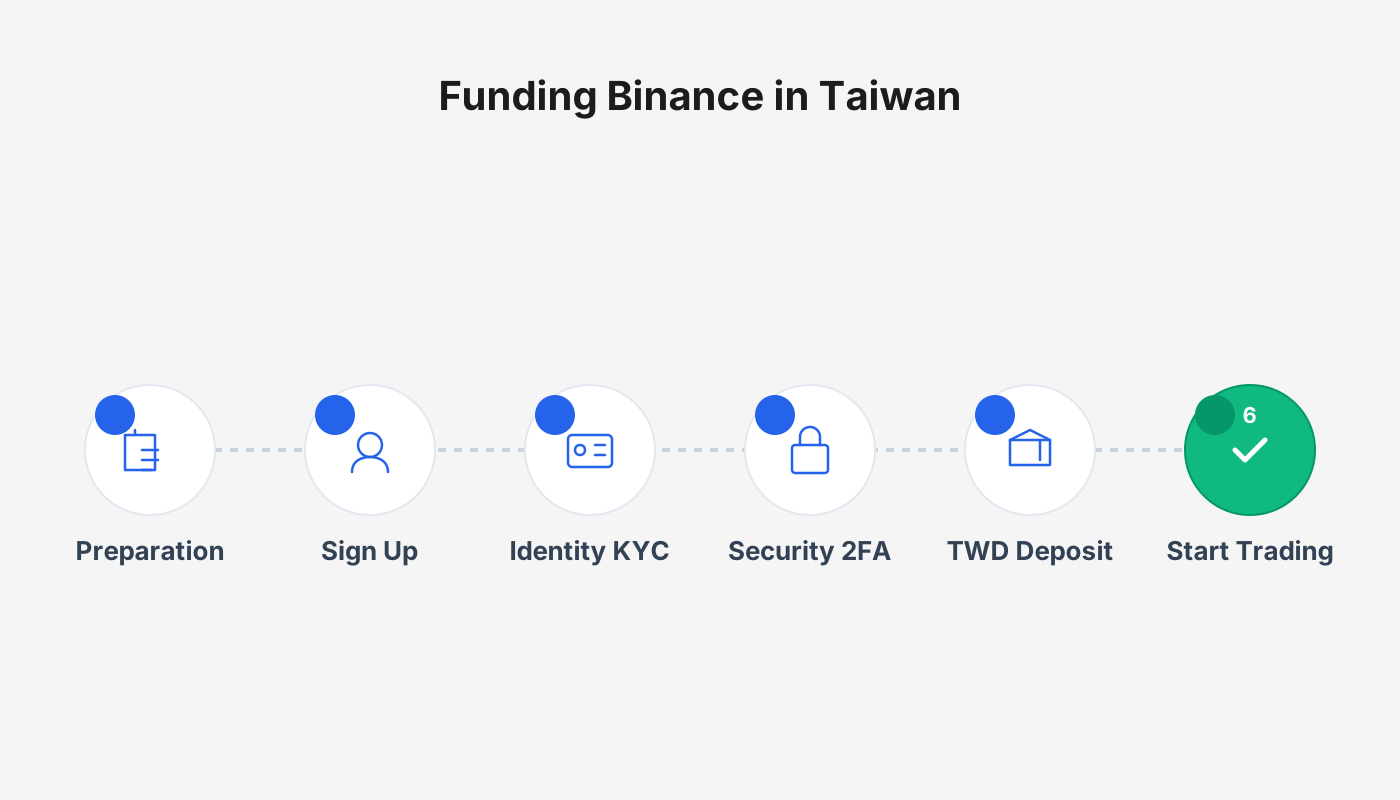
Preparations Before Funding Binance
Before you can fund, complete the following two steps:
- Create a Binance account
Register via the official referral link (referral code: `B2345`) to enjoy up to a 40 % discount on trading fees.
- Complete KYC identity verification
Submit basic personal information and a government‑issued ID. Only after passing KYC can you unlock funding, trading, and other functionalities. Verification works like a bank account opening process and can be used to recover your account if you forget your password.
Funding Binance Tutorial 1: Via a Taiwanese Exchange
Among all funding options, purchasing USDT on a local Taiwanese exchange (e.g., BitoPro, MAX, XREX) with New Taiwan Dollars and then transferring it to Binance is the cheapest solution. The example below uses the MAX exchange to illustrate the full workflow.
Step 1: Deposit TWD into a Taiwanese Exchange
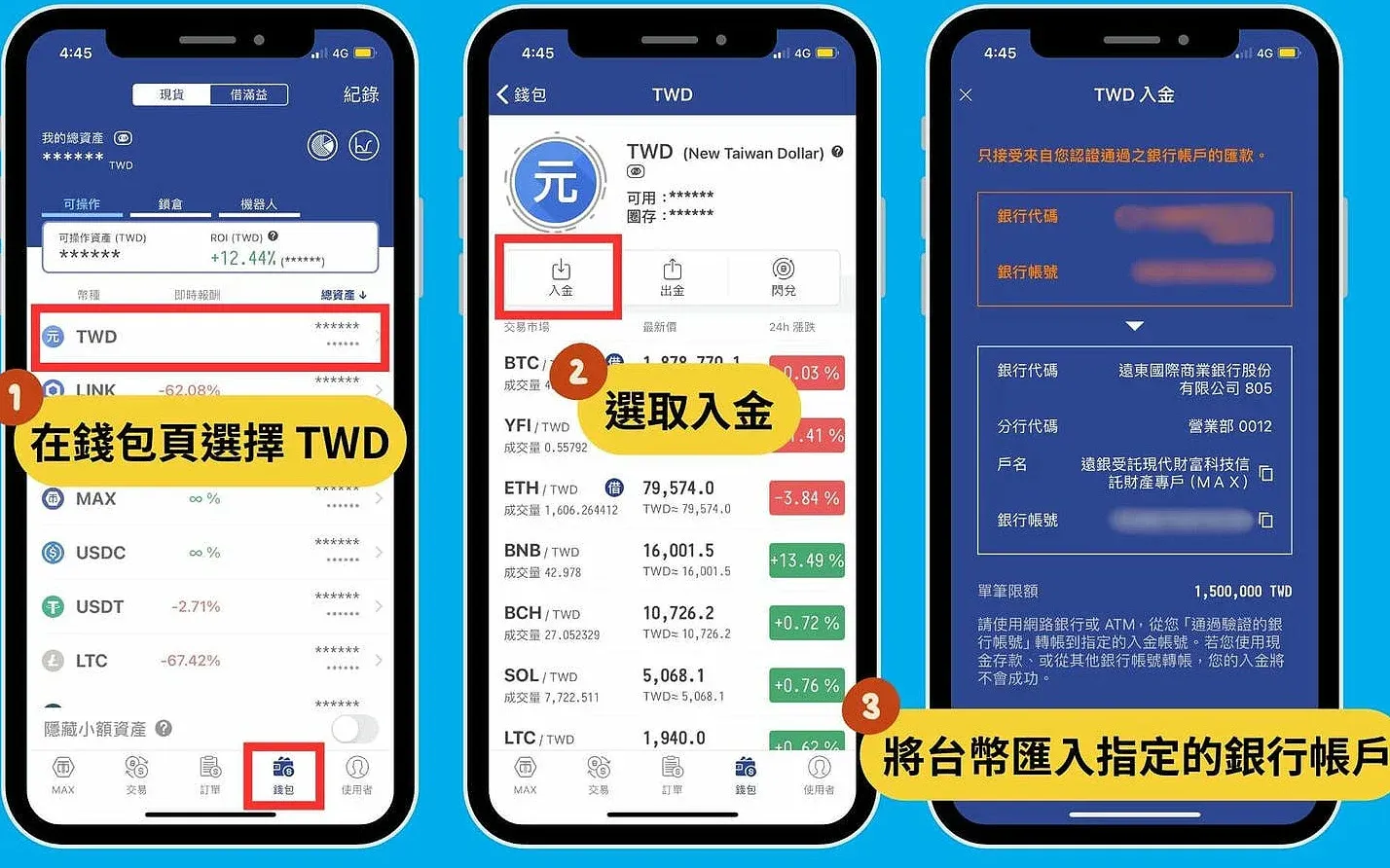
- Open the MAX app, go to Wallet → TWD → Deposit to obtain the deposit details.
- Transfer TWD from your bank account to the deposit account designated by MAX; the transfer typically arrives within about one minute.
Key points
- Use a bank account that has already been verified during the exchange’s onboarding; otherwise the deposit will fail.
- Only online‑banking or ATM transfers are accepted; counter (branch) deposits are not supported.
- Single‑transaction, daily, and monthly deposit limits are NT$1.5 million, NT$2 million, and NT$5 million respectively.
Step 2: Purchase USDT on the Taiwanese Exchange
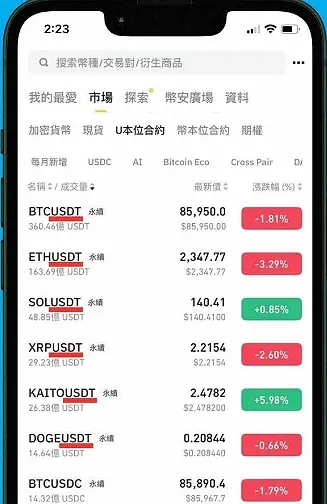
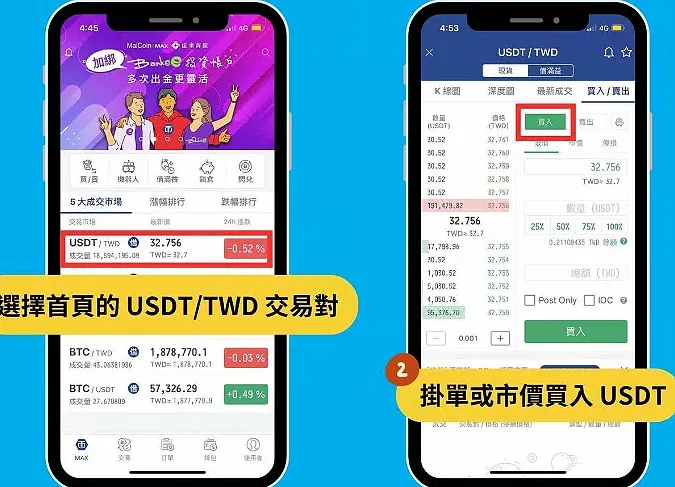
- On the MAX home screen select the USDT/TWD trading pair.
- You can place a market order for an instant fill, or set a limit order to wait for a better price.
Step 3: Copy Binance Deposit Address
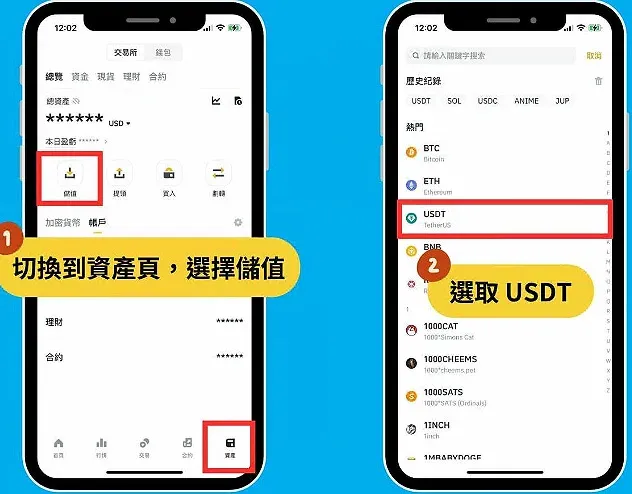
- Open the Binance app, navigate to Wallet → Deposit → USDT.
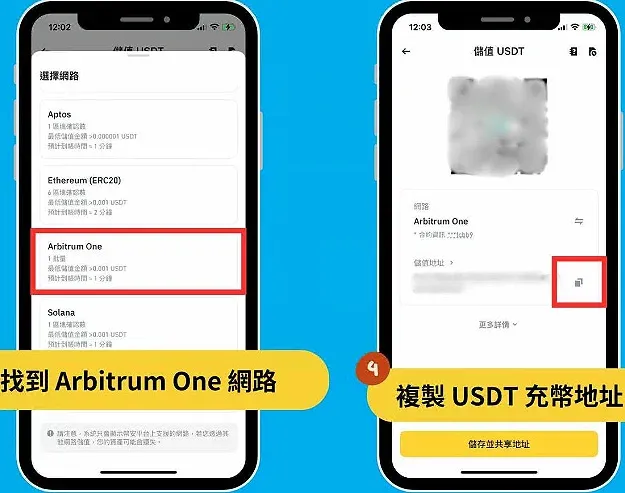
- Choose the deposit network Arbitrum One.
- Copy the displayed USDT deposit address.
Step 4: Transfer USDT from the Exchange to Binance
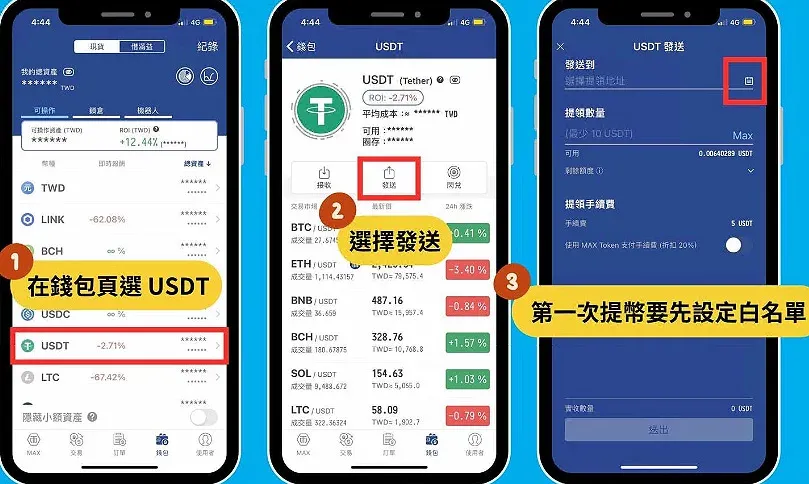
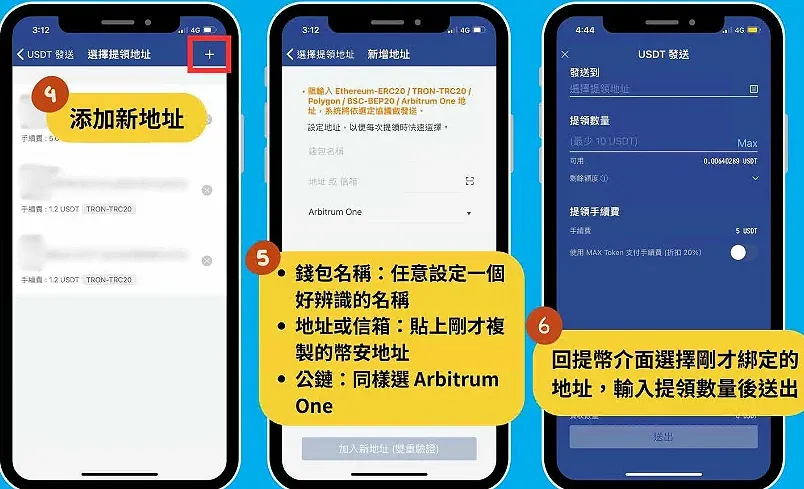
- In MAX go to Wallet → USDT → Send, paste the Binance deposit address.
- Add the address to the whitelist (you can name it yourself, select the Arbitrum One chain), enter the amount, and submit.
- After roughly 3–5 minutes the USDT will appear in your Binance account.
Binance does not charge a deposit fee; MAX will levy a withdrawal fee of about 0.1 USDT on the Arbitrum One network.
Critical Tips
- The sending chain and the receiving chain must match; using different blockchains will result in a loss of assets.
- If a chain mismatch occurs, contact both Binance support and the exchange’s support team. Over the past two years Binance has successfully helped users recover assets worth roughly $4.4 billion.
Funding Binance Tutorial 2: Credit‑Card / Apple Pay
This method is the fastest, but the fees and exchange rate are relatively high, making it suitable only for small‑amount funding. Binance imposes a minimum of NT$550 per card transaction; amounts below this threshold must use an alternative channel.
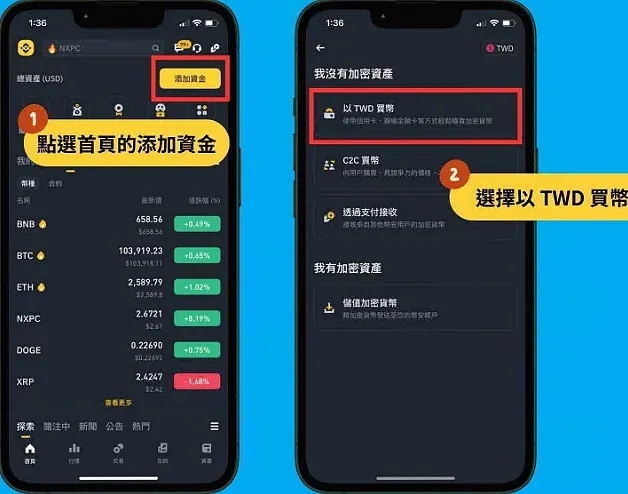
Step 1: Open the “Buy Crypto” Page
- Click Add Funds at the top‑right corner of the Binance homepage.
- Choose Buy Crypto with TWD to enter the purchase interface.
Step 2: Add Card Details and Complete Verification
- Select Credit‑Card Purchase or Apple Pay Purchase.
- Enter the purchase amount (minimum NT$550). First‑time users must add a new card.
- The system will request a photo of your ID, a selfie, and answers to questions about source of funds, purchase frequency, etc.
The Apple Pay flow is identical; you only need to link an existing Apple Pay account—no extra card entry is required.
Step 3: Confirm and Complete the Purchase
- After verification, review the exchange rate on the Binance page and confirm the transaction.
- This payment method works on both Android and iOS; Apple Pay is limited to iOS devices.
Funding Binance Tutorial 3: Binance C2C (No Longer Supported)
Since December 2024, due to the amendment to the Anti‑Money‑Laundering Act that restricts unregistered personal crypto‑dealer services, Binance C2C has ceased supporting TWD funding.
C2C (Customer‑to‑Customer) was originally an over‑the‑counter matching service that accepted bank transfers, Line Pay, JKoPay, and other payment methods, making it convenient for small deposits. It is currently unavailable for TWD transactions.
Step 1: Enter the Purchase Amount
- In the Binance app, tap Add Funds → Quick Buy to open the C2C page.
- Input the desired TWD amount; the system automatically calculates the USDT you would receive and matches you with a seller.
Step 2: Confirm the Order and Choose a Payment Method
- Select your preferred payment method (bank transfer, LINE Pay, JKoPay) and provide the personal information requested by the seller.
- After you have transferred the money, click Paid – Notify Seller to receive the USDT from the counter‑party.
C2C trading works like buying a product on an e‑commerce platform; you must wait for the seller’s confirmation before the transaction is finalized.
Funding Fees & Exchange‑Rate Comparison
| Funding Method | Fees | Purchase Exchange Rate | Funding Speed |
|---|---|---|---|
| **Via Taiwanese exchange** (lowest cost) | Binance charges no deposit fee; the exchange may levy a withdrawal fee of 0.1–5 USDT | Most favorable | ~30–40 minutes |
| **Credit‑card** (highest cost) | 2 % platform fee + ~1.5 % overseas card‑processing fee | Less favorable | Instant |
| **C2C** (no longer supported) | 0 %–0.1 % fee | Depends on seller quote | Medium (30–60 minutes) |
Using a Taiwanese Exchange Is the Cheapest Way
Testing shows that credit‑card funding consistently offers a poorer exchange rate and higher fees, making it worthwhile only for urgent, small‑scale needs. The most economical recommendation remains: purchase USDT on a local exchange first, then transfer it to Binance.
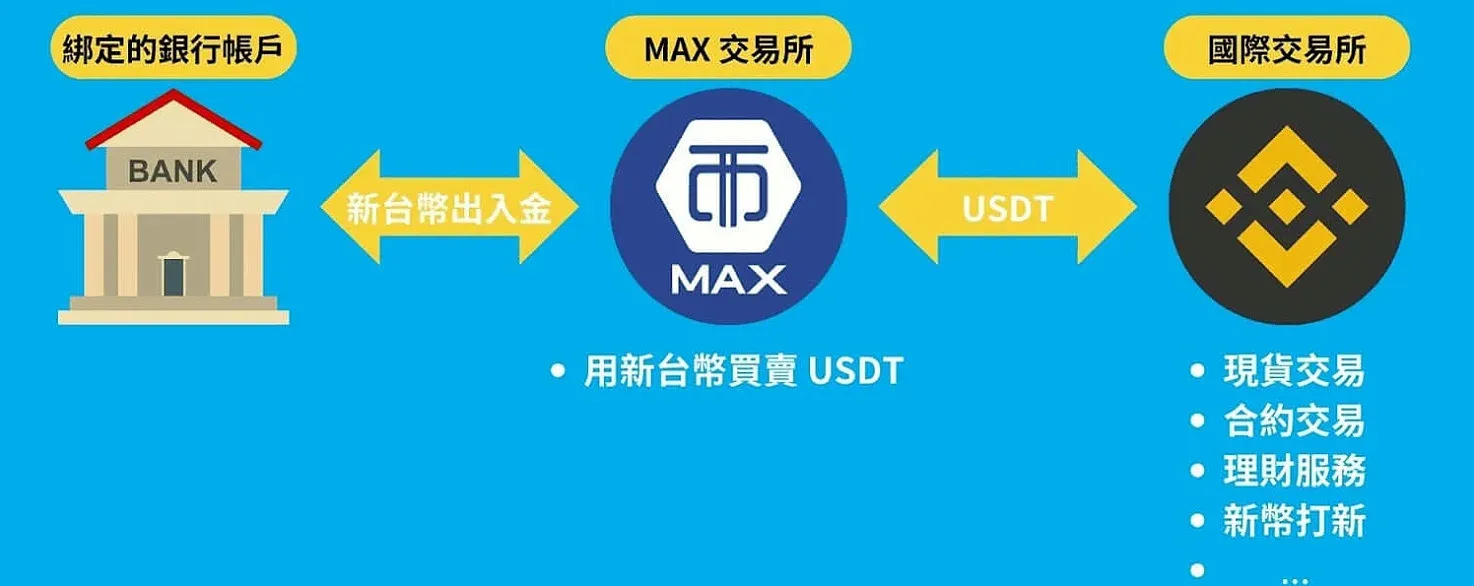
Although you must open an account on a local exchange and complete a 1–2‑day KYC process, the exchange rate is superior and the same channel can be used for withdrawals.
What to Do If a Binance Funding Attempt Fails?
Credit‑Card Decline
Since the Financial Supervisory Commission imposed limits on crypto‑related card purchases in 2022, several banks have stopped supporting card‑funding for Binance. Try using a card issued by a different bank.
Network or Address Mistake
If a wrong blockchain or address is used, the funds will not arrive. Contact both Binance support and the sending exchange’s support team simultaneously; they can trace the transaction and help recover the assets. Binance has assisted users in retrieving roughly $4.4 billion worth of mistakenly sent funds over the past two years.
What Is Binance?
Binance, launched in 2017, now serves more than 270 million users worldwide and is the leading cryptocurrency exchange by volume. Its large scale, extensive asset list, and user‑friendly interface make it popular among both beginners and professional traders.
Is Binance Safe?
Binance employs two major mechanisms to protect user assets:
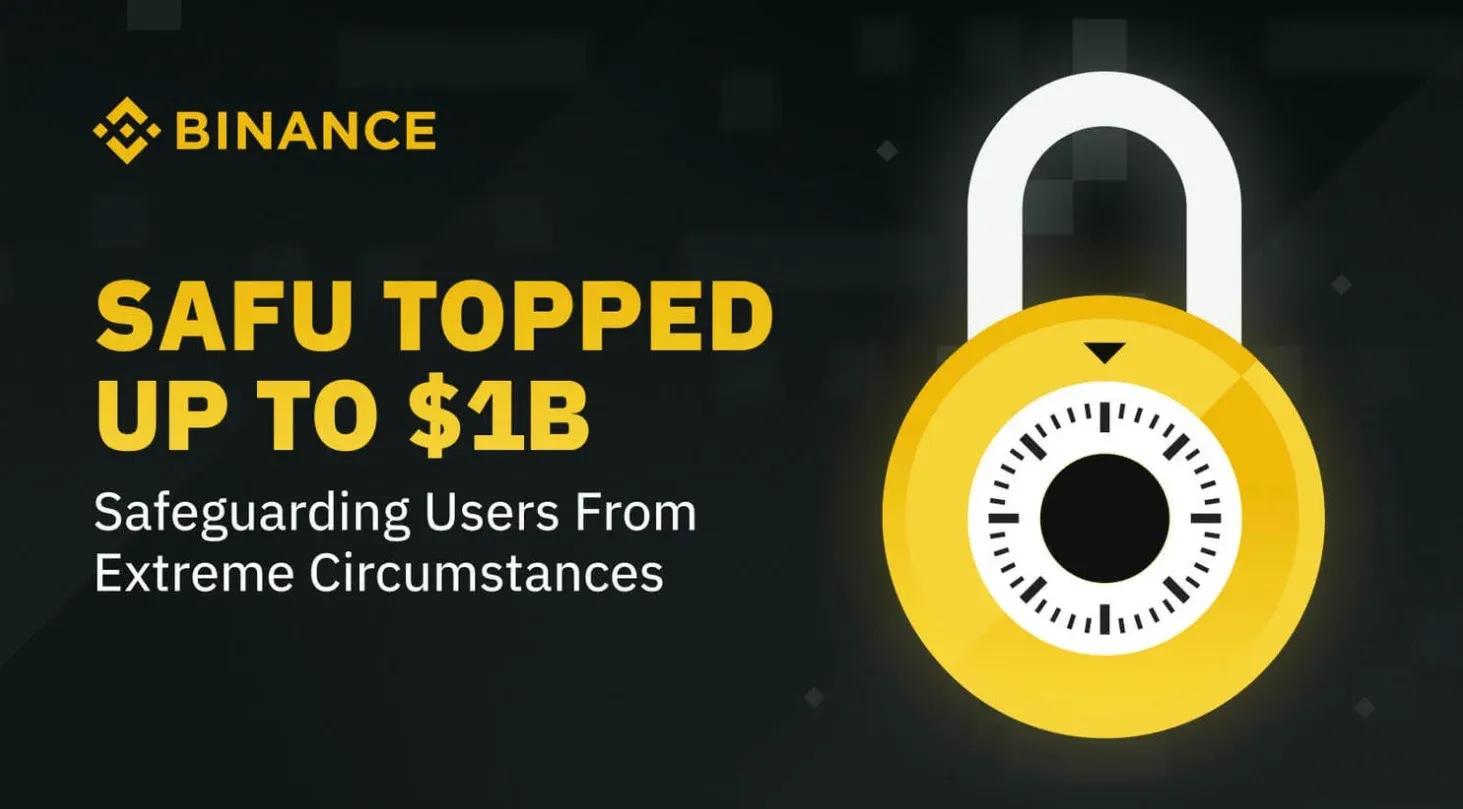
- Secure Asset Fund for Users (SAFU)
Launched in July 2018, the SAFU fund originally comprised BUSD, BNB, and BTC with a total value of about $1 billion. It is used to compensate users in the event of a security breach. As of 2024, the fund’s assets have been fully converted to USDC and can be inspected via the official SAFU wallet address.
- Proof‑of‑Reserves
At the beginning of each month Binance publishes a snapshot of its reserves on the official website, confirming a 1:1 relationship between platform assets and user deposits.
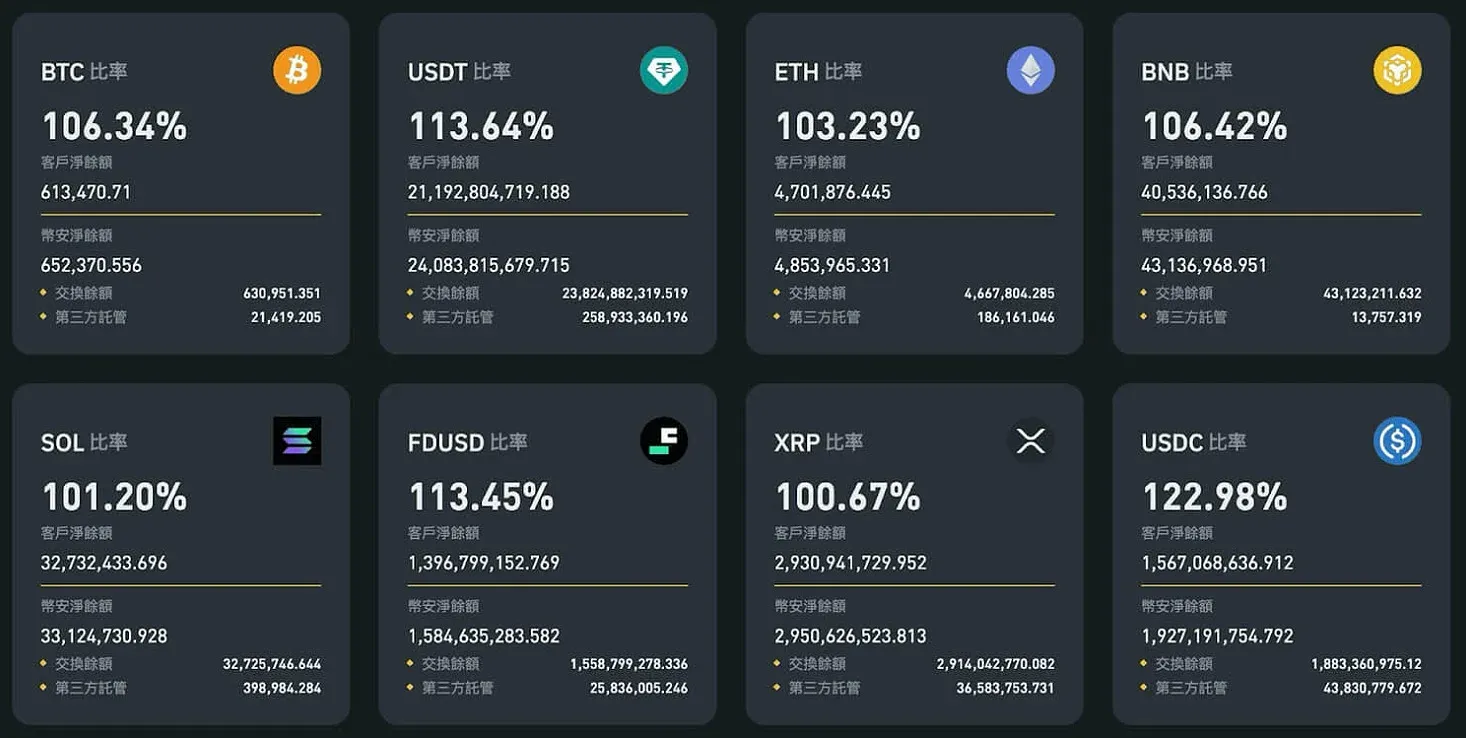
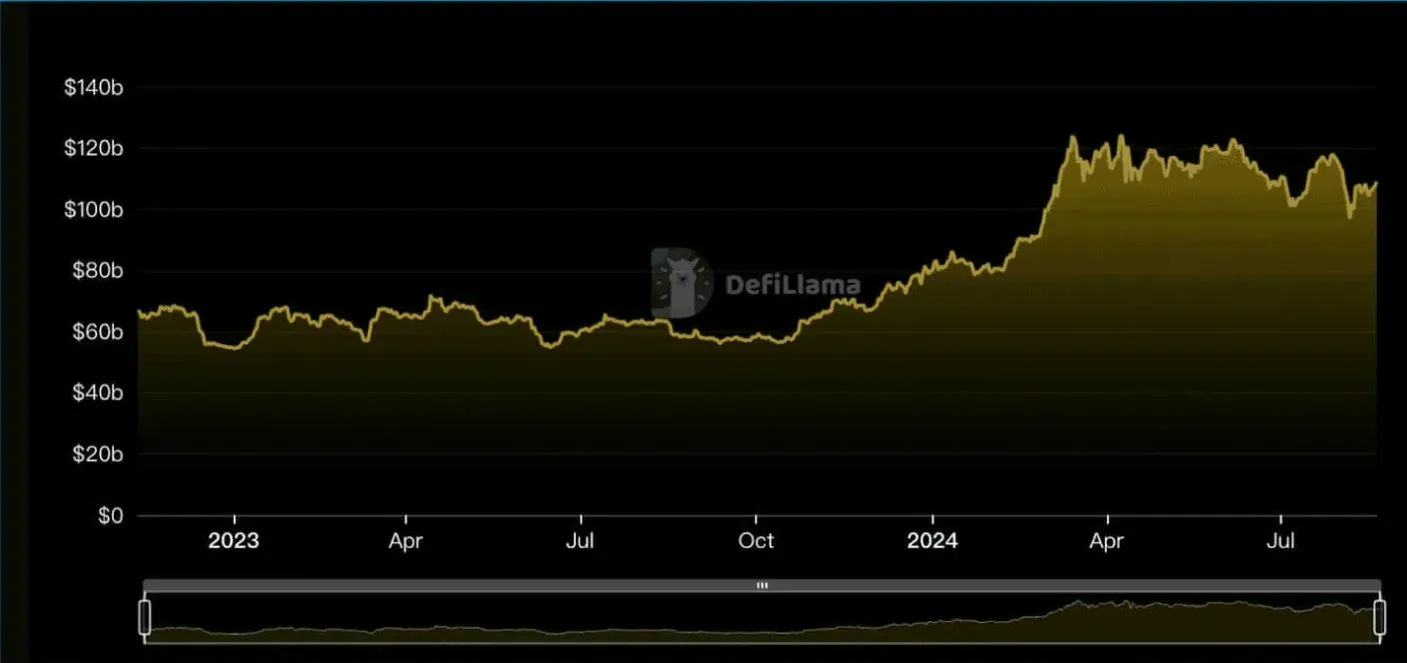
Real‑time data can also be viewed on the Defillama dashboard; if you notice unusually large outflows, consider withdrawing to a personal wallet as a risk‑mitigation step.
Frequently Asked Questions (FAQ) About Funding Binance
Q: What is the cheapest way to buy USDT on Binance?
A: Use a regulated Taiwanese exchange (e.g., MAX, BitoPro, XREX) to purchase USDT, then transfer it to Binance. Local exchanges typically offer better rates, and the same route can be used for withdrawals.
Q: What is the minimum amount I can fund on Binance?
A: Minimums vary by method:
- Credit‑card: NT$550
- Taiwanese exchange: effectively no minimum; blockchain transfers can be as low as NT$1
Q: How long does a funding transaction take to arrive?
A: All three methods can be completed within about 10 minutes, after which the system sends a notification.
Q: Which fiat currencies does Binance support for funding? Does it support Taiwan?
A: Binance supports over 60 fiat currencies and numerous payment methods, but TWD is not directly supported. You must use a credit‑card or a third‑party channel (such as a local exchange) to fund.
Q: My account balance looks incorrect after funding. What should I do?
A: It may take a few minutes for the balance to refresh. Wait for the system notification before assuming there is an issue.
**Q: How can I ensure the safety of my funds during the
Related Reading
💡 Register on Binance with referral code B2345 for the maximum trading fee discount. See Binance complete guide.



