
 Bitaigen Research
 Trust Wallet is a non‑custodial decentralized mobile wallet; after downloading the app and creating or importing a seed phrase, you can manage multi‑chain assets, send and receive payments, stake, and use DApps.
In this article we systematically outline the core concepts and operational flow of Trust Wallet for newcomers, helping you quickly get started with multi‑chain asset management, staking, and DApp usage, avoid common pitfalls, and safely enter the decentralized finance ecosystem.
What Is Trust Wallet? Is It a Scam?
Cryptocurrency wallets come in many varieties, the most common being cold wallets, hot wallets, and exchange‑custodial wallets. As a decentralized hot wallet, Trust Wallet sits alongside MetaMask as one of the two most widely used products today.
- Founded: Established in 2017 and acquired by Binance in 2018.
- Security model: Non‑custodial; the private keys are fully controlled by the user, and the platform cannot access or move user assets.
It is important to note that Binance also offers another crypto wallet—Web3 Wallet. Although both belong to the Binance ecosystem, Trust Wallet is not limited to Binance exchange members, and the two wallets operate independently in terms of features and data.
Trust Wallet Highlights
| Feature | Description |
|---|---|
| **Multi‑chain support** | Supports 70+ blockchains, including EVM‑compatible chains as well as non‑EVM networks such as Bitcoin, Solana, Tron, etc. |
| **Asset management** | Handles cryptocurrencies, NFTs, and other digital assets in a single interface. |
| **Staking services** | Built‑in staking for a variety of tokens with a unified UI. |
| **DApp gateway** | Integrated DeFi, GameFi, and other decentralized applications for quick access to popular DApps. |
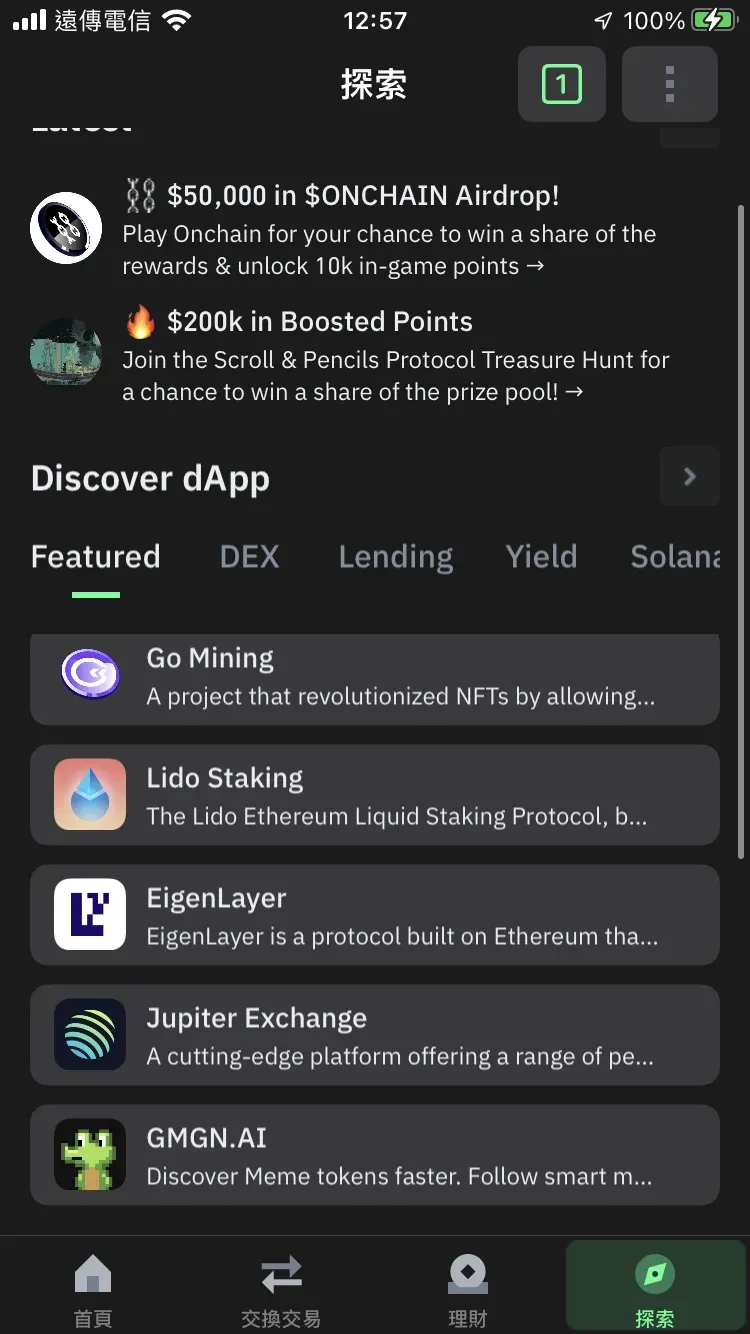
How Secure Is Trust Wallet?
Trust Wallet protects your assets through three major mechanisms:
1. Independent Security Audits
Regularly commissions reputable third‑party security firms to audit its code, promptly identifying and fixing potential vulnerabilities.

2. Privacy Protection
- Self‑custody: Private keys are stored only on the user’s device; the platform never touches them.
- Zero personal tracking: No collection of IP addresses, email addresses, or other personal identifiers.
- No registration required: Users can create a wallet freely without providing identity information.
3. Real‑time Security Monitoring
- Provides anomalous‑activity warnings before transactions to deter phishing or fraud.
- Supports cloud‑based backup of the seed phrase, reducing risk from device loss.
- Allows users to hide and report unsafe NFTs.
Source: Trust Wallet
Trust Wallet vs. Exchange Wallets
| Item | **Trust Wallet** | **Exchange Wallet** |
|---|---|---|
| Asset control | Users manage their own private keys; assets are independent | Assets are custodial; risk of theft or exchange insolvency |
| Asset state | Segregated by blockchain; not interchangeable across chains | Multi‑chain assets can be swapped internally on the exchange |
| Fees | All actions require on‑chain gas fees | Only trades, deposits, and withdrawals incur platform fees, usually lower |
| Feature set | Supports DeFi, GameFi, NFT minting, IDOs, and other on‑chain services | Focuses on spot, derivatives, and other centralized financial products |
| Token coverage | Can acquire obscure tokens via on‑chain DEXs (risk assumed by user) | Primarily offers mainstream tokens |
| User complexity | Requires users to manage private keys and on‑chain actions | User‑friendly UI, suitable for beginners |
Trust Wallet Beginner Guide
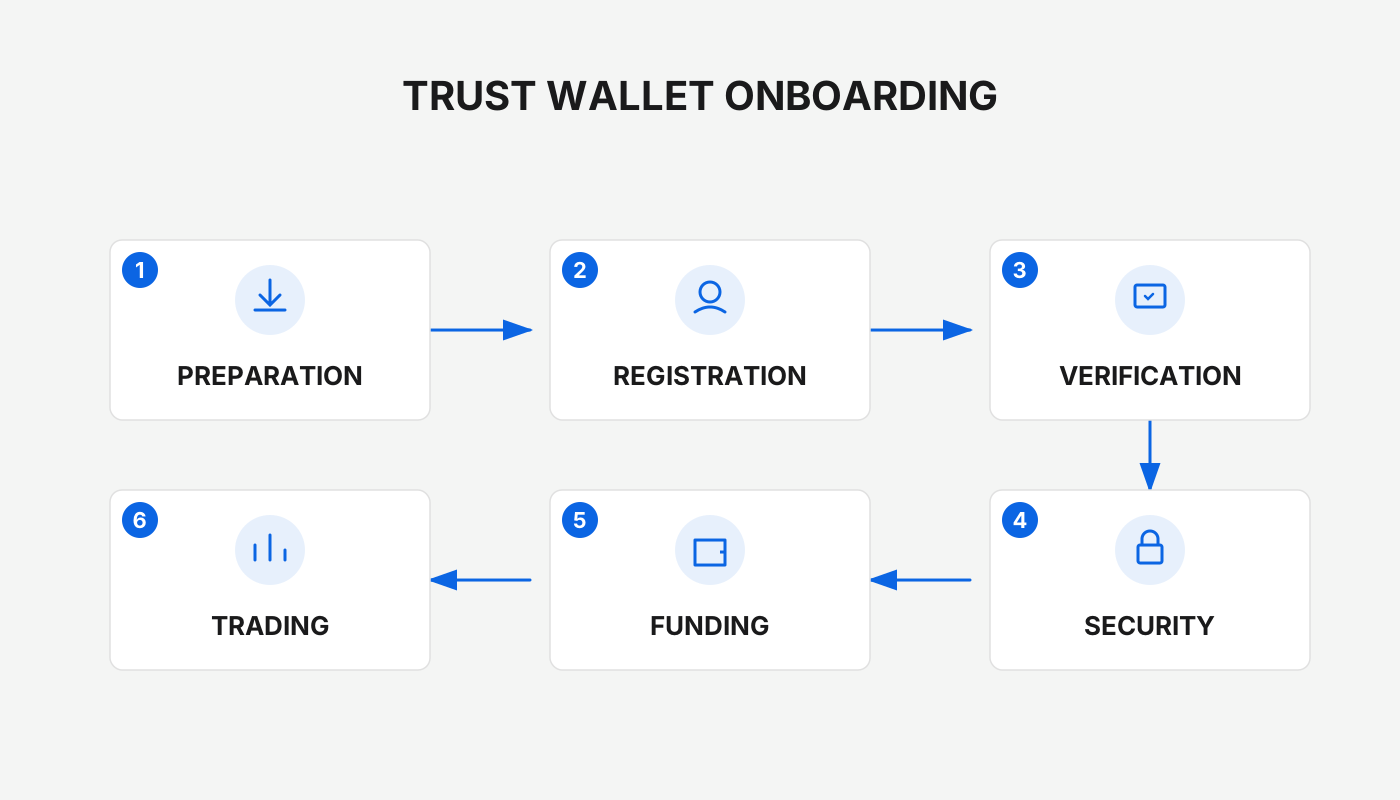
Step 1: Download the App
- Official download links are available for both iOS and Android.
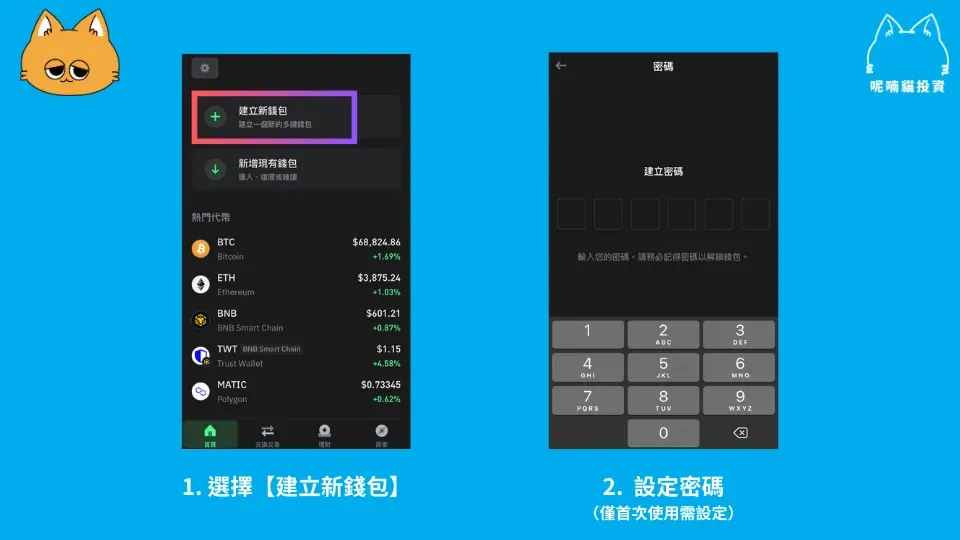
Step 2: Create or Import a Wallet
Create wallet → Set a password
Step 3: Back Up Your Seed Phrase
The official app offers two backup options: manual write‑down and iCloud sync. The seed phrase is equivalent to a private key; it must be stored offline because the platform cannot retrieve it for you.
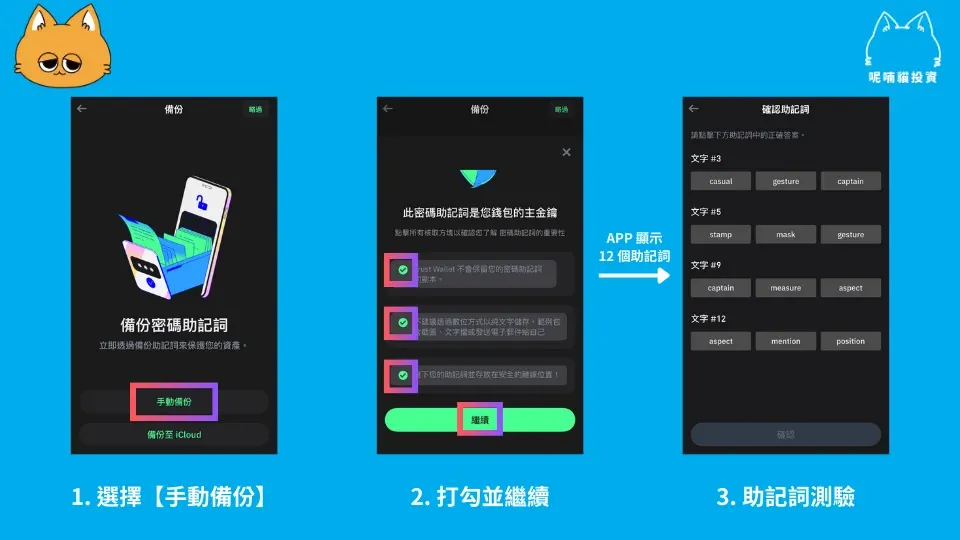
After successfully completing the seed‑phrase verification, you will be taken to the main dashboard to begin using the wallet.
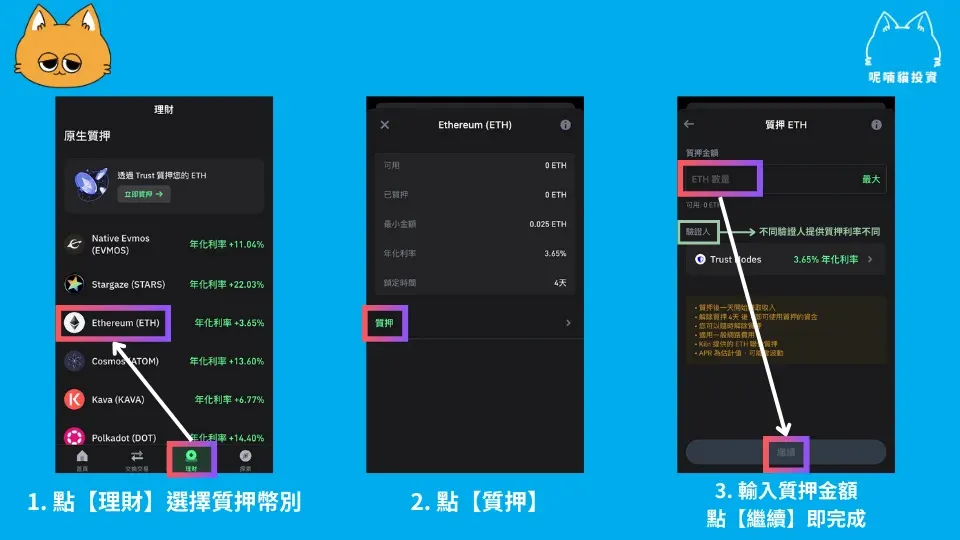
Staking Cryptocurrencies (Example: ETH)
- Navigate to the [Finance] tab.
- Select the token you wish to stake → [Stake].
- Enter the amount, choose a validator → [Continue] to finalize.
Trust Wallet includes more than 24 staking options, allowing users to complete the process without leaving the app.
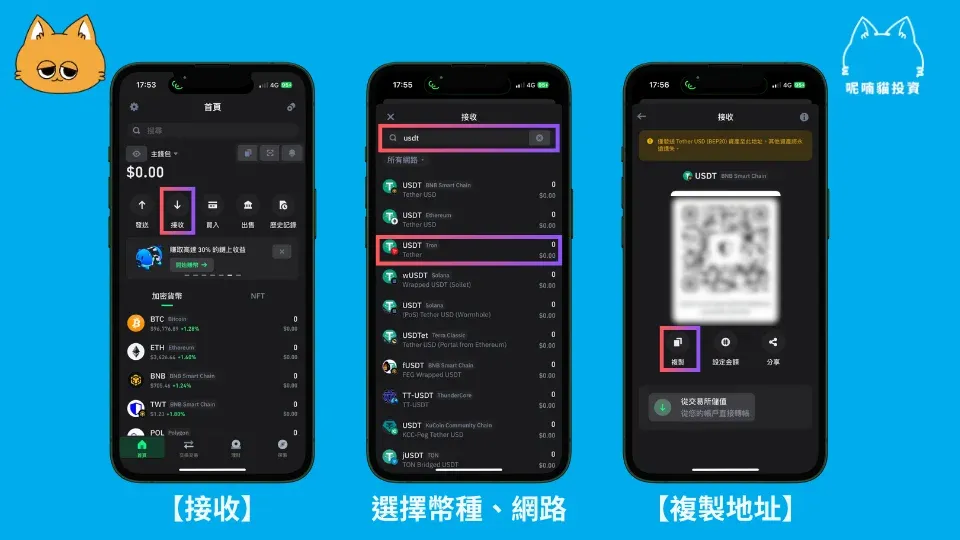
Receiving Funds (Deposit)
- Tap [Receive].
- Choose the token and network, then copy the displayed address.
- Paste that address in another wallet or exchange to complete the transfer.
If you wish to fund the wallet with local fiat (e.g., USD, EUR, GBP), you must first purchase the corresponding cryptocurrency on a local exchange that supports SEPA, SWIFT, or other fiat‑on‑ramp methods, then transfer the crypto to Trust Wallet.
Always ensure that the token and network you select match the source; mismatched selections can result in permanent loss of funds.
Trust Wallet also supports “Transfer from Binance” functionality. Users located in the United States should use Binance.US rather than the global Binance platform for this feature.
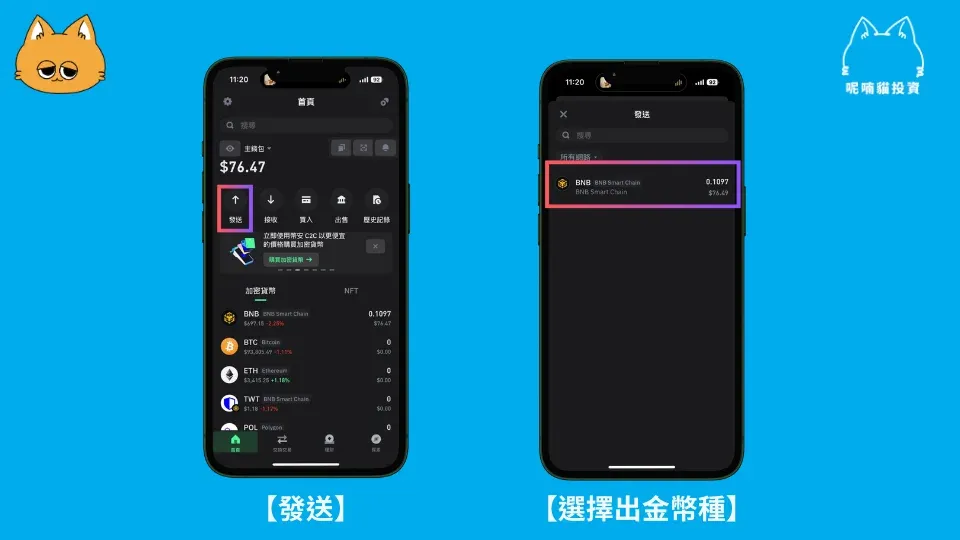
Sending Funds (Withdrawal)
- Open [Send].
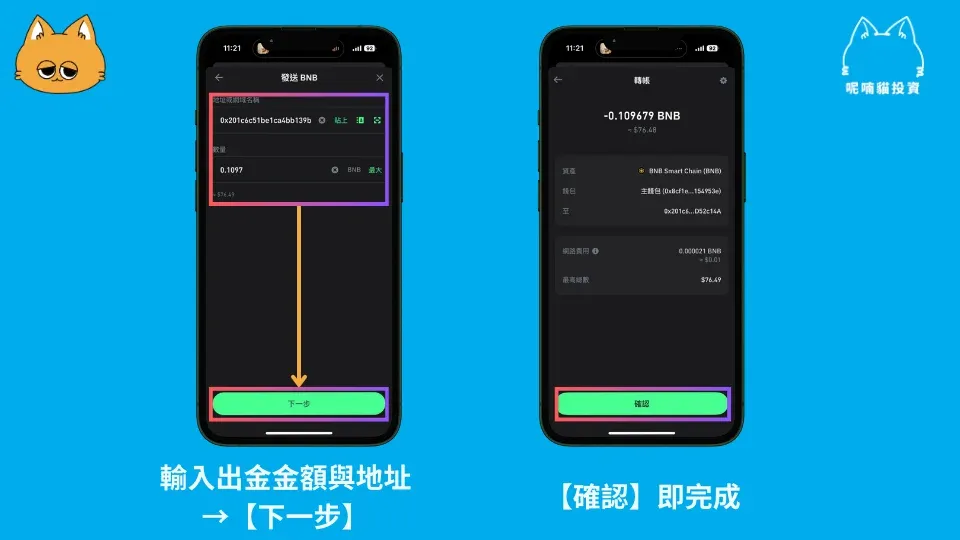
- Choose the token, enter the amount and the recipient’s address.
- Review the details and confirm to execute the transaction.
If you need to convert the assets back to fiat (e.g., USD), you will have to send them to a regulated exchange that supports fiat withdrawals via SEPA, SWIFT, or local bank transfers, and then withdraw the fiat from that exchange.
Common Use‑Case Summary
1. Download Trust Wallet
Select the appropriate version for your phone’s operating system and install it.
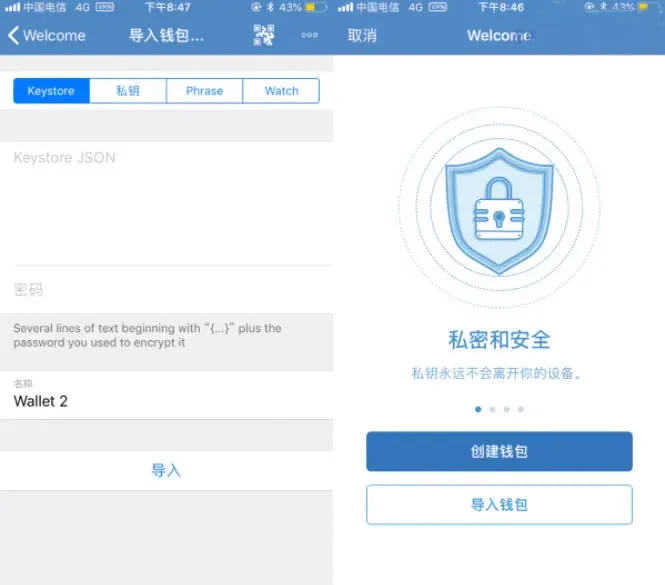
2. Create or Import a Wallet Private Key (Seed Phrase)
Follow the on‑screen prompts to set up or import a wallet, and store the seed phrase securely.
3. Deposit ETH
After obtaining your wallet address, transfer ETH from another wallet or exchange.
4. Purchase ethroll
Open the built‑in browser, navigate to `https://ethroll.hygj.io`, and click the purchase button to participate in the activity.
Advantages of Trust Wallet
| Advantage | Explanation |
|---|---|
| **Free to use** | No download or usage fees; only on‑chain transaction costs apply. |
| **Broad token support** | Works with 40+ blockchain networks, covering hundreds of thousands of tokens. |
| **Convenient asset handling** | Supports ENS, FIO, Unstoppable Domains, etc.; you can send or receive by scanning a QR code or entering a human‑readable name. |
| **Decentralized** | Private keys remain on the device; the platform cannot access or control your assets. |
| **Privacy‑focused** | Does not collect personal data, safeguarding user identity. |
| **Yield on holdings** | Offers staking‑type reward programs for assets such as Tezos, Tron, Cosmos, Algorand, and others. |
| **Bank‑card purchases** | Integrated with multiple payment providers, allowing users to buy crypto directly in the app using a debit or credit card. |
| **DApp browser** | Built‑in gateway to DeFi, GameFi, and other decentralized applications. |
| **Asset conversion & trading** | Provides “one‑click swap” and connects to the Binance DEX for on‑chain trading. |
| **Community emojis** | Rich set of stickers and social activities that enhance the user experience. |
The fundamental security of any wallet hinges on how you protect your private keys. Use a strong password, store your seed phrase offline, and maintain multiple backups to prevent loss or exposure.
This completes the full Trust Wallet usage guide. For more details, updates, or feature walkthroughs, feel free to follow Bitaigen (比特根) and its subsequent articles.
*Please note that cryptocurrency transactions may have tax implications in your jurisdiction. Consult a tax professional to understand your local reporting obligations.*
Related Reading
- Complete Trust Wallet Guide: Download, Install, Setup & Use
- Proof-of-Stake Staking: Earn Crypto Rewards Securely
- HypeVM Mining: HyperSwap Staking, HyperLend & Sentiment Loop
💡 Register on Binance with referral code B2345 for the maximum trading fee discount. See Binance complete guide.



