
 Bitaigen Research
 We have compiled, from the perspective of the Bitaigen editorial team, a complete walkthrough for withdrawing fiat currency (USD) from the OKX platform. The article breaks down the core concepts of the fiat trading area, deposit and withdrawal channels, and practical steps, while offering solutions to common issues to help both newcomers and experienced users get up to speed quickly. If you are looking for a safe and efficient withdrawal process, continue reading for the full illustrated guide.
How to Withdraw Fiat (USD) from OKX Exchange?
In OKX’s 2020 year‑end summary, the platform’s total annual trading volume reached 3.29 trillion USDT, with spot, delivery contracts, perpetual contracts, and options contracts accounting for 1.35 trillion, 1.24 trillion, 692.8 billion, and 6.1 billion USDT respectively. This massive trading scale shows that an increasing number of investors—including many newcomers to the crypto space—choose OKX for buying and selling digital assets. For these users, the most pressing question is how to smoothly withdraw fiat funds (e.g., USD) from the platform. Below we outline the key points from multiple angles.
1. Basic Concepts of the Fiat Trading Area
- Deposit channels: If your account holds no digital assets yet and you wish to convert cash into cryptocurrency, you can do so in the fiat trading area. Users simply need to bind a bank card, or (where available) link a SEPA/SWIFT‑compatible bank account, choose a suitable buyer or seller, and complete a buy or sell order.
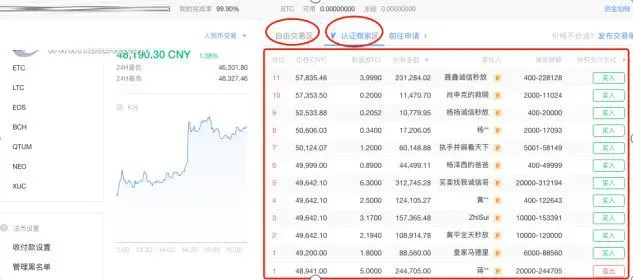
- Trading modes: The platform offers two trading modes—Free Trading Area and Verified Merchant Area. Verified merchants are screened by the platform, must post a 5,000 OKB deposit, and are subject to stricter requirements on metrics such as order volume and completion rate.
In the order list, the system displays all active orders in real time: sell orders with lower prices appear higher, while buy orders with higher prices appear higher; if prices are identical, verified merchants are shown first, and among peers the ordering follows the timestamp of the order placement.
2. Procedure for Purchasing Digital Assets
- In the left‑hand sidebar, select the target cryptocurrency and click the corresponding “Buy” or “Sell” button.
- Enter the desired trade quantity; the system will pop up a merchant‑detail panel showing the nickname (only for verified merchants), total order count, completion rate, supported payment methods, KYC level, average payment and coin‑release times, etc.
- After confirming price and quantity, click “Confirm” to submit the order.
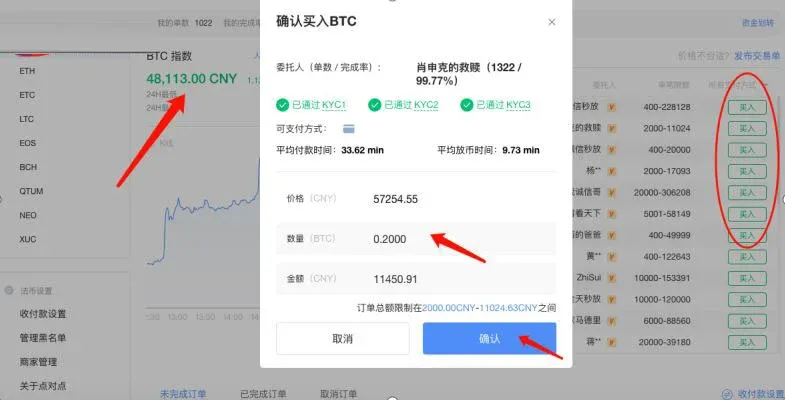
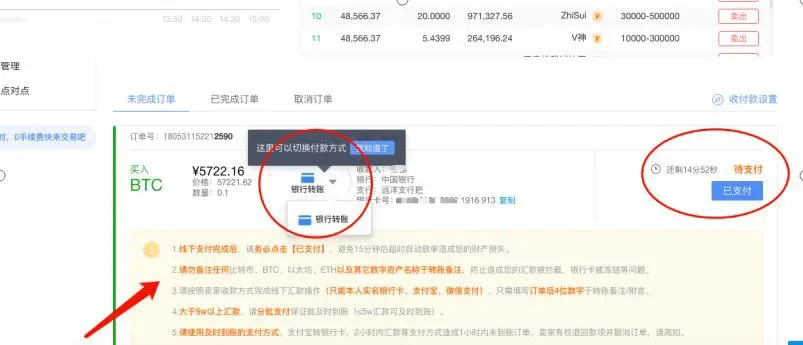
- Once the order is created, you can view its details on the “Unfilled Orders” page. Here you may switch the payment method (the platform defaults to bank card; SEPA/SWIFT availability depends on the merchant). After making the payment, be sure to click “Paid”, then wait for the counterparty to release the crypto.
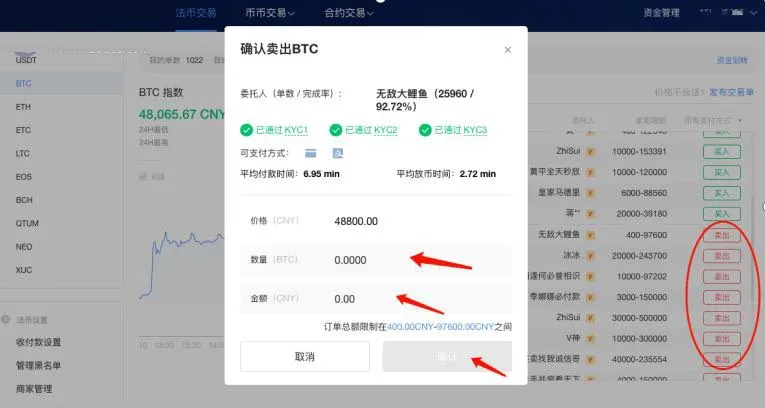
- If you wish to sell assets, simply select “Sell” on the same page, enter the amount, and confirm. Once the buyer has paid, release the coins immediately to complete the trade.
3. Tips for Placing Your Own Orders
When existing orders do not meet your desired price, you can post a buy or sell order yourself:
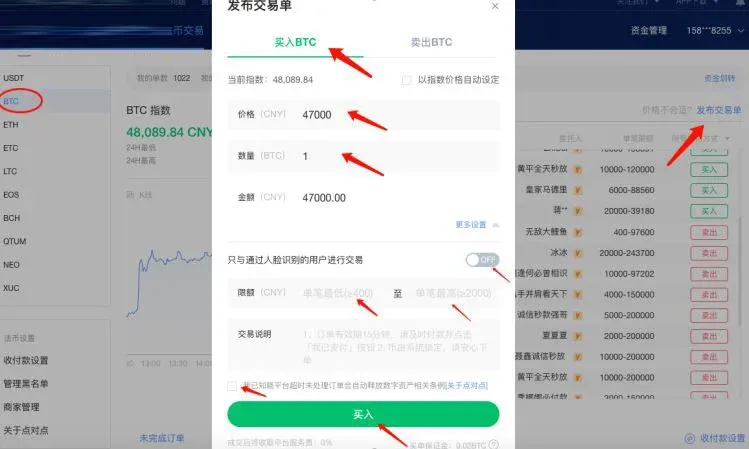
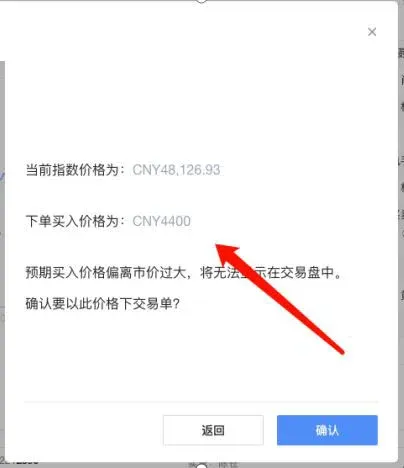
- Posting a buy order: On the trading page for the chosen asset, input your desired buy price, quantity, and set a per‑order limit, then click “Buy”. The system will warn you if your price deviates significantly from the market index, prompting you to re‑confirm or adjust the parameters.
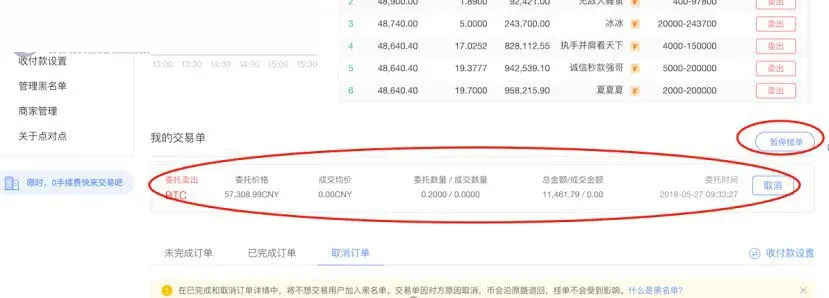
- Posting a sell order: The process is identical—enter your preferred sell price and quantity, then submit. Active orders appear under “My Orders”, waiting to be matched by other users. If you need to go offline temporarily, you can use the “Pause Receiving Orders” function to hide the order from the order book until you resume.
4. Daily Withdrawal Limit Rules
OKX sets daily withdrawal limits based on a user’s fee tier and KYC level; limits for all assets are aggregated and expressed in BTC equivalents.
- For example, if you are Level 1, you may withdraw up to 300 BTC per day. Suppose you have already withdrawn 250 BTC today, then you use 25 BTC worth of OMG and 15 BTC worth of XUC, bringing the total to 290 BTC. Only 10 BTC remains available. If you now attempt to withdraw 20 BTC worth of XRP, the system will reject the request.
- To raise your limit, you can contact your account manager at OKX and request a tier increase.
Additionally, KYC level influences the 24‑hour cumulative limit: KYC 1 (≤ 100 BTC) and KYC 2 (≤ 300 BTC) correspond to different caps.
---
This completes the full illustrated guide for withdrawing fiat (USD) from OKX. For further OKX tips and the latest updates, stay tuned to Bitaigen (BitRoot)’s other articles.
*Note for users in the United States: OKX may not be available to U.S. residents due to regulatory restrictions. U.S. users should consult local regulations and consider using compliant platforms such as Binance.US for fiat‑to‑crypto transactions.*
💡 Register on Binance with referral code B2345 for the maximum trading fee discount. See Binance complete guide.



