
 Bitaigen Research
 How to Sell Ethereum on Binance Spot Market?
On Binance Spot Market, you can sell Ethereum using five order types: Limit Order, Market Order, Take‑Profit/Stop‑Loss (TP/SL) Order, Trailing Stop Order, and OCO (One‑Cancels‑the‑Other) Order.
How does Binance’s spot market allow you to sell ETH? How do you place a limit order, market order, TP/SL order, trailing‑stop order, or OCO order on Binance Spot?
Ethereum is one of the most commonly held crypto assets. Below, the Bitaigen editorial team walks you through the complete process of selling ETH on Binance Spot, complete with screenshots and key considerations.

In this article we systematically outline every step required to sell Ethereum on Binance’s spot platform—from the most basic limit order to the flexible OCO order—providing real‑world screenshots and practical tips. Whether you’re a beginner looking to get started quickly or an experienced trader fine‑tuning your strategy, the guide also includes full instructions for registration, app download, and referral‑code benefits. It’s worth reading in full.
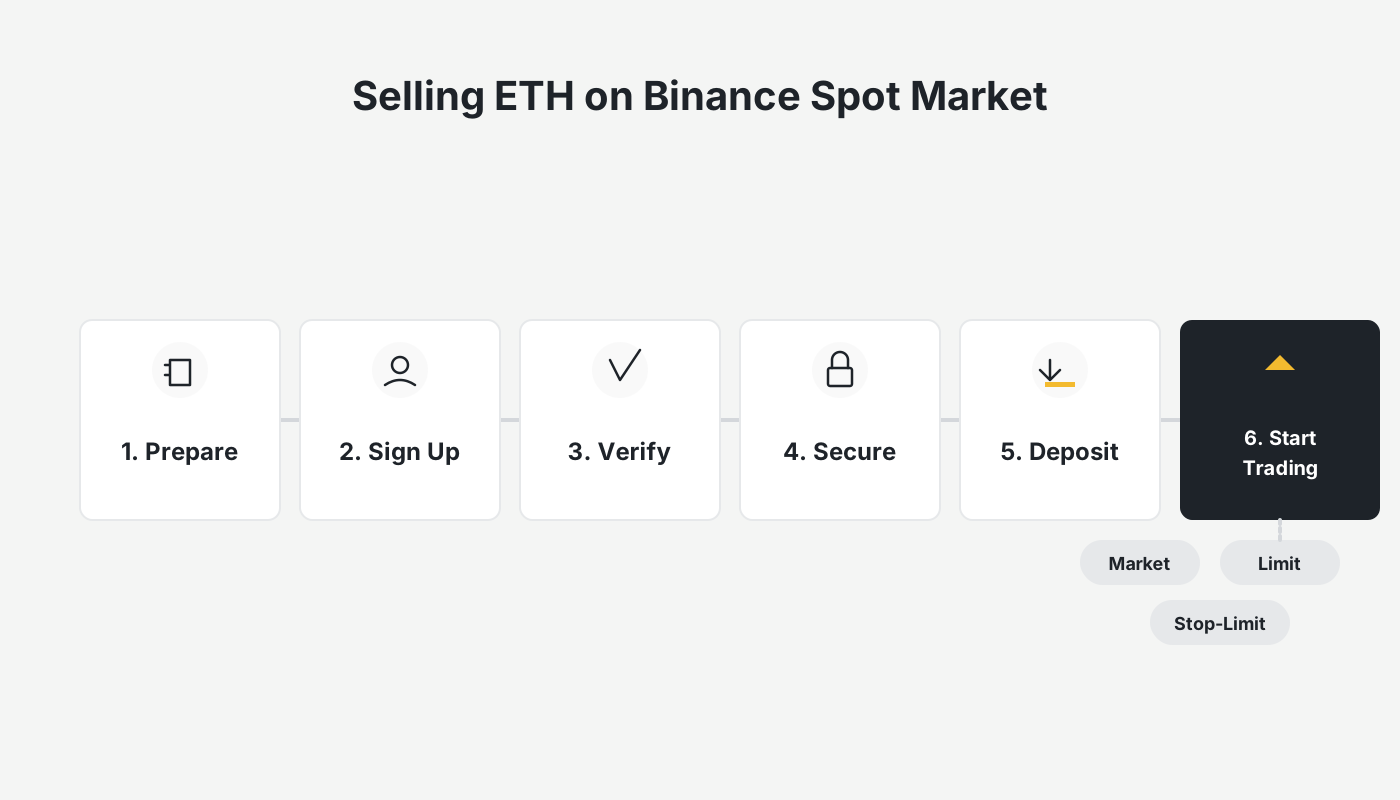
Binance Official Website + App Download + Referral Code + Tutorial
If you haven’t created a Binance account yet, you can register using the link below and download the official Binance app (Android + iOS). The tutorial that follows has been personally tested by the author, with detailed steps to help you complete registration, verification, and subsequent usage smoothly.
- Binance Referral Code: `B2345` (Register with this code to enjoy a permanent 20 % fee discount.)
- Binance Official Website
- Binance App Download
- How to download Binance on an iPhone in Mainland China? A step‑by‑step guide covering download, registration, deposit/withdrawal, and buying & selling tutorials.
- Detailed guide for Android users in Mainland China to install the Binance App (2026 version) – includes the newest registration walkthrough.
- Binance Spot Tutorial for Buying Ethereum: Limit Order, Market Order, Take‑Profit/Stop‑Loss Order, OCO Order – complete with screenshots.
Important for U.S. users: Binance’s global platform is not available in the United States. Residents of the U.S. must use Binance.US instead. The steps described below apply to the international Binance platform; the Binance.US interface is similar but may have minor differences.
What You Need to Know Before Selling ETH on Binance Spot
Binance Spot offers five distinct sell‑order types:
| Order Type | Main Feature |
|---|---|
| **Limit Order** | Executes only when the market reaches the price you set. |
| **Market Order** | Executes immediately at the current market price. |
| **Take‑Profit/Stop‑Loss Order** | Triggers a limit order once a specified price is hit, allowing you to lock profit or limit loss. |
| **Trailing Stop Order** | Adjusts the stop price automatically based on a percentage pull‑back, helping you capture more upside while protecting downside. |
| **OCO Order** | Places a **Limit Order** and a **Take‑Profit/Stop‑Loss Order** simultaneously; when one fills, the other is automatically canceled. |
Two essential points to remember:
- You can only sell assets that you already hold in your spot wallet.
- The total value of each sell order must be ≥ 5 USD (or the equivalent in USDT).
All the practical demonstrations below are performed on the Pro version of the Binance app; the Lite version can be accessed by tapping the avatar icon in the top‑left corner.

Binance Spot Market – Step‑by‑Step Guidance for Selling ETH (Mobile App)
1. Preparatory Steps Before Trading
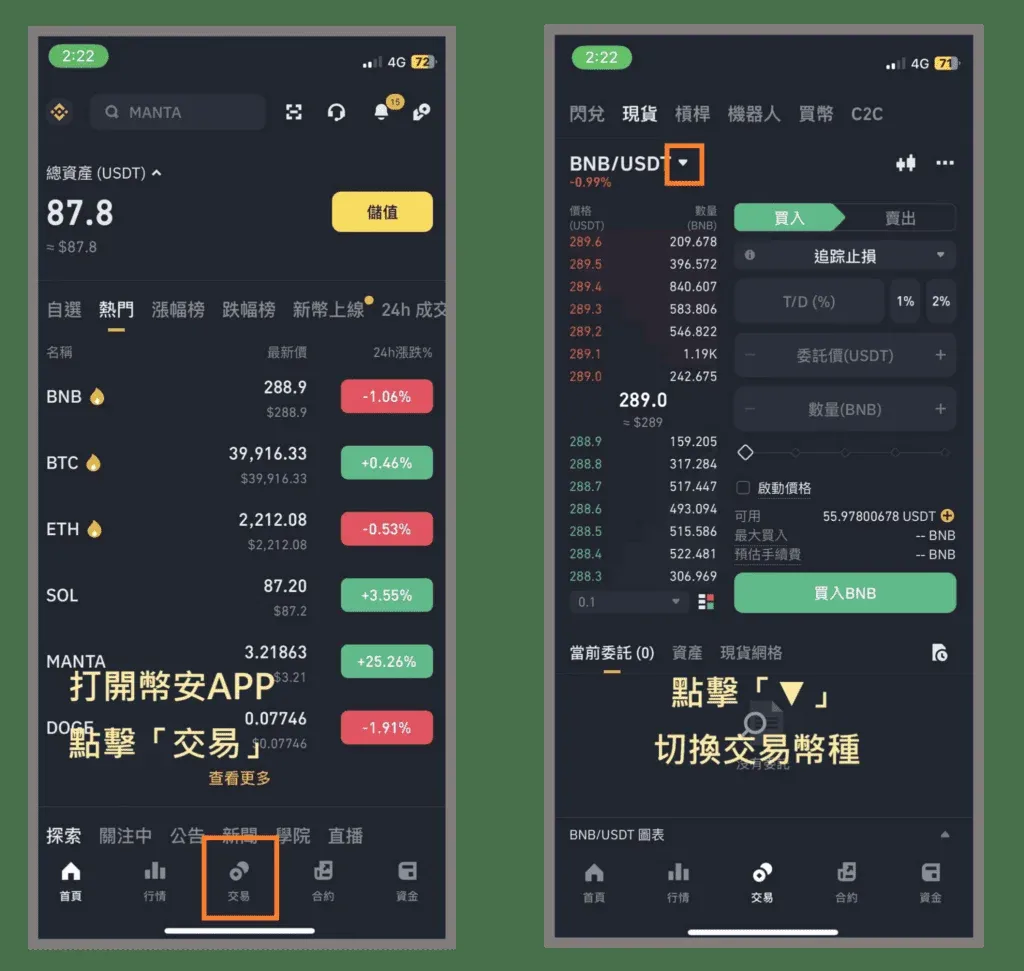
Step ① Enter the Trading Pair Selection Page
Tap the Trade button in the middle of the bottom navigation bar, then tap the ▼ icon next to the trading pair at the top‑left to switch currencies.
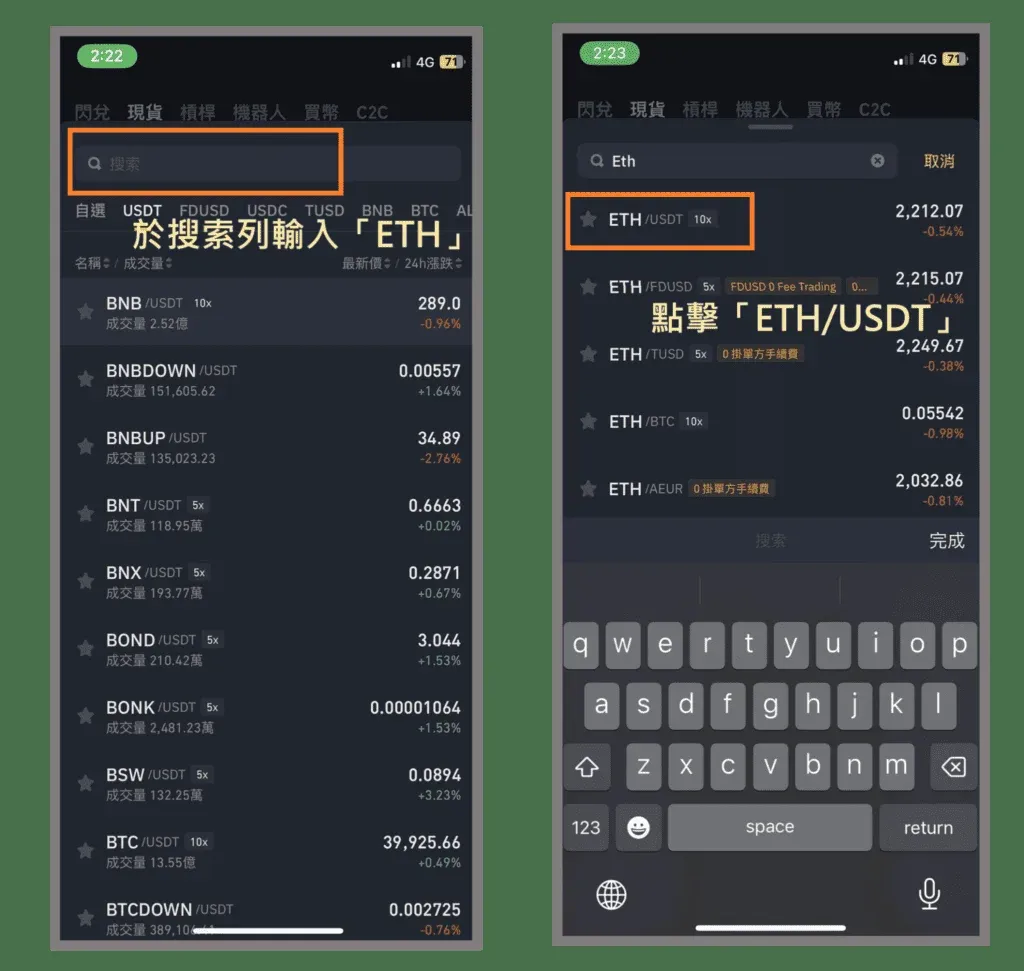
Step ② Search for and Open the ETH/USDT Trading Screen
Enter “ETH” into the search bar and select ETH/USDT (if you want to convert ETH to BTC, choose ETH/BTC instead).
- The left side shows the amount of ETH you intend to sell; the right side shows the USDT (or other target currency) you will receive.
- Labels such as “10x”, “5x” indicate the leverage options available for that pair (relevant only to margin/derivatives trading, not spot).
Step ③ Switch to the “Sell” Tab
The interface defaults to the Buy tab. Tap Sell to switch views.
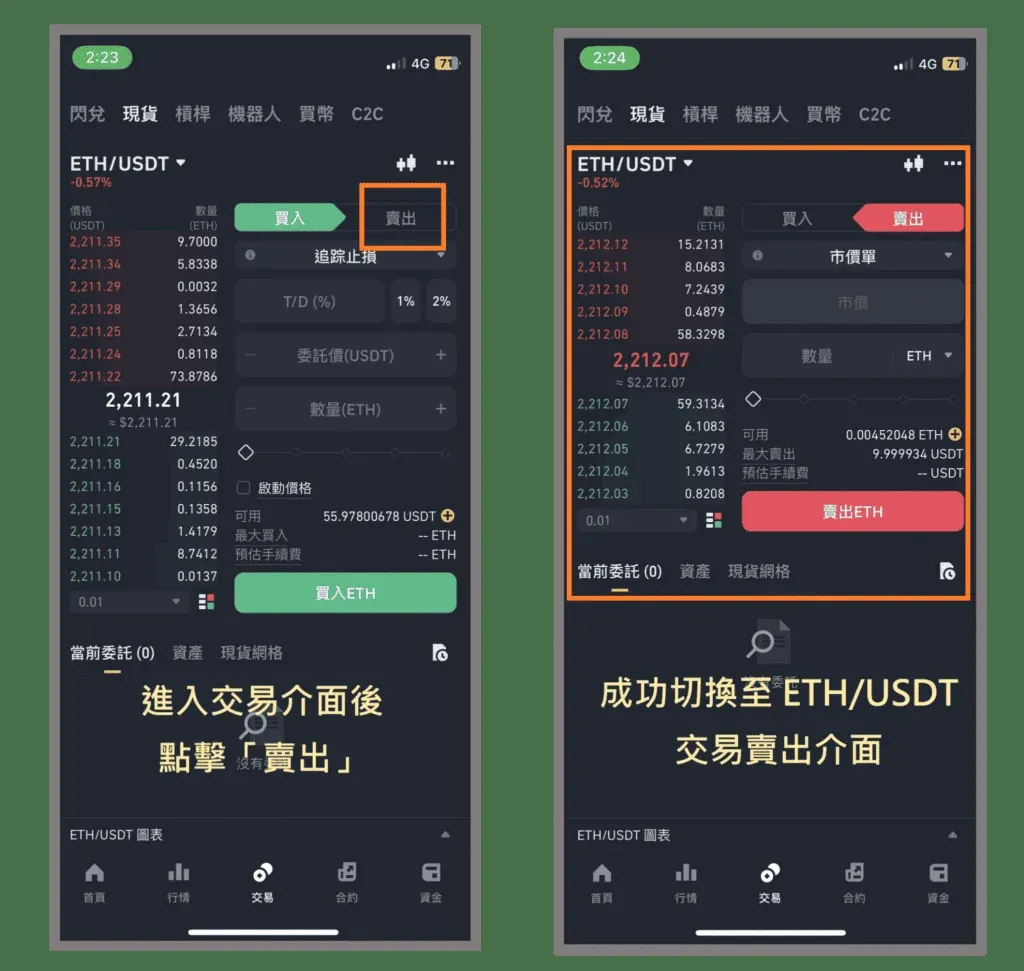
Quick tip: If you’re new to the sell interface, watch the demo a few times. The workflow is straightforward once you get used to the layout.
2. Limit Order Tutorial
Definition: A Limit Order only executes when the market price reaches the specific limit you set.
Step ① Select “Limit”
Tap the ▼ dropdown inside the orange‑bordered box that shows the order‑type selector, then choose Limit.
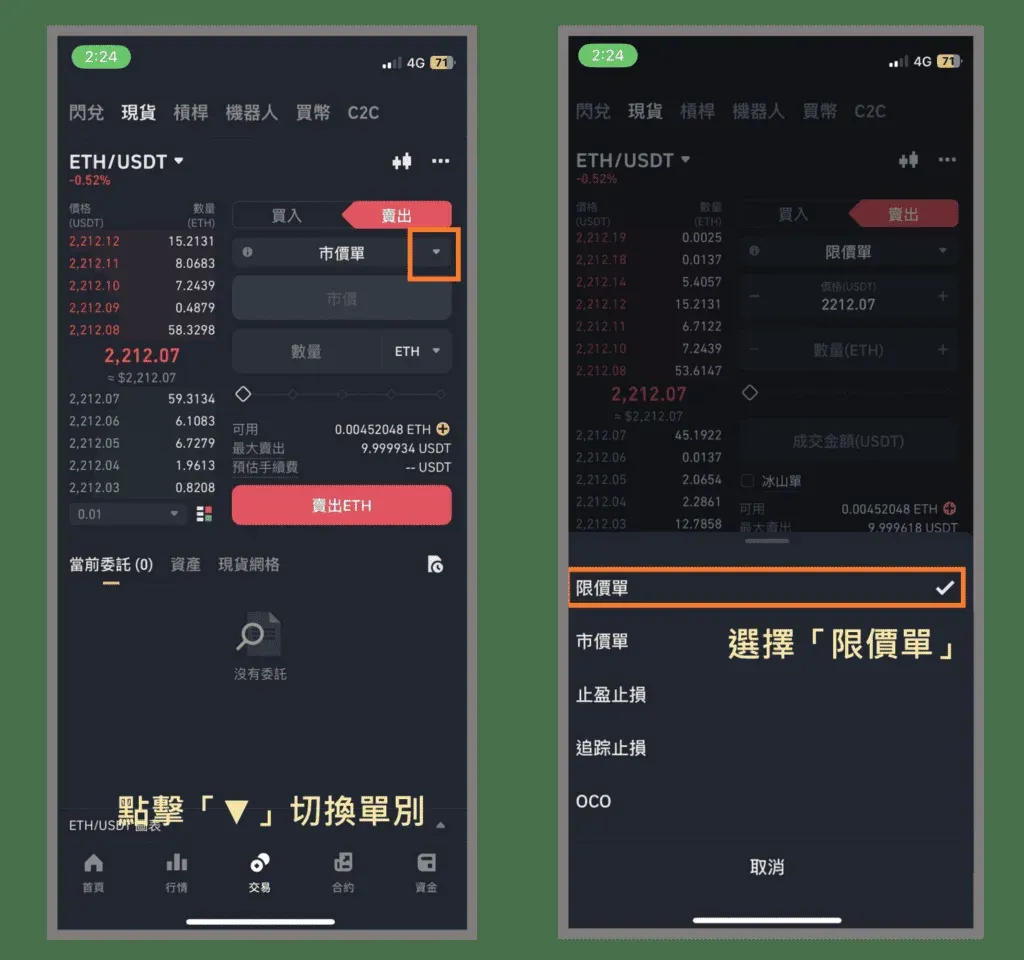
Step ② Enter Order Details
| Parameter | Meaning |
|---|---|
| **Price** | The USDT price per ETH at which you want to sell. |
| **Quantity** | The amount of ETH you want to sell. |
*Example:* Price = 2,220 USDT, Quantity = 0.005 ETH → When ETH reaches 2,220 USDT, 0.005 ETH will be sold.
Step ③ Confirm and Place the Order
After verifying the information, tap the Sell ETH button.
Step ④ Order‑Placed Confirmation
A popup stating “Order placed successfully” appears, indicating that the limit order is now live and will execute automatically once the price condition is met.
Tips
- A limit order does not execute until the market meets your price; it remains open without generating a trade.
- For assets with high volatility, you may prefer a market order or a TP/SL order to secure rapid profit or cut loss.
3. Market Order Tutorial
Definition: A Market Order executes instantly at the best available price in the order book.
Step ① Select “Market”
From the order‑type dropdown, choose Market.
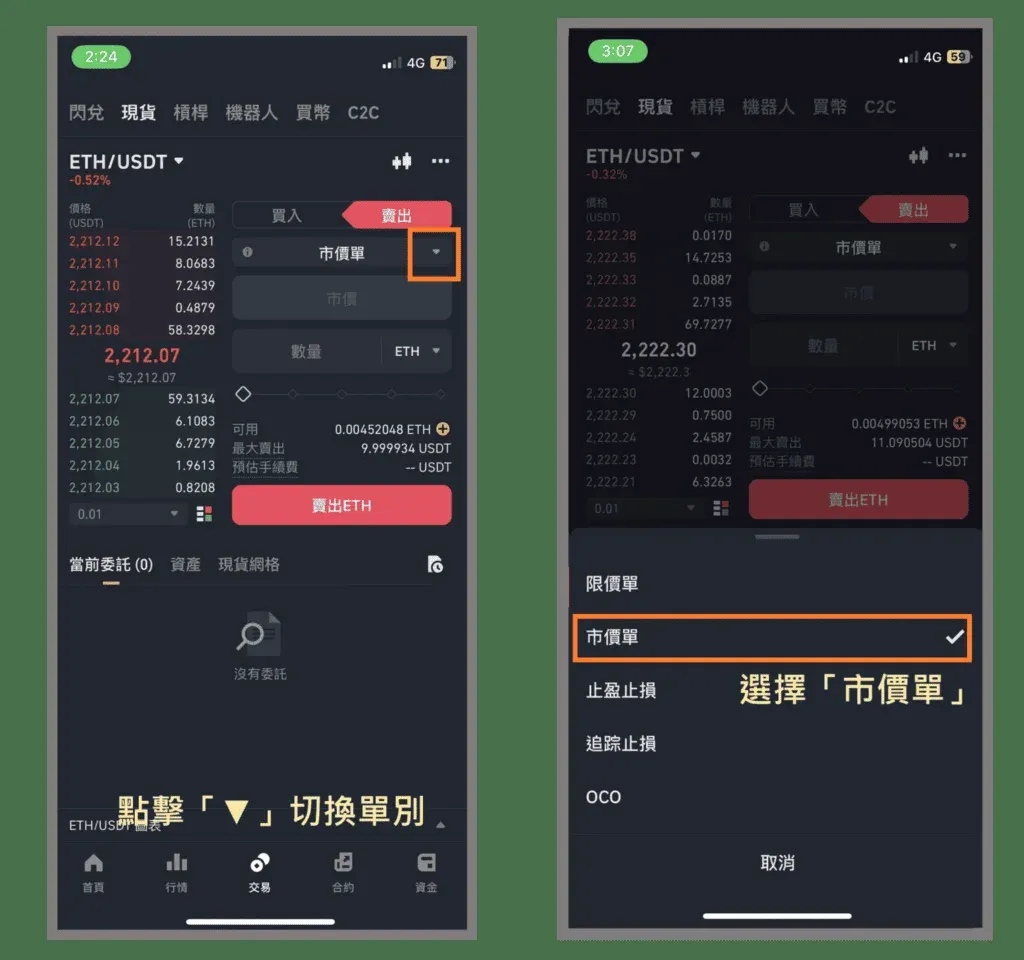
Step ② Enter the Sell Quantity
Only the Quantity field is required (e.g., 0.05 ETH). The system will immediately match your sell request with the highest current buy price.
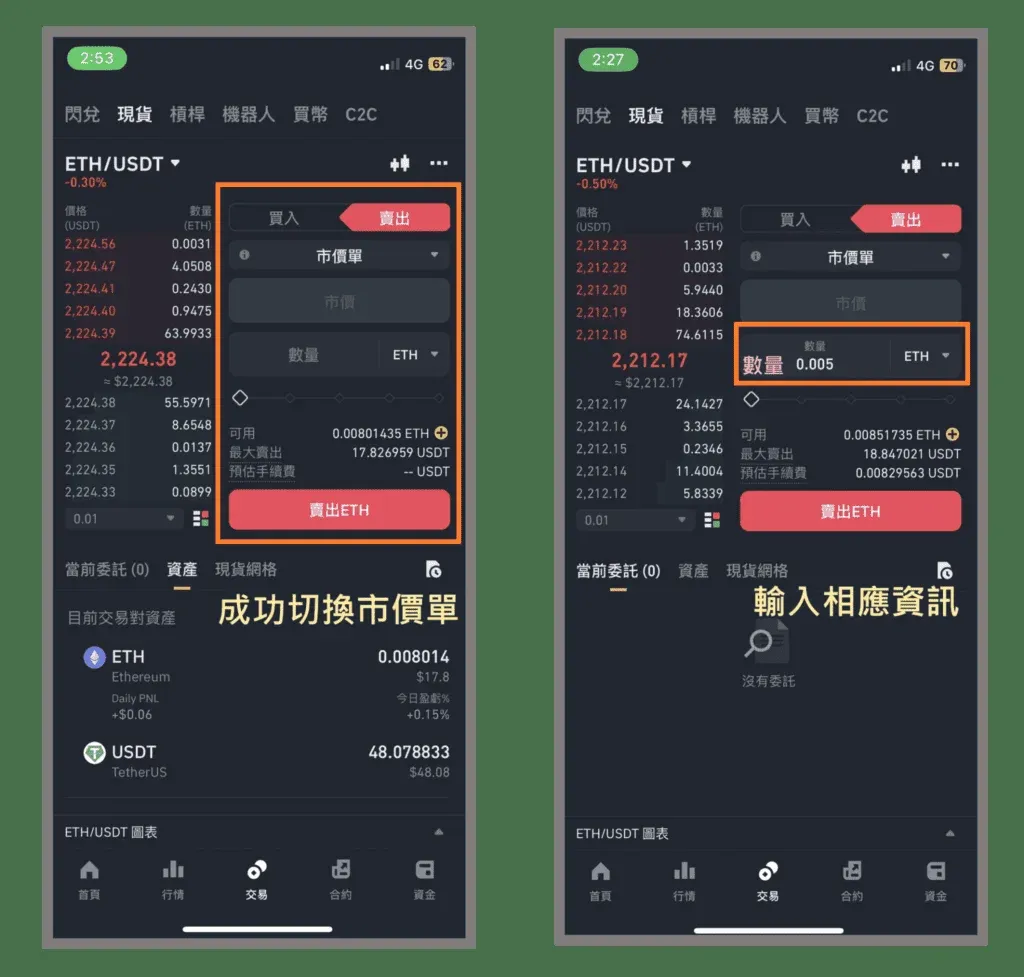
Step ③ Confirm and Submit
After confirming the quantity, tap Sell ETH. The platform instantly matches you with the nearest buy order.
Step ④ Trade Confirmation
A popup stating “Order placed successfully” confirms that the market order has been fully executed.
Market orders are the quickest way to close a position and are ideal when you need to exit immediately.
4. Take‑Profit/Stop‑Loss (TP/SL) Order Tutorial
Definition: A TP/SL Order creates a limit order once a trigger price is reached, allowing you to lock in profit (take‑profit) or limit loss (stop‑loss).
Step ① Select “Take‑Profit/Stop‑Loss”
Choose Take‑Profit/Stop‑Loss from the order‑type dropdown.
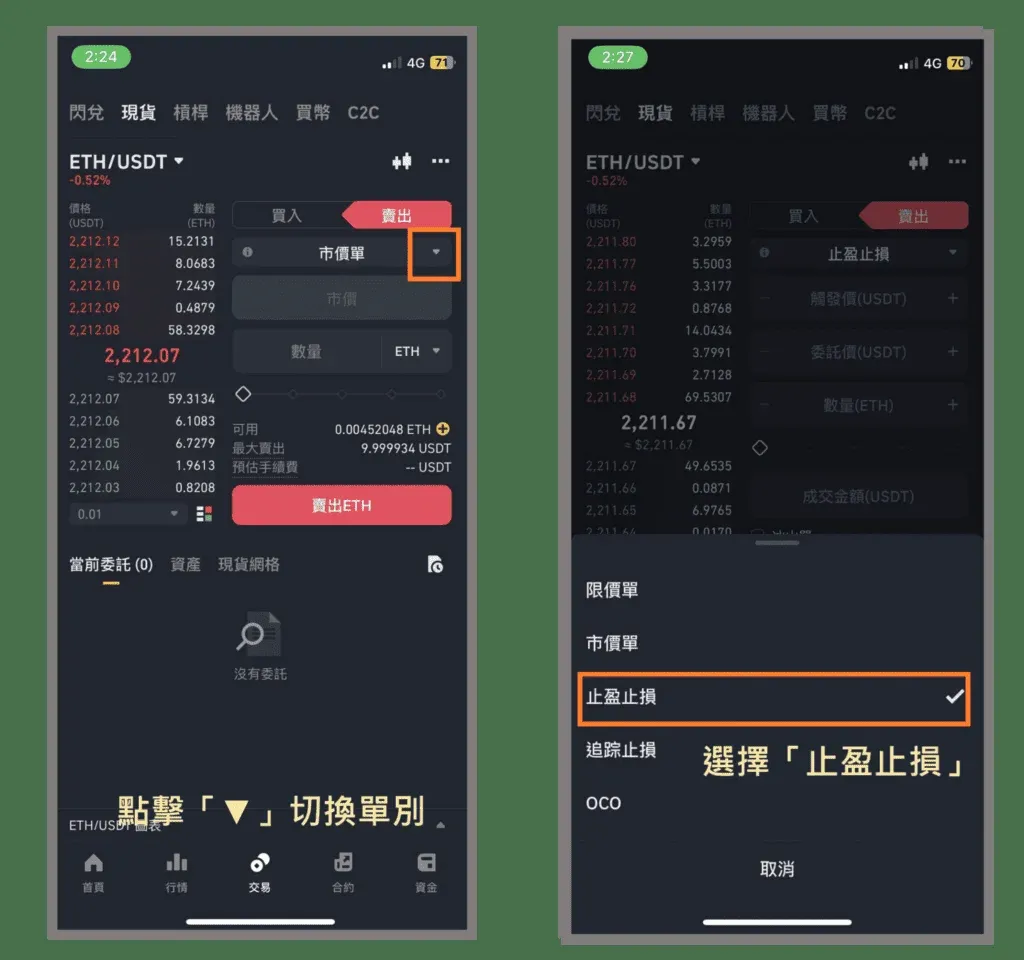
Step ② Fill in the Required Fields
| Parameter | Meaning |
|---|---|
| **Trigger Price** | The market price at which the limit order is generated. |
| **Limit (Order) Price** | The price at which the generated limit order will sell ETH. |
| **Quantity** | The amount of ETH to sell once the trigger fires. |
- Take‑Profit Example: Bought at 2,000 USDT, set Trigger = 2,100 USDT, Limit = 2,200 USDT, Quantity = 0.005 ETH → When ETH rises to 2,100 USDT, the system creates a limit order at 2,200 USDT, locking in profit.
- Stop‑Loss Example: Bought at 2,500 USDT, set Trigger = 2,200 USDT, Limit = 2,100 USDT, Quantity = 0.005 ETH → When ETH drops to 2,200 USDT, a limit order at 2,100 USDT is placed, capping the loss.
Step ③ Confirm the Information
Tap Sell ETH after double‑checking the values.
Step ④ Second Confirmation
A detailed order‑summary screen appears; verify the trigger price, limit price, quantity, and estimated fee.
Step ⑤ Final Confirmation
Tap Confirm to submit the TP/SL order.
Step ⑥ Order‑Placed Confirmation
A popup reads “Order placed successfully”, indicating that the TP/SL order is now live and will activate when the trigger price is reached.
Tips
- The small white text at the bottom‑left of the order card briefly explains the function of the TP/SL order for quick identification.
- Avoid setting the trigger and limit prices too close together; tight spacing can cause the order to fail due to slippage.
5. Trailing Stop Order Tutorial
Definition: A Trailing Stop Order automatically moves the stop price in line with market movements, based on a predefined pull‑back percentage. It can be used for both protecting downside and “trailing” a profit target.
Step ① Select “Trailing Stop”
Choose Trailing Stop from the order‑type dropdown.
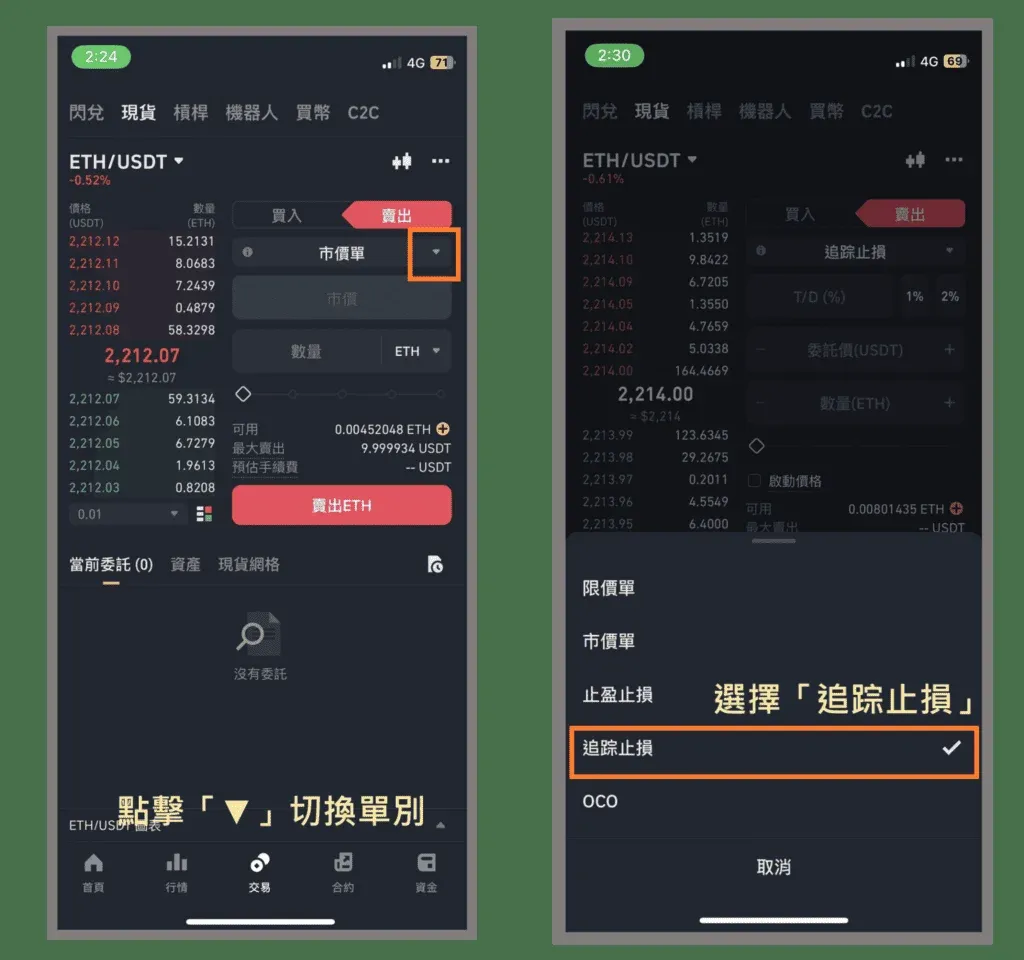
Step ② Enter Parameters
| Parameter | Meaning |
|---|---|
| **Trailing Rate** | The percentage drop from the highest observed price that will trigger the order. |
| **Limit (Order) Price** | The price at which the generated limit or market order will sell ETH after the trigger. |
| **Quantity** | The amount of ETH to sell once the trigger fires. |
| **Activation Price (optional)** | The price level that must be reached before the trailing mechanism starts monitoring. |
*Example:* No activation price, Trailing Rate = 5 %, Limit = 2,000 USDT, Quantity = 0.005 ETH → If ETH peaks at 2,300 USDT and then falls 5 % (to 2,185 USDT), the system automatically sells 0.005 ETH at the 2,000 USDT limit price.
Step ③ Confirm and Place the Order
After confirming the trailing rate, limit price, and quantity, tap Sell ETH.
Step ④ Second Confirmation
A summary screen appears; double‑check all fields.
Step ⑤ Final Confirmation
Tap Confirm to activate the trailing‑stop order.
Step ⑥ Order‑Placed Confirmation
A popup stating “Order placed successfully” confirms that the trailing‑stop order is now active.
Tips
- Trailing stops can serve as dynamic stop‑losses or as a “trailing‑take‑profit” mechanism that locks in gains as the market moves in your favor.
6. OCO Order Tutorial
Definition: OCO (One‑Cancels‑the‑Other) simultaneously places a Limit Order and a Take‑Profit/Stop‑Loss Order. When either order fills, the other is automatically canceled, ensuring you’re only executed once.
Step ① Select “OCO”
Pick OCO from the order‑type dropdown.
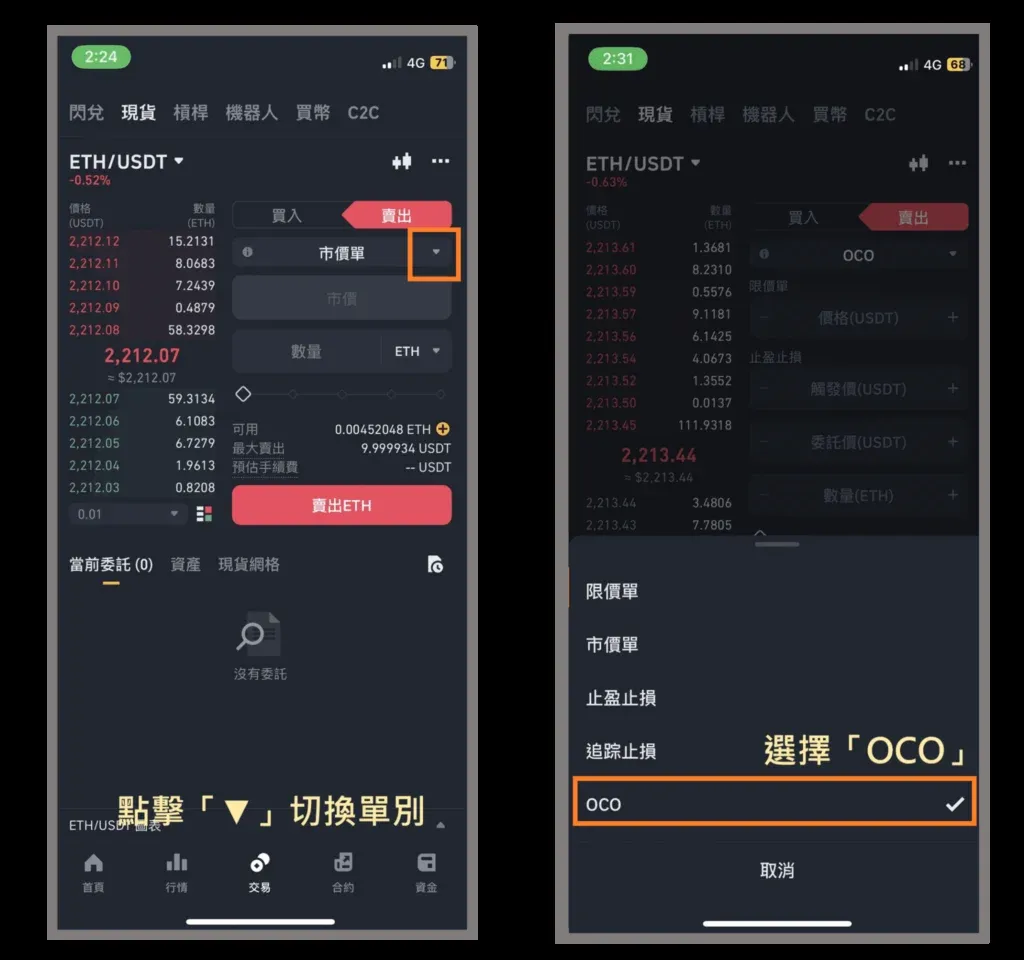
Step ② Enter Complete Information
- Limit (Take‑Profit) Portion
- Price: Desired limit price for taking profit.
- Quantity: Amount of ETH to sell if the price reaches the limit.
- Take‑Profit/Stop‑Loss Portion
- Trigger Price: Price that activates the stop‑loss.
- Limit (Order) Price: Price at which the stop‑loss limit order will sell.
- Quantity: Usually the same as the limit portion.
*Example Table:*
| Type | Price / Trigger | Limit Price | Quantity |
|---|---|---|---|
| **Limit (Take‑Profit)** | 2,500 USDT | — | 0.005 ETH |
| **TP/SL (Stop‑Loss)** | 2,100 USDT (trigger) | 2,000 USDT (limit) | 0.005 ETH |
- If ETH climbs to 2,500 USDT, the limit order executes and the TP/SL order is cancelled.
- If ETH falls below 2,100 USDT, the TP/SL order triggers, selling at 2,000 USDT and cancelling the limit order.
**Step ③ Confirm and
Related Reading
- Binance Sell Orders: Limit, Market, TP/SL, Trailing, OCO
- Top Crypto Exchange Apps: Binance & OKX Registration Guide
- Top 10 Crypto Exchange Apps 2025 – Best Platforms
💡 Register on Binance with referral code B2345 for the maximum trading fee discount. See Binance complete guide.



