
 Bitaigen Research
 In this article we outline the most common root causes of imToken transfer failures and provide practical troubleshooting and resolution ideas, helping you quickly pinpoint the issue and restore smooth transactions. This will make your asset management more reassuring. If you want to understand the specific reasons and step‑by‑step procedures, keep reading.
Everyone had, to some degree, a childhood dream of being a mysterious detective. Whether you still keep that curiosity or have let it be buried by daily life, it’s fine. Today we’ll step into the blockchain world together, starting from the most basic operation—sending a transfer—and systematically dismantle the reasons why a transaction might fail.
Before you initiate any transfer, make sure your imToken app is upgraded to version 2.0. In fact, many transfer‑related problems can be avoided entirely simply by updating the product.
It’s similar to the difference between an old car and a new one—do you want to keep driving a Tesla Model 1, or jump straight into the latest Model 3? Users who have already switched to the 2.0 version are welcome to share their smooth‑experience in the comments below!
If you are still on version 1.0, don’t worry; we have prepared a 2.0 Migration Guide:
https://imtoken.fans/t/topic/19696
When you see a transaction marked as “Transfer Failed” on imToken, it is usually caused by one of the following three categories:
- Out of gas – insufficient gas
- Bad instruction – faulty instruction
- Reverted – transaction reverted
It is important to clarify that the miner fee paid for the transfer is not returned to your wallet. This is not a fee that imToken “keeps” for itself; the reason is explained in the sections below.
Out of gas (Insufficient Gas)
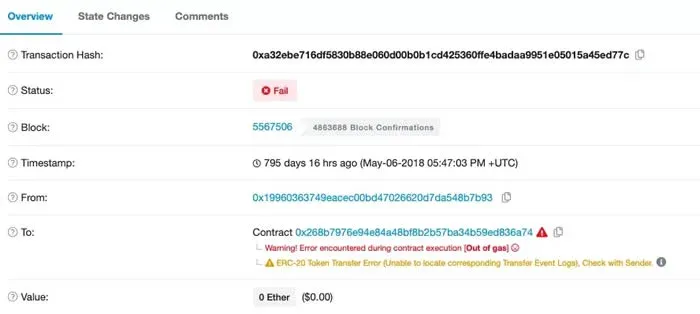
A simple analogy: a car needs fuel to drive, and a blockchain transfer consumes gas. Imagine you need 200 liters of gasoline to travel from point A to point B, but you only have 150 liters. You clearly cannot reach the destination; even though you never arrive, the fuel you used is already spent. In blockchain terms, if the gas limit you set for a transfer is too low, the transaction will run out of “fuel” midway and fail, producing the error out of gas. Miners will have attempted to include the transaction in a block, but because the gas ran out, the inclusion fails and the miner’s fee is still deducted. This fee goes to the miner; imToken does not charge any additional amount.
How to avoid it: imToken 2.0 automatically calculates a reasonable gas limit for you, ensuring the transaction can be packaged successfully. If you prefer to set the gas manually, be extra careful and avoid setting it too low, otherwise you may lose the miner fee.
Bad instruction (Faulty Instruction)
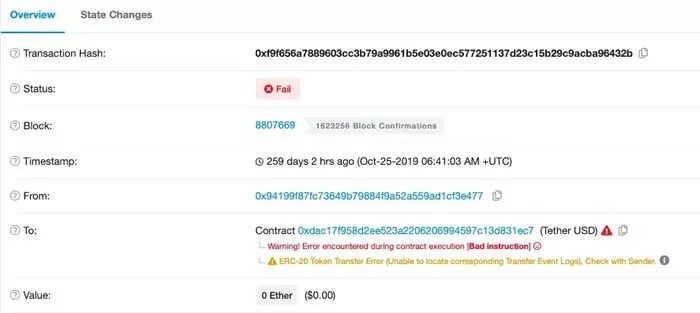
The literal meaning of “Bad instruction” is “faulty instruction”. This message typically appears when there is a logical flaw in the smart‑contract code itself, causing an error during execution. It is analogous to a malfunctioning machine receiving a command it cannot process; the contract’s developer must fix the code. The miner fee is still collected by the miner.
Reverted (Transaction Reverted)
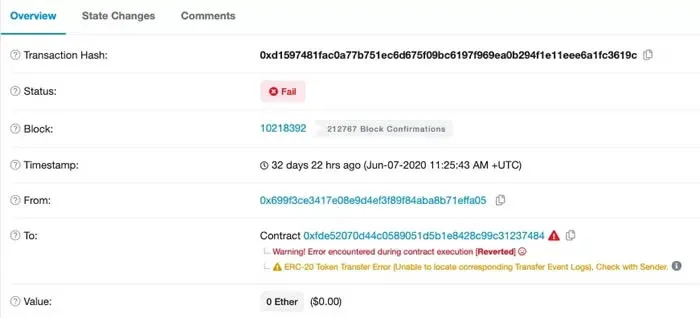
Ethereum has two types of accounts: externally owned accounts (EOAs) controlled by private keys, and contract accounts governed by smart contracts. Reverted is a function call that immediately aborts contract execution and rolls back the state. When a contract encounters an error or a condition is not met, it triggers a revert.
For example, a contract might promise “pay $1 (≈ USD 1) to receive a cup of tea”. If the contract does not check inventory and the stock is empty, even after the user pays $1 the tea cannot be delivered. The contract will then execute `revert`, throw an error, and roll back the transaction state.
Thus, both Bad instruction and Reverted stem from issues within the contract itself. The recommended course of action is to contact the contract creator (the project team) for a fix.
Final Note
We recommend using the Ethereum block explorer Etherscan. It works much like checking an order on an e‑commerce platform: simply paste your wallet address or transaction hash, and you can view every detail of the transaction. Give it a try!
The above constitutes a complete analysis of the reasons and solutions for imToken transfer failures. For more related material, follow Bitaigen (比特根) and explore other relevant articles.
💡 Register on Binance with referral code B2345 for the maximum trading fee discount. See Binance complete guide.



