
 Bitaigen Research
 Our Bitaigen editorial team has carefully compiled a complete guide to depositing and withdrawing on the Bibox platform, helping newcomers get up to speed quickly while avoiding common pitfalls. The article breaks down everything from security settings and wallet selection to detailed operational steps, accompanied by screenshot illustrations to ensure each step is clearly visible. To smoothly move assets in and out, keep reading for practical tips.
Bibox Trading Platform Withdrawal Guide
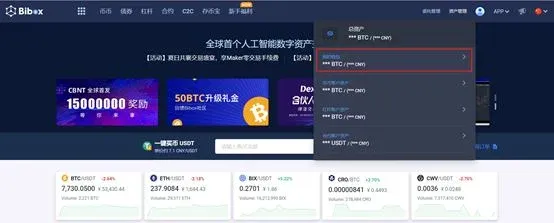
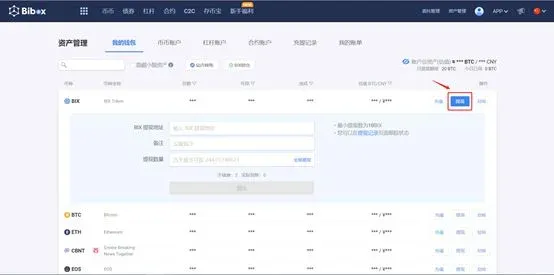
- Navigate to Asset Management → My Wallet, log in, and select the cryptocurrency you wish to withdraw from the list, then click Withdraw.
- In the pop‑up form, enter the withdrawal address, an optional memo, and the amount to withdraw; confirm to submit the withdrawal request.
- To monitor the progress in real time, click Withdrawal History for tracking.
---
Preparations Before Depositing
Before initiating any deposit, you must complete the security setup, which includes binding a Google Authenticator or SMS code and setting a funds password. Detailed steps can be found in the platform’s Security Settings Guide.
---
How to Deposit Digital Assets into Your Bibox Account
- Open the official website <https://www.bibox.com> and log in with an existing account.
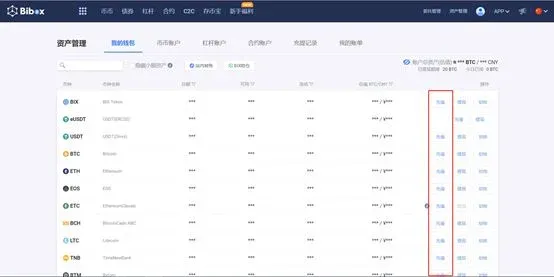
- At the top of the page choose Asset Management → My Wallet, then locate the cryptocurrency you wish to deposit and click Deposit.
- After confirming that the coin type is correct, click Click to Copy Address; the platform will automatically copy the deposit address for that coin. Next, open the wallet or exchange where you currently hold the same cryptocurrency, paste the copied address into the corresponding Withdraw/Transfer field, and submit.
- Some external platforms require a second‑factor verification such as Google Authenticator, SMS code, or email code when you initiate a withdrawal. Once that verification passes, the withdrawal command is broadcast to the blockchain network; after miners confirm the transaction, the funds will appear in My Wallet.

---
Fiat Deposit Options When You Don’t Own Cryptocurrency
Bibox does not directly support purchasing digital assets with fiat currencies such as the Chinese yuan, USD, or EUR. Users can instead use the platform’s partner LinkCoin to convert fiat to crypto. The procedure is as follows:
- Visit <https://www.linkcoin.pro> and log in quickly using your Bibox credentials.
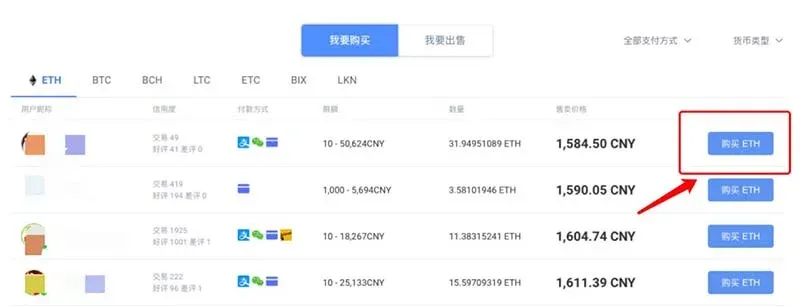
- In the trading pair list, select the cryptocurrency you wish to acquire and click the corresponding Buy button.
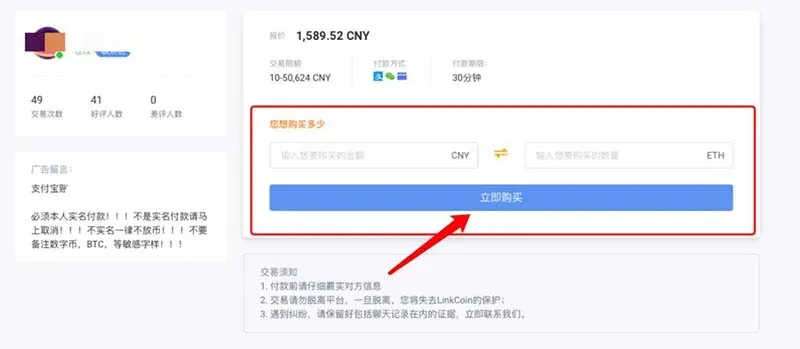
- Enter the purchase amount (in USD, EUR, or other supported fiat) and click Buy Now. The system will lock the seller’s crypto and require the buyer to complete payment within 30 minutes.
- After the payment is confirmed, the purchased cryptocurrency will be credited to your Bibox wallet automatically.
Note for U.S. users: When using fiat on‑ramps, opt for services that are compliant with U.S. regulations, such as Binance.US, rather than the global Binance platform.
Tax reminder: Cryptocurrency gains may be taxable in your jurisdiction. Consult a tax professional to understand your local reporting obligations.
---
Related Reading
- Withdraw Crypto to a Cold Wallet: Step‑by‑Step Guide
- Gate.io On‑Chain Deposit & Withdrawal Guide (App & Web)
- How to Securely Withdraw or Liquidate on OKX in 2026
💡 Register on Binance with referral code B2345 for the maximum trading fee discount. See Binance complete guide.



