
 Bitaigen Research
 Where to Download the Binance APP? How Many Official Download Paths Exist?
Binance was founded in 2017 and launched its mobile app in April of that year. As a leading platform in the cryptocurrency space, Binance attracts a massive user base thanks to its robust technical infrastructure, high liquidity, and user‑friendly interface. Whether you are a newcomer or an experienced trader, you can conduct a wide variety of crypto transactions on the Binance platform. For many users, however, the question of how to safely download and install the Binance APP is a matter that deserves careful attention.
Official download channels for the Binance mobile app include a direct‑link APK from the website, the official website’s download page, the Apple App Store, QR‑code scanning, and download links sent via the official support email.
Below, the Bitaigen editorial team outlines the several ways you can obtain the Binance APP. We hope you find the guide useful!

In this article we systematically list the official acquisition channels for the Binance APP, helping users identify safe paths and avoid the risk of downloading malicious copies. By dissecting the direct‑link, App Store, QR‑code, and email‑link methods, you can quickly locate a reliable entry point that matches your device. If you want to ensure smooth and secure trading, keep reading for the full guide.
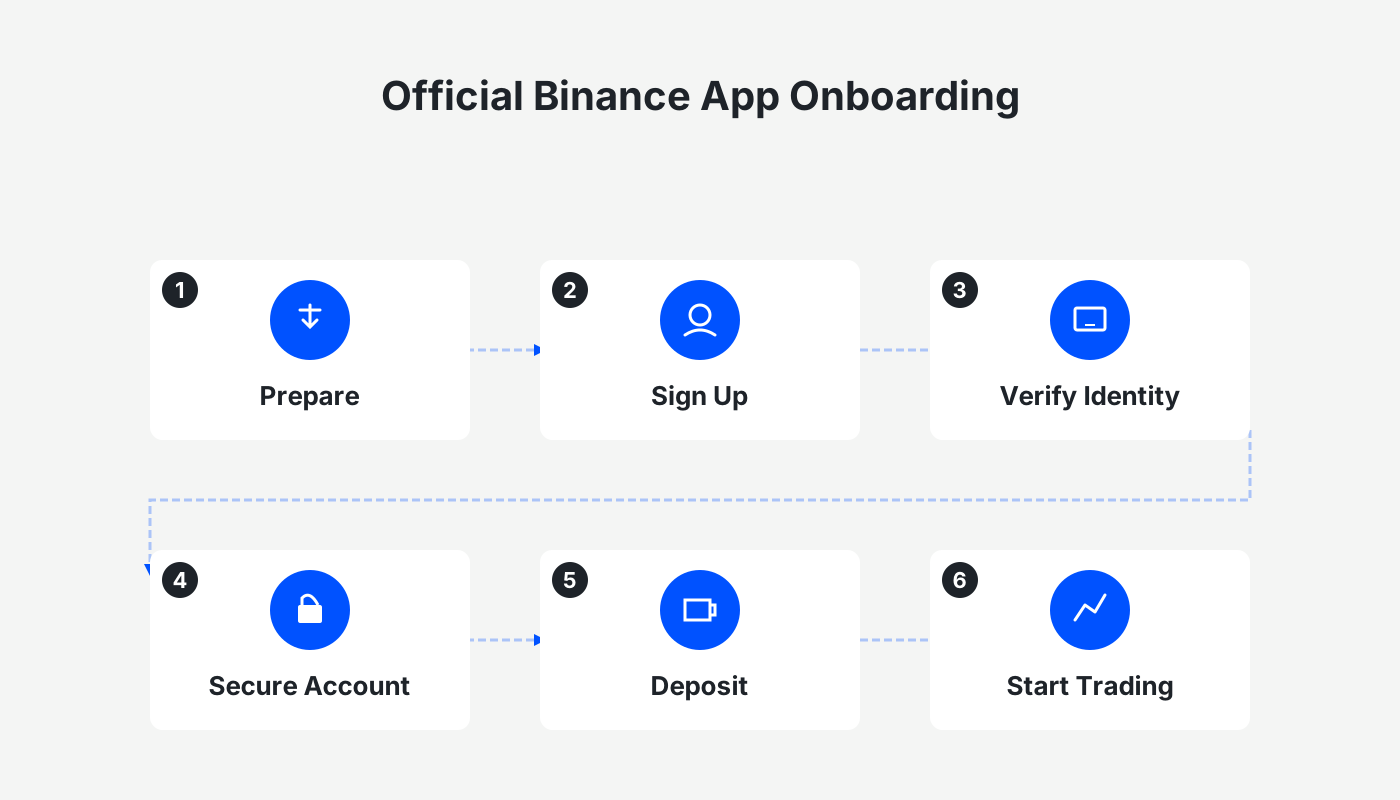
1. Download Paths for the Binance APP
The Binance APP supports multiple operating systems, including Android, iOS, and a desktop client. Users can pick the method that matches their device. Below are four common official download approaches.
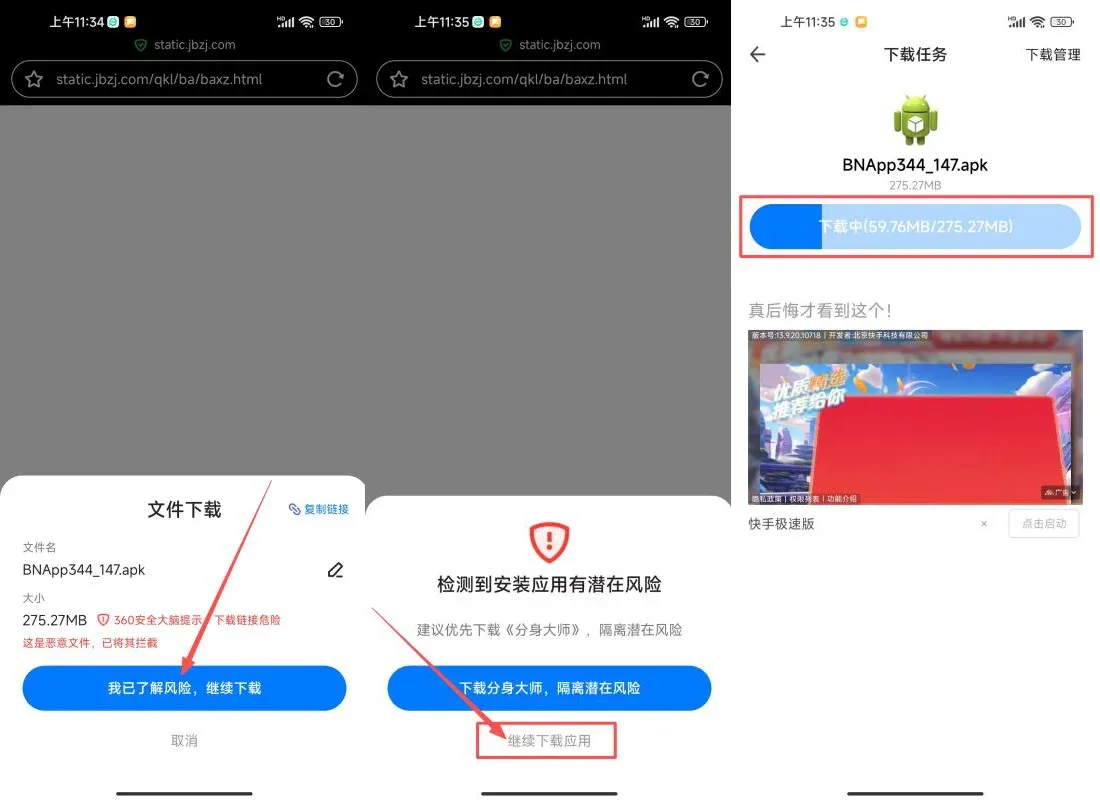
1. Direct‑link APK from the Binance website *(the most reliable method for downloading Binance in Mainland China)*
- First, click the Binance APP download link. When the browser prompts you to download a file, choose “I understand the risks, continue download.”
- The system will display a warning “Potential risk detected for this app installation.” Click “Continue downloading the app.”
*Tip: Any app that is not installed from an official app store will trigger a similar risk warning.*
- After the download finishes, tap “Install” or the installation prompt that pops up, then click “Continue.”
- During the installation process you will be asked to “Allow” certain permissions—confirm them.
- If an “Installation risk warning” appears, select “Ignore the risk and continue installation.”
- When the risk details appear a second time, click “Install” again.
- On most Android devices the system will show “Three dots in the upper‑right corner → Single‑time installation authorization.” Complete this step and proceed with the installation.
- Once installation is finished, a “Installation successful” message will be displayed.
2. Official Binance Website Download
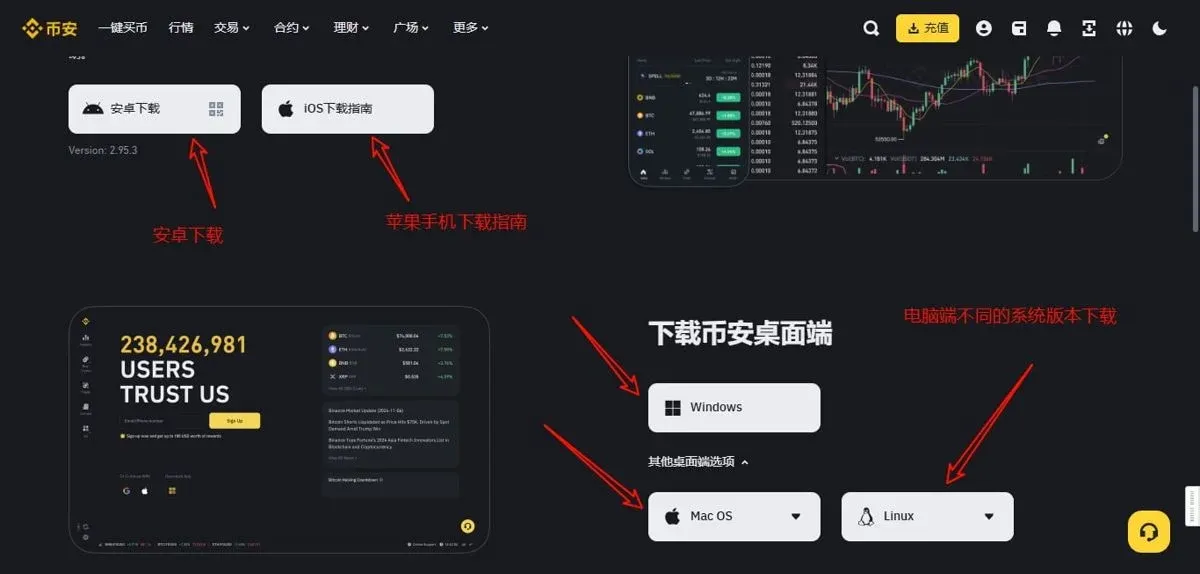
Downloading through Binance’s own website is the safest option. Visit the official site (www.binance.com) to obtain the latest version of the app.
- Open the website: Type the address into your browser and land on the homepage.
- Select “Download”: The button in the top‑right corner automatically detects your device type (Android or iOS) and offers the appropriate link.
- Install: Clicking the link will start an APK download for Android, or redirect iOS users to the App Store where they can tap “Get” to install.
Downloading from the official site guarantees you receive the most recent version and avoids the potential hazards of third‑party sources.
3. App‑Store Download (iOS only)
Google Play does not list the Binance APP in mainland China, so iOS users should obtain it from the App Store.
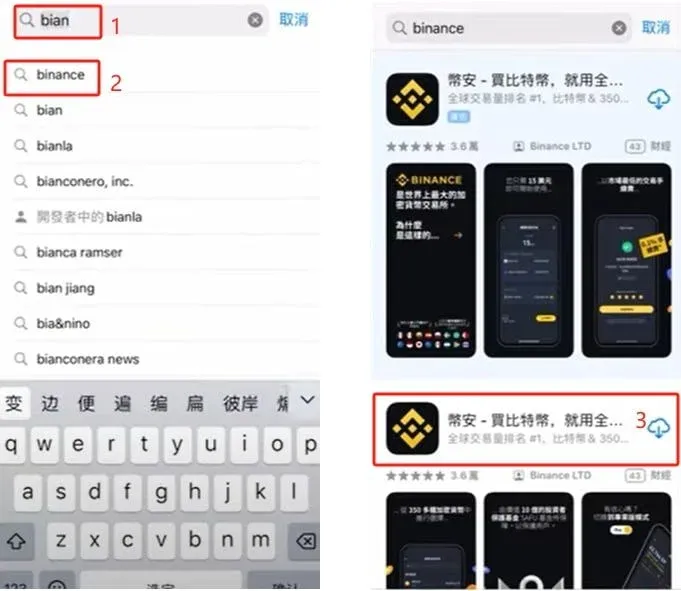
- Open the App Store on your iPhone or iPad.
- Type “Binance” (or “币安”) into the search bar.
- Choose the official listing (usually among the first two results) and tap “Get” to install.
Note: If the search returns no results or the download fails, your Apple ID may be tied to a region where Binance is unavailable. In that case you can switch to an Apple ID registered in a supported region such as Taiwan or Hong Kong.
iOS Download Tutorial Using an Overseas Apple ID
- Create an overseas Apple ID: Use a virtual address generator to produce a Taiwanese address and select “Taiwan, China” during registration.
- Log into the App Store: Sign out of your current account in the top‑right corner, then log in with the newly created Apple ID.
- Set billing information: Choose “None” or skip the payment method, then fill in the generated address.
For detailed steps, refer to the screenshots embedded in the article (
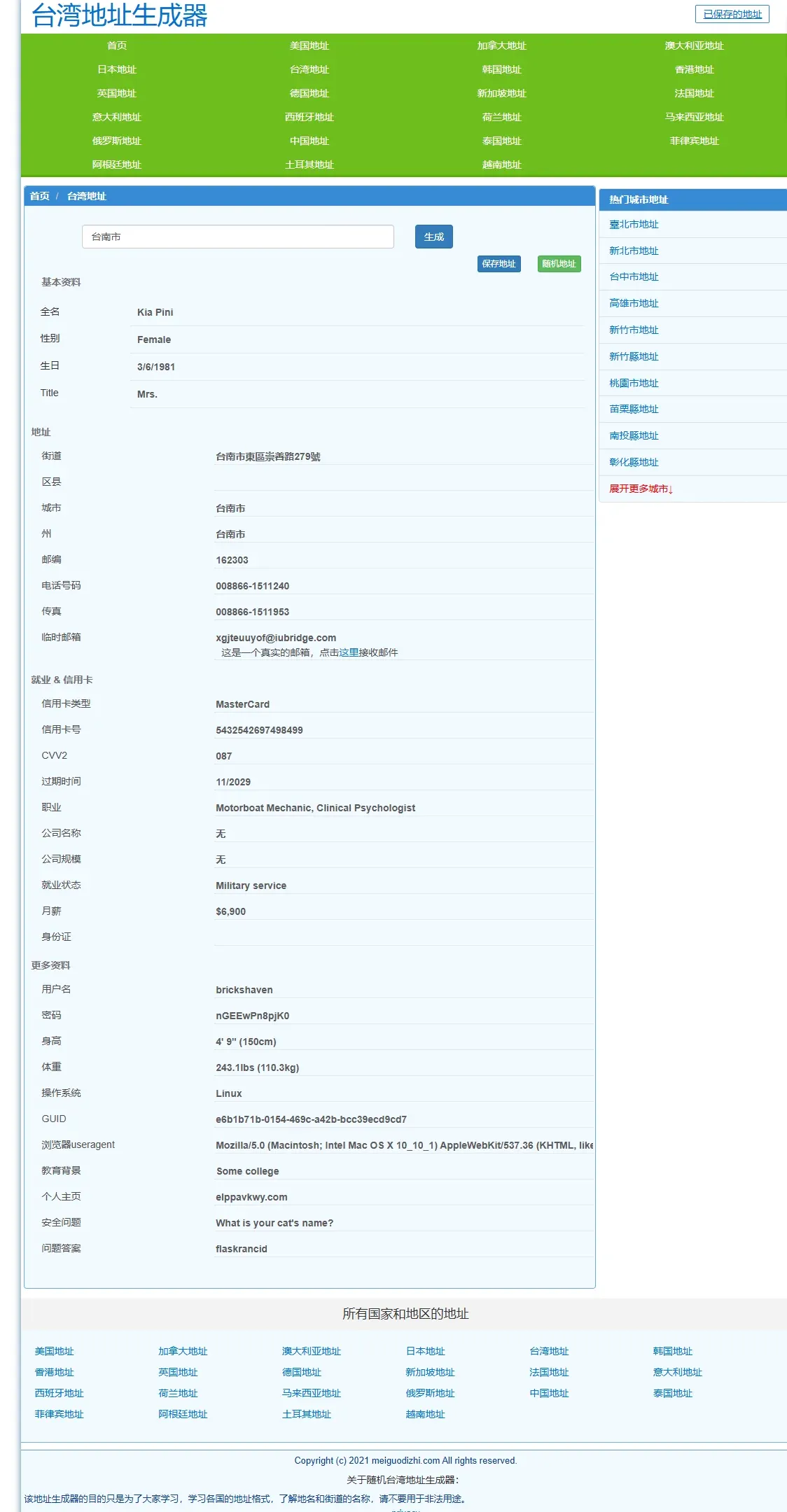
~
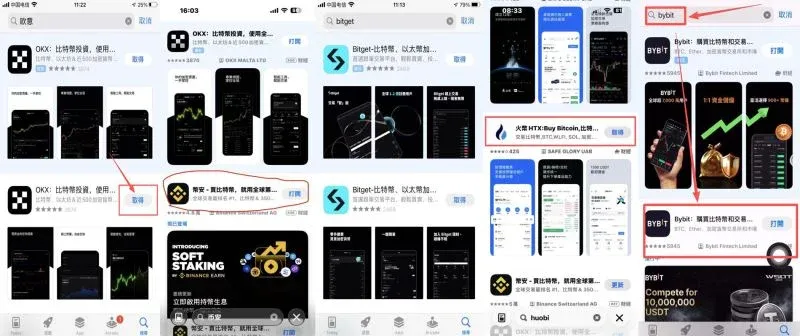
).
4. Download via QR‑Code Scan
Binance also provides a QR‑code that works for both Android and iOS devices.
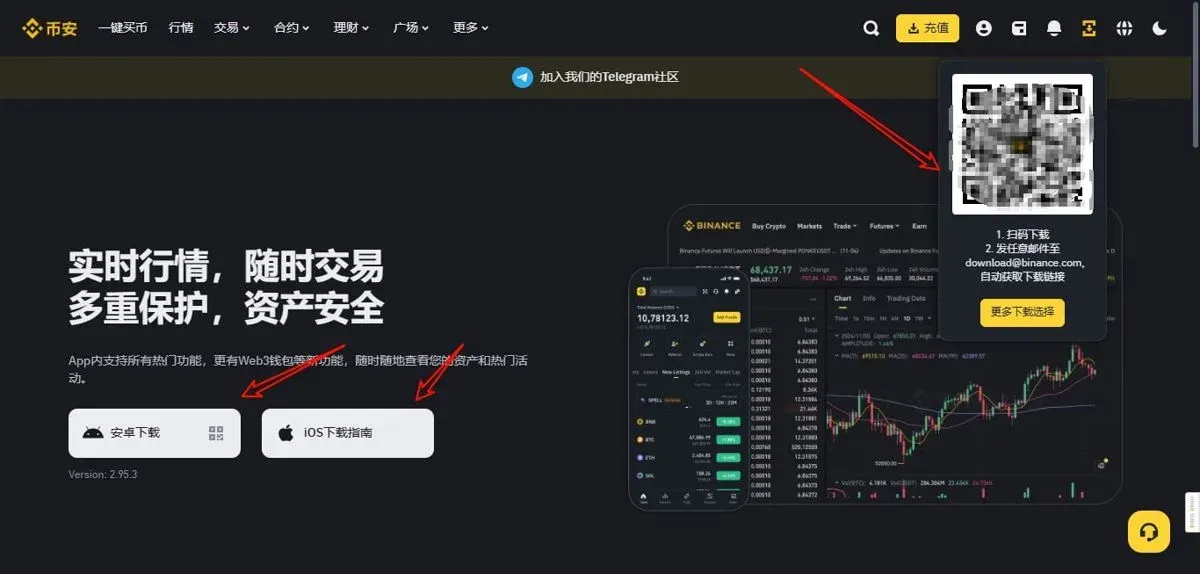
- On a desktop browser, open the Binance website and hover over the “Download” menu in the top‑right corner; a QR‑code will appear.
- Use your phone’s browser (not WeChat or QQ) to scan the code.
- iOS devices will automatically jump to the App Store, while Android devices will start downloading the APK directly.
5. Request a Download Link via Email
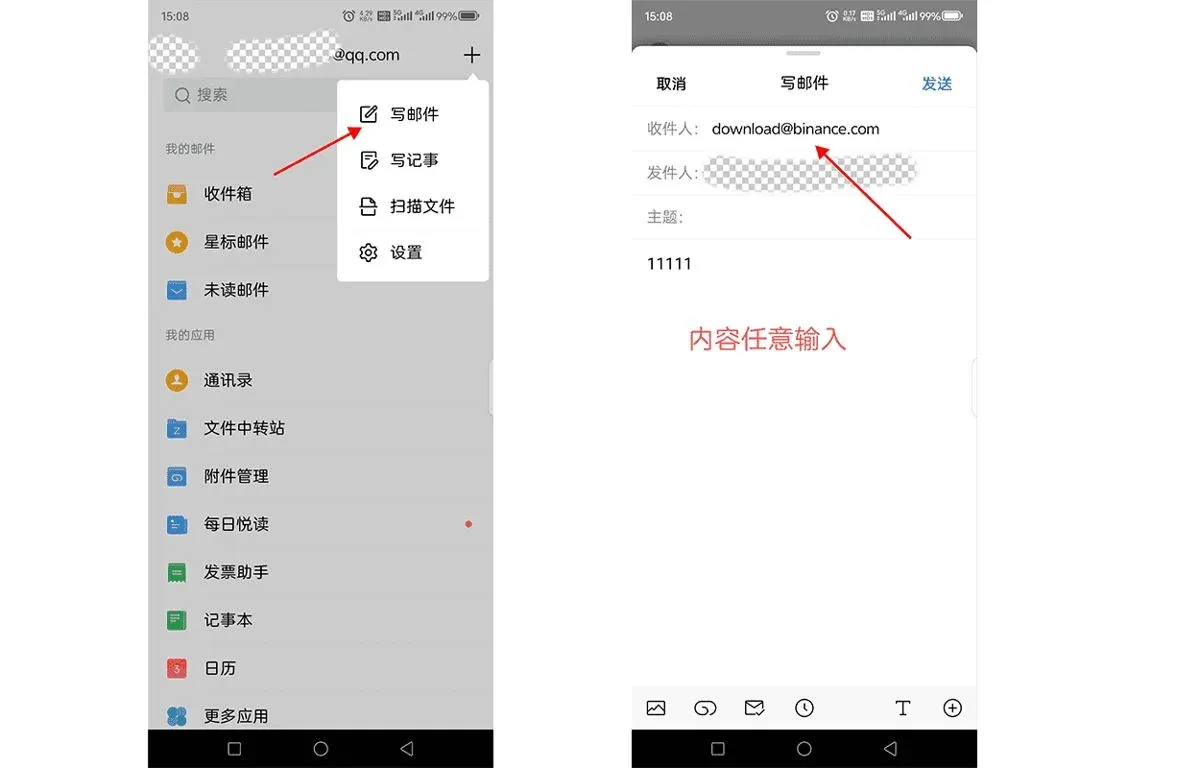
You can also email Binance’s support address to request a download link; the team typically replies within minutes.
- From a commonly used email account (QQ, NetEase, Outlook, etc.) send a message to the Binance download address (https://www.bitaigen.com/binance/download).
- When you receive the reply, copy the link into your browser and download the installer.
2. Benefits of Using the Latest Binance APP Version
1. Enhanced Security
Binance continuously patches vulnerabilities, upgrades two‑factor authentication (2FA), and adds biometric options such as fingerprint and facial recognition to raise the protection level of accounts and transactions.
2. New Features and Improvements
- Trading features: Additional trading pairs, payment methods, and contract products.
- UI refinements: More intuitive navigation and an upgraded user experience.
- Performance boosts: Faster order execution and reduced lag.
3. Stability and Compatibility
Each new release resolves compatibility issues, supports a broader range of device models and operating‑system versions, and ensures smooth operation across different hardware.
3. Important Considerations When Downloading the Binance APP
1. Common Causes of Installation Failure
- Enable the “Allow installation of apps from unknown sources” permission (on Huawei devices you may also need to disable “Pure mode”).
- Verify that the downloaded APK is complete (check file size against the official size).
- Clear your browser cache and retry the download if the file appears corrupted.
2. Permission Settings
During installation the system will request access to the camera, storage, and other resources. Grant only those permissions that are strictly necessary to avoid unnecessary data exposure.
3. Regular Updates
To keep your account secure and enjoy the newest features, check for updates regularly. If the in‑app updater does not work, return to the official website or request a fresh installer via email.
4. Registering an Account on Binance
Preparations Before Registration
- Email address or phone number: Required for login and receiving verification codes.
- Government‑issued ID (passport or national ID): Needed for KYC (Know‑Your‑Customer) verification.
- Secure network environment: Avoid public Wi‑Fi and keep firewalls and anti‑virus software up to date.
Quick Registration Steps
- Visit the Binance registration page and click “Register.”
- Enter your email or phone number and create a strong password that includes uppercase and lowercase letters, numbers, and special symbols.
- Input the referral code B2345 (which gives a 20 % fee discount) and submit the form.
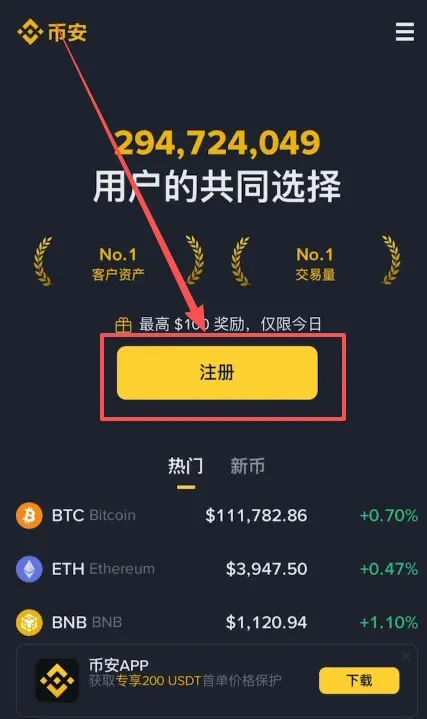
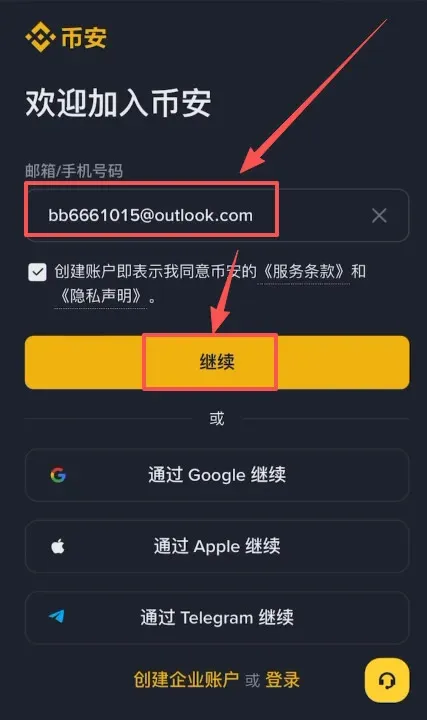
Email‑Registration Example
- You can use Outlook, Gmail, or domestic services such as QQ or 163.
- After receiving the verification code, enter it, set your password, and the account will be created.
5. Binance Identity Verification (KYC)
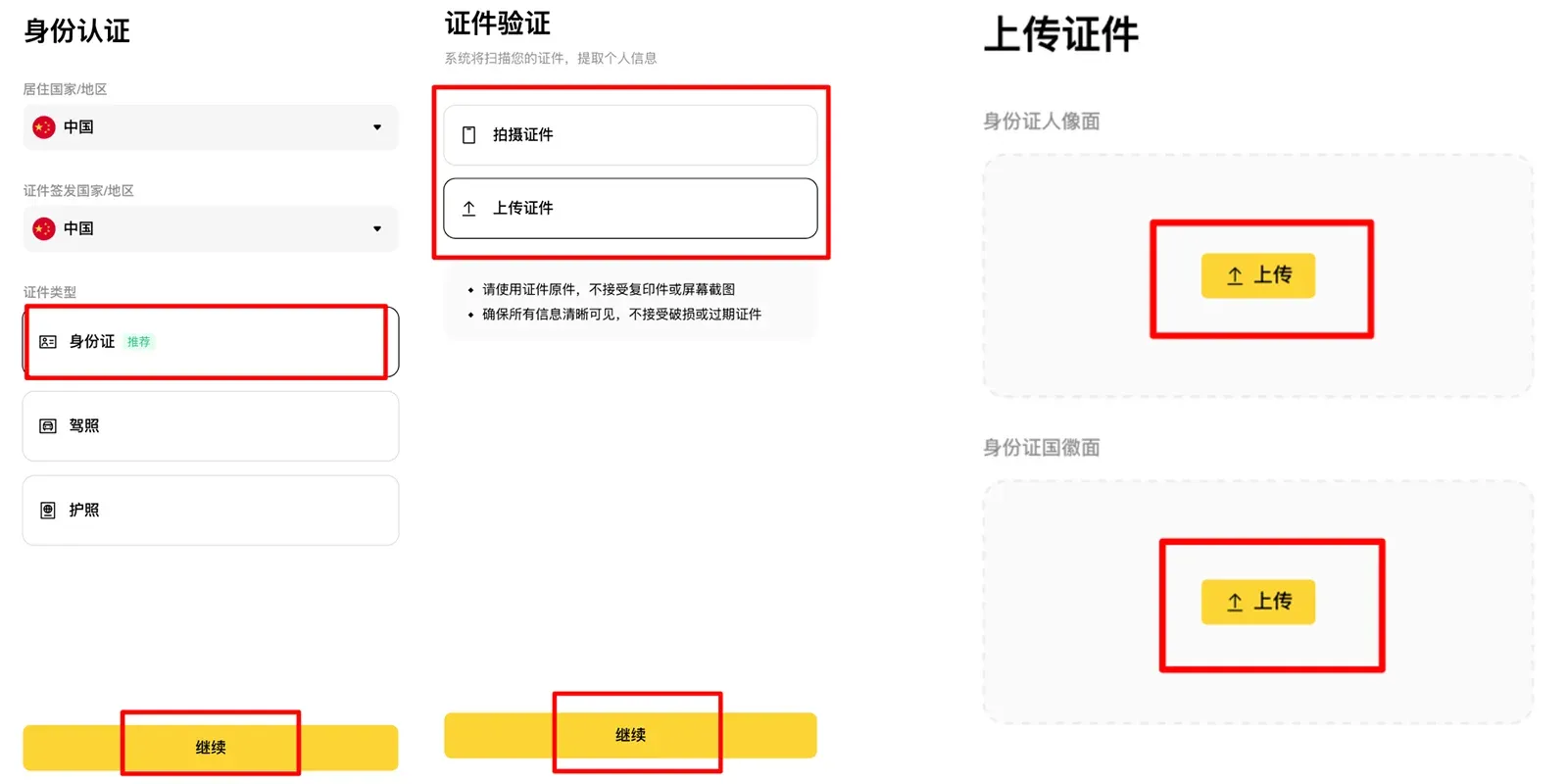
After registration, tap “Verify” to start the KYC process. Chinese users should select “China” as the country and upload a photo of their national ID. Verification is usually completed within the same day if the information is accurate. All submitted data must be truthful; otherwise verification may be rejected.
Overview of the KYC Workflow
- Log into the Binance APP, tap the avatar in the top‑left corner, then select “Identity Verification.”
- Choose your country of residence and upload front‑ and back‑side photos of your ID.
- Perform facial recognition (head movements, mouth opening, etc.) as prompted.
- Review the information, submit, and wait for approval (generally a few hours).
Tax note: Crypto gains may be taxable in your jurisdiction. Consult a tax professional to understand your obligations, especially when converting between crypto and fiat currencies such as USD, EUR (via SEPA), or using SWIFT transfers.
6. Adding a Security Authenticator
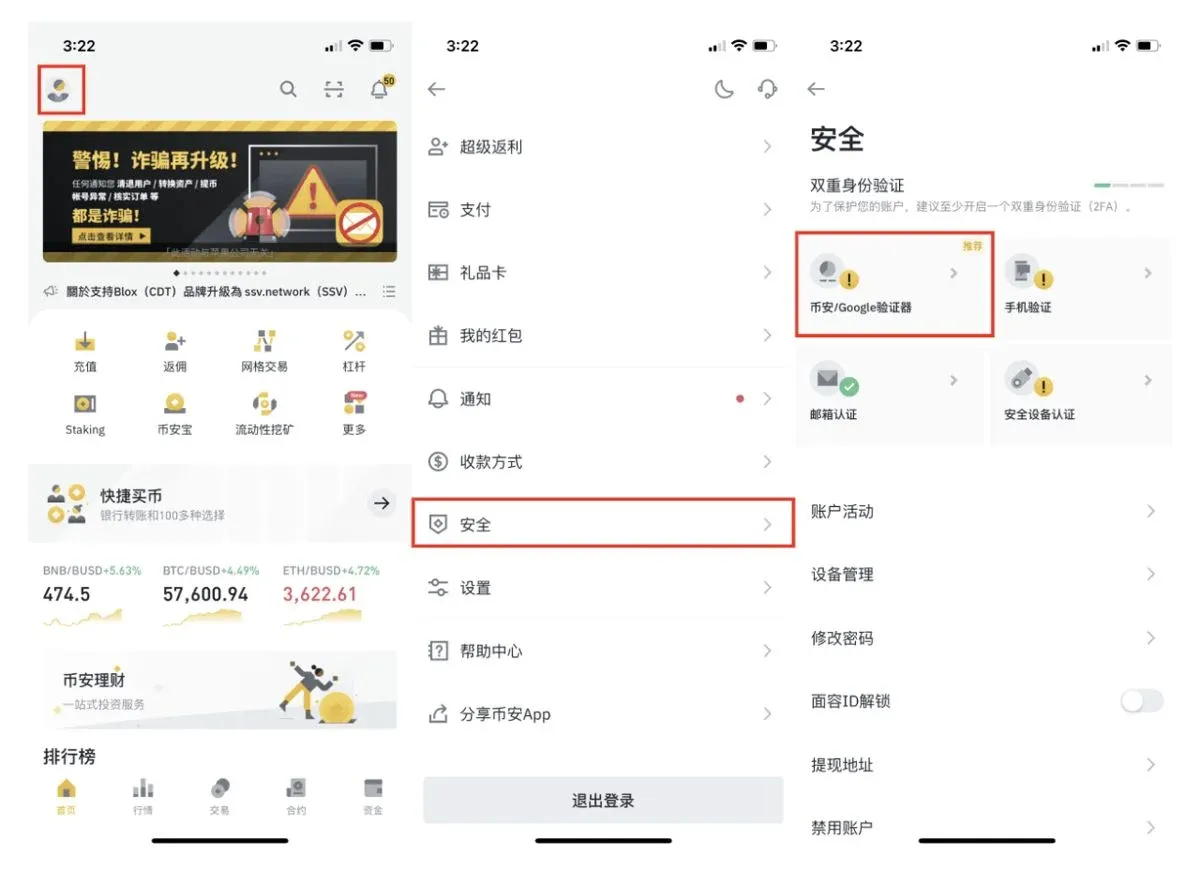
- Both Google Authenticator and Binance Authenticator can serve as second‑factor verification tools.
- We recommend the Binance Authenticator for seamless integration. Follow these steps:
- Open the Binance APP → Profile → Security → Binance/Google Authenticator.
- Choose the appropriate authenticator to download, then record the 16‑digit secret key displayed by the system.
- In the authenticator app, add the secret key manually or scan the QR code to generate a 6‑digit code.
- Return to the Binance APP, input the 6‑digit code, and complete the binding.
7. How to Deposit Funds into Binance
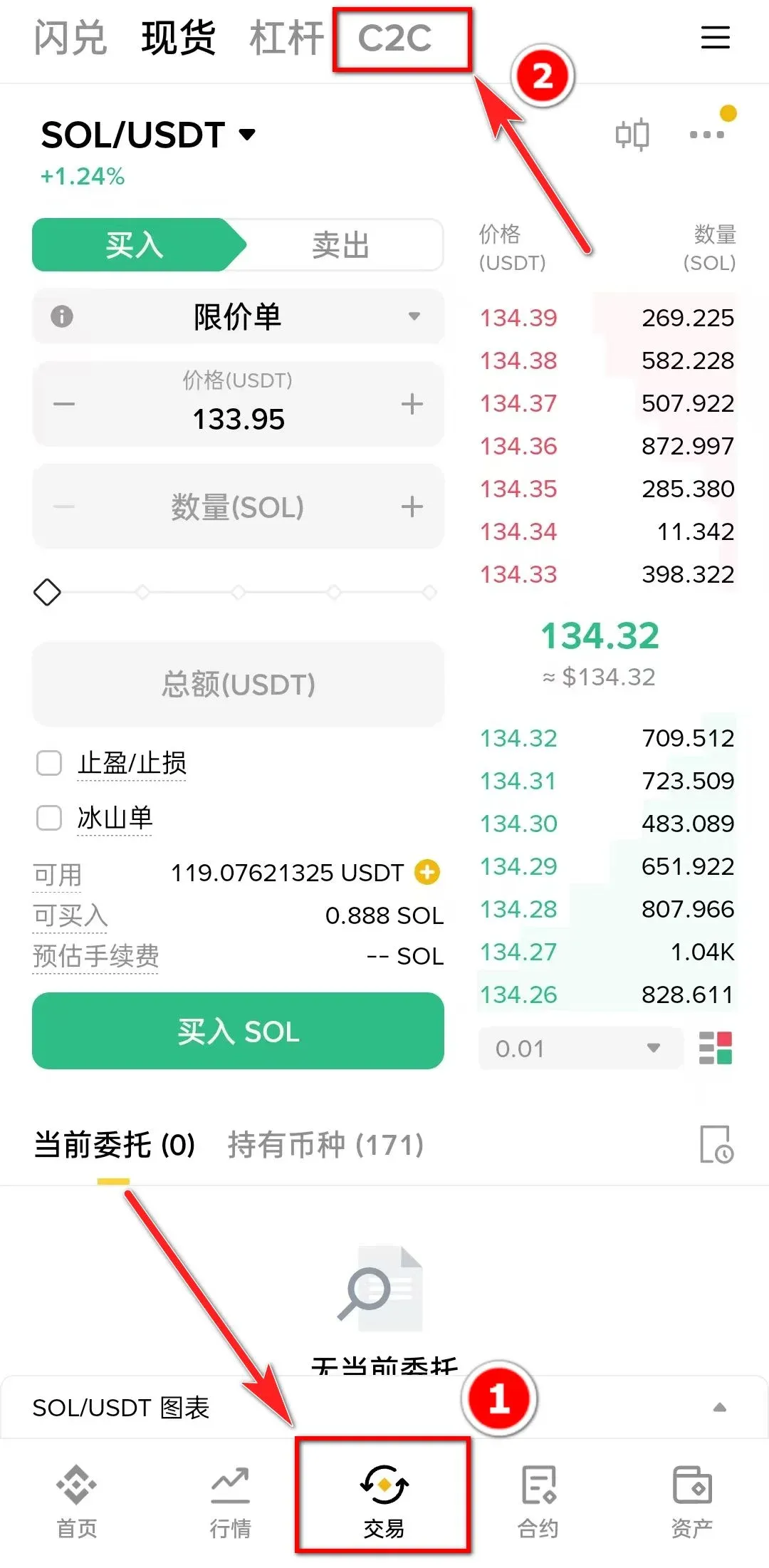
- Open the app’s home screen and tap “Trade” → “C2C.”
- On the “Buy Crypto” page choose either the “Quick” section (ideal for beginners) or the “Custom” section (for more experienced users). The default trading pair is USDT.
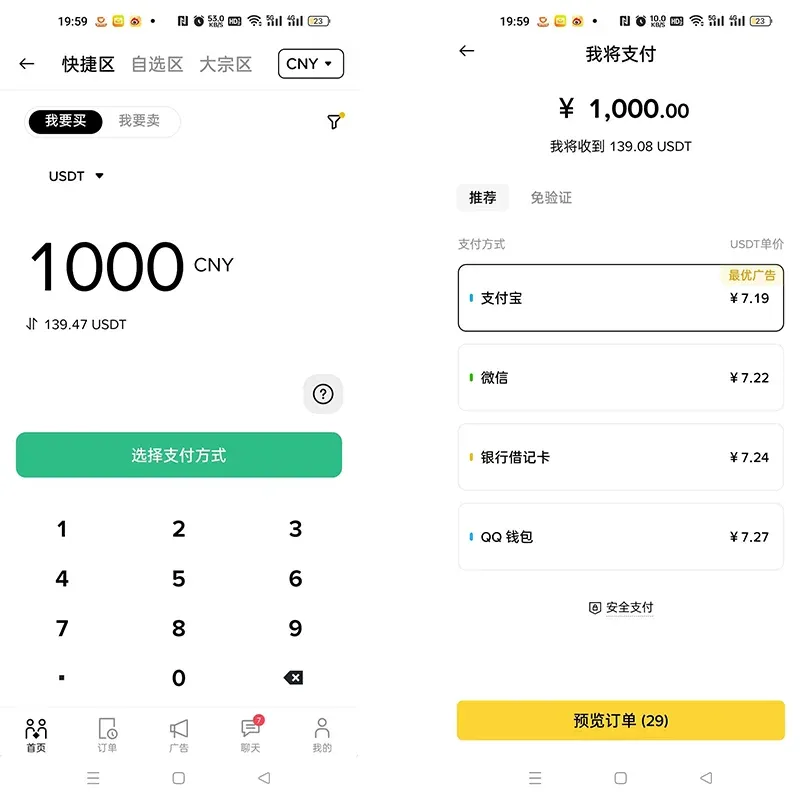
8. Quick‑Section Trading (C2C)
- Enter the purchase amount (e.g., 1000 CNY ≈ 139.47 USDT), select a payment method (WeChat Pay, Alipay, or bank card), confirm, and complete the payment.
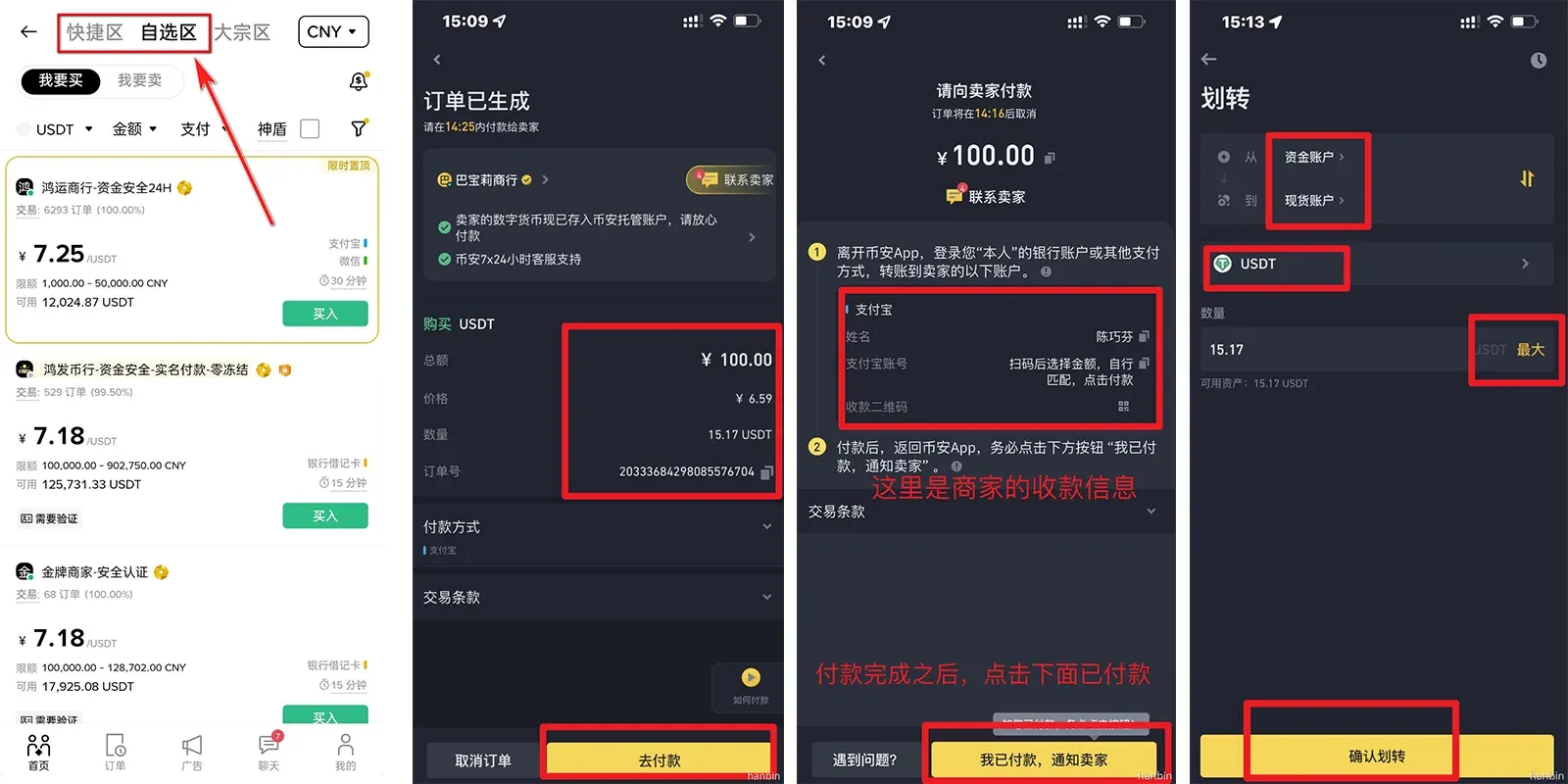
9. Custom‑Section Trading (C2C)
- Filter merchants by amount and preferred payment method, then tap “Buy.”
- Follow the merchant’s provided payment instructions (Alipay or bank‑transfer) to settle the off‑platform transaction.
- Once the merchant confirms receipt, the USDT will be released into your Binance account.
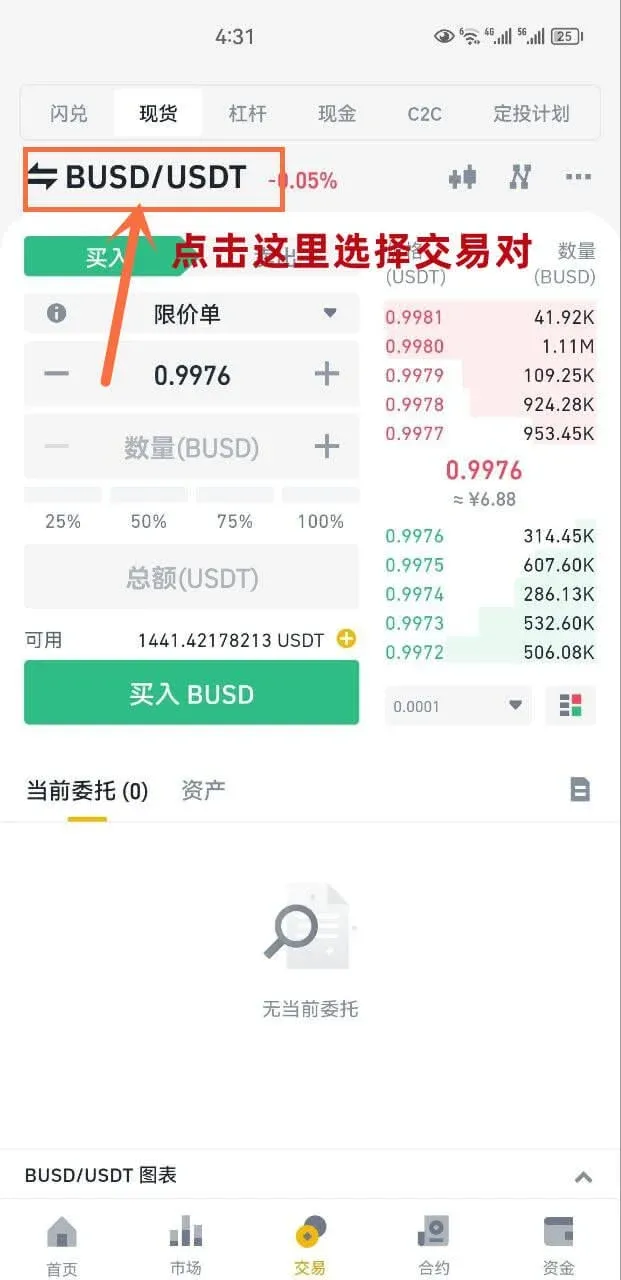
10. Spot‑Trading Workflow (Crypto‑to‑Crypto)
- Ensure you have USDT in your account (you can acquire it via the C2C “Quick” or “Custom” sections).
- Transfer USDT from your fiat wallet to the Spot wallet.
- Tap “Trade”, select a trading pair such as BTC/USDT, enter the amount you wish to purchase, and press “Buy BTC.”
Common Order Types
- Limit order – Executes at the price you specify.
- Market order – Executes immediately at the best available price.
- Other advanced order types can be explored by
Related Reading
💡 Register on Binance with referral code B2345 for the maximum trading fee discount. See Binance complete guide.



