
 Bitaigen Research
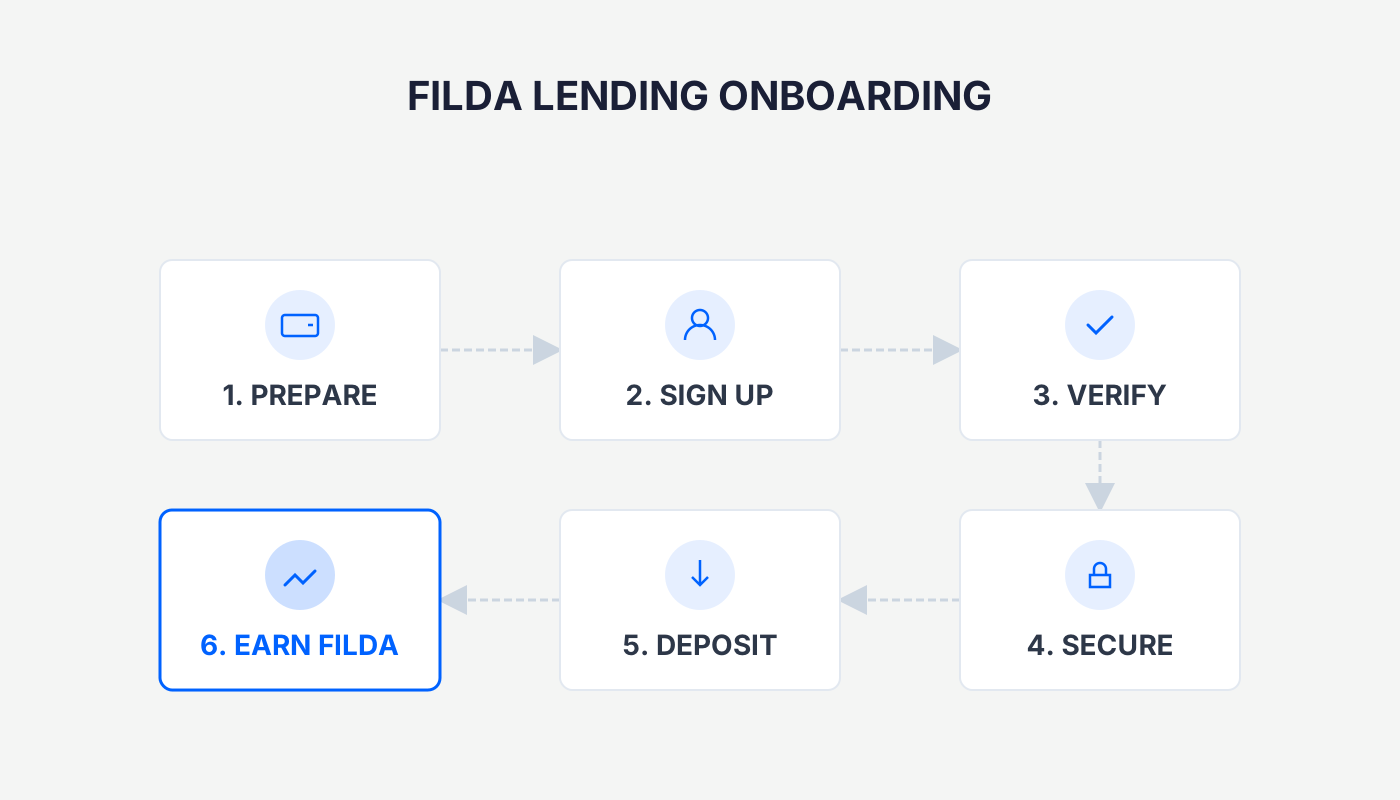
The first lending project deployed on HECO, Filda mining, is divided into two phases: lending and liquidity provision. First, prepare HT in a HECO‑compatible wallet to cover gas fees, then log in to the official Filda website to make a deposit or provide LP tokens and stake them, thereby earning FILDA rewards. *(For users in the United States, fiat on‑ramps must be accessed through Binance.US or other regulated platforms; global users can use USD via SEPA/SWIFT channels.)*
Project Background
FilDA is a decentralized finance (DeFi) ecosystem built across multiple chains—Elastos public chain, HECO (Huobi Eco‑Chain), and Filecoin. It offers staking, lending, and wealth‑management services for FIL, ELA, and other assets. By means of cross‑chain bridges, tokens such as ELA, HT, and FIL can be transferred into FilDA as collateral, and the platform supports the staking, lending, and wealth‑management of assets like HT and HUSD.
Risk Notice
- Liquidity mining is not risk‑free; participants should conduct their own research and make independent judgments. This article does not constitute investment advice.
- The primary risk for lending platforms is a sharp decline in the value of collateral or oracle manipulation leading to forced liquidation, which may cause losses for borrowers.
- Unless the platform’s code is compromised or the team absconds, lenders’ funds are relatively safe, but the corresponding annualised returns are usually lower than those of high‑risk mining activities.
Tax reminder: Crypto gains may be subject to taxation in your jurisdiction. Please consult a tax professional to understand your local obligations.
Pre‑Mining Checklist
- Set up a wallet that supports HECO
https://www.jb51.net/blockchain/764965.html
- How to transfer coins to a HECO wallet
https://www.jb51.net/blockchain/764988.html
- Maintain a sufficient amount of HT
Every transaction requires HT as a gas fee; it is recommended to keep at least 1 HT in the wallet.
In this guide we walk you through the complete mining workflow of HECO’s first lending project, Filda, covering wallet preparation, deposit‑staking, and reward collection, while highlighting the key risks of cross‑chain collateral. The step‑by‑step breakdown is designed to help newcomers get started quickly, and we remind you to perform a thorough risk assessment before proceeding. Subsequent sections will dive deeper into the details—please continue reading.
Usage and Mining Procedure
Note: The current BASIS GOLD feature supports non‑impermanent loss mining for HT, HUSD, and HBTC, as well as higher‑risk dual‑pool LP mining for BAGS‑HUSD, BAGS‑HBTC, BAG‑HUSD, and BAG‑HBTC. Please evaluate the risks before interacting.
1. Lending Mining
1. Log in to the Official Site
Visit https://filda.io/ or search Filda on the Discover page of the TP wallet.
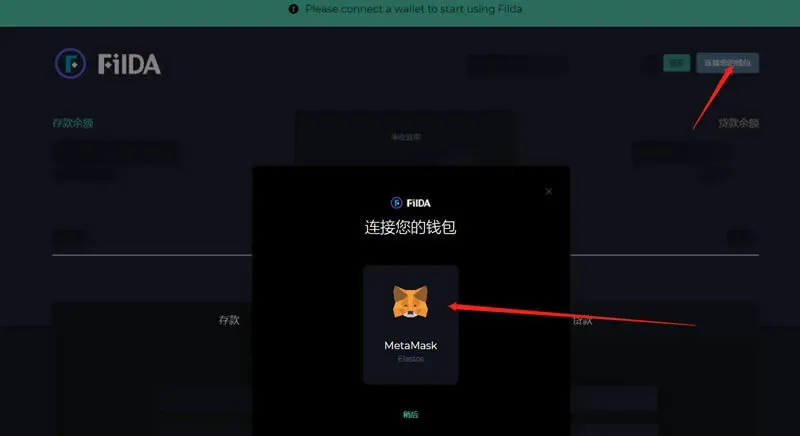
2. Connect a HECO Wallet
Switch MetaMask to the HECO Mainnet and connect your wallet.
3. Choose an Asset
The platform currently supports 11 assets, including HT, HUSD, ELA, HFIL, HBTC, HETH, and others.
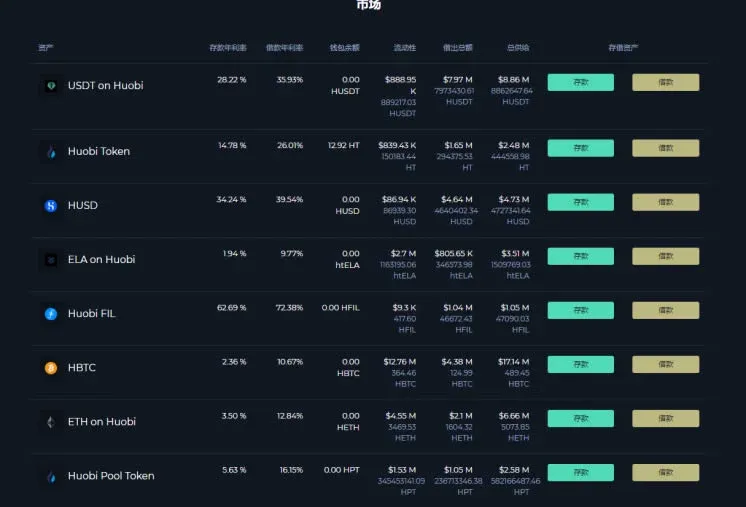
On this screen you can deposit (lend) or borrow assets. In addition to conventional interest earnings, FilDA also offers lending mining, whereby users earn FILDA tokens by depositing and borrowing.
4. Token Supply and Mining Timeline
- Total supply: 500,000,000 (five hundred million)
- Start date: 2021‑01‑05 12:00 UTC, with an approximate four‑year emission schedule
- First 4 weeks: 25 FILDA per block (representing 4 % of the weekly emission)
- Thereafter: 12 FILDA per block
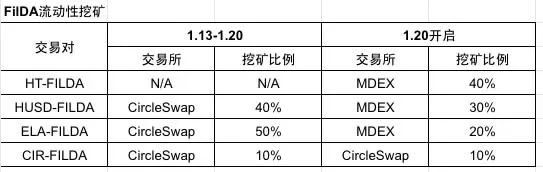
- Distribution: Lending mining 40 %, liquidity mining 40 %, insurance pool 15 %, team & operations 5 %
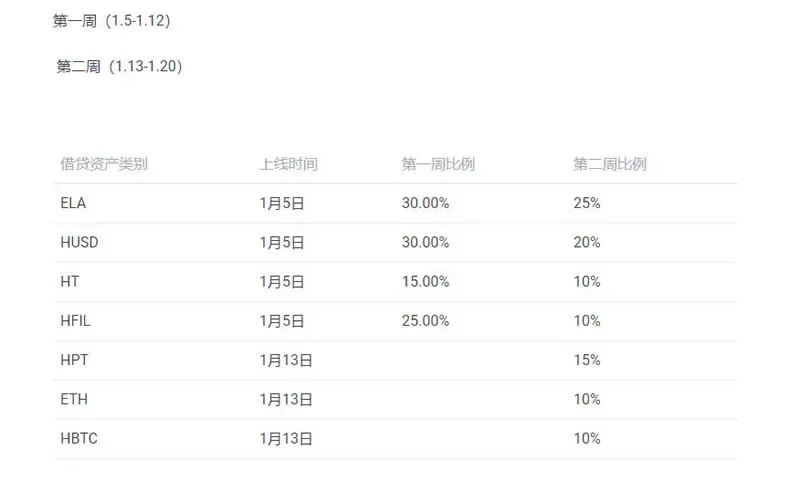
5. Allocation for Lending Mining
- Lending mining accounts for 40 % of the total issuance; the deposit side and the borrow side each receive 20 % of the FILDA tokens.
6. Allocation for Liquidity Mining
- Liquidity mining also occupies 40 % of the total supply. The specific pools and their weightings are adjusted from time to time.
7. How to Deposit Assets (Lending)
Using HUSD as an example, the current annualised return is roughly 12.44 % (subject to supply‑demand dynamics). Steps:
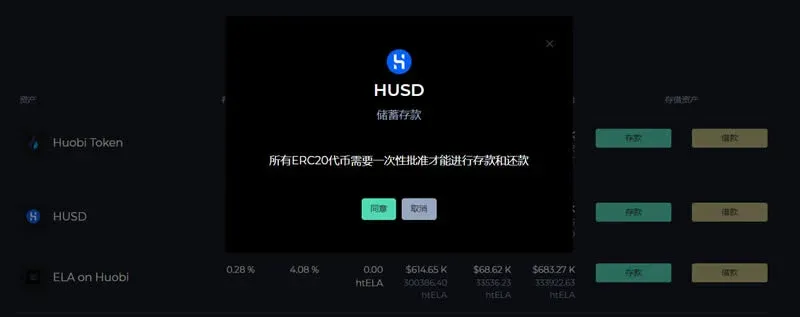
- Click Deposit → Agree to grant permission.
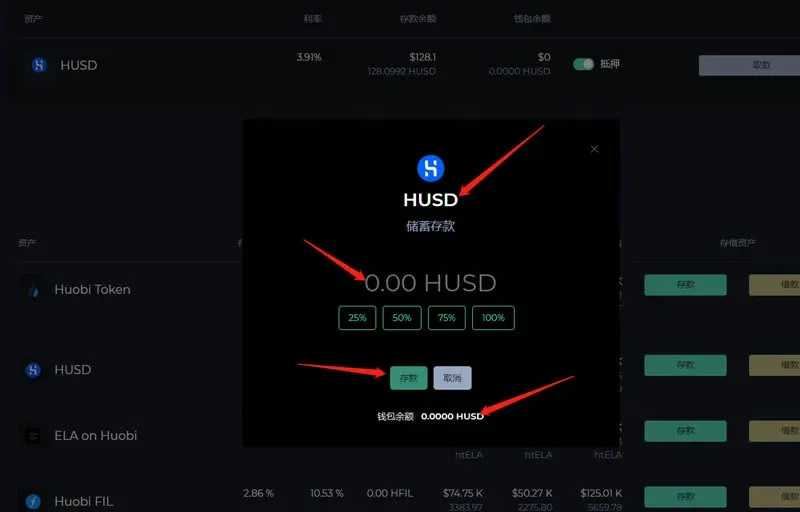
- Enter the amount you wish to deposit, confirm, and the transaction will be processed.
8. How to Borrow Assets (Loan)
Lending on FilDA uses an over‑collateralised model; you must first lock collateral before you can borrow.
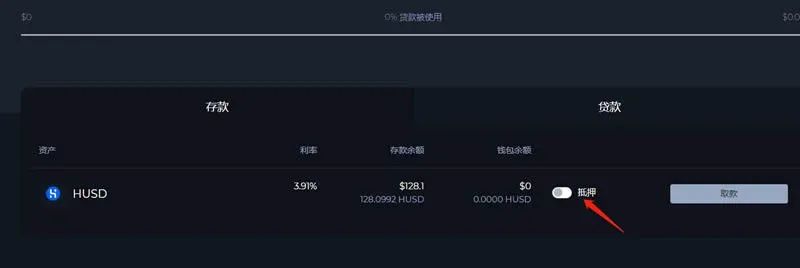
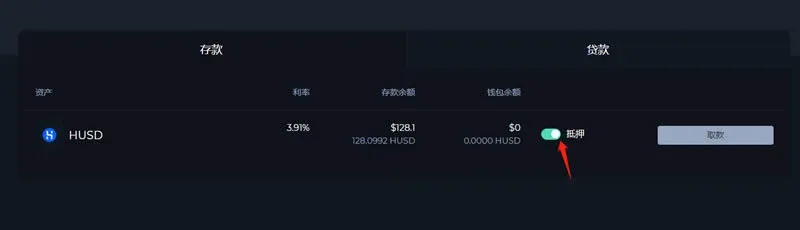
- After completing a deposit, locate the asset on the dashboard and click Collateralise to set it as collateral.
- Once the collateral transaction is confirmed (the status turns green), a Borrow option appears below.
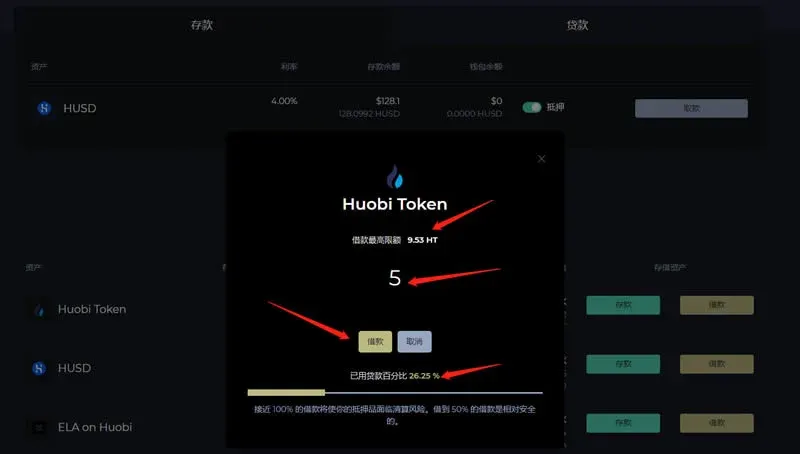
For instance, using HUSD as collateral to borrow HT, the interface will display the maximum borrowable amount, the actual amount you will receive, and the utilisation ratio. Click Borrow to have the loan transferred to your wallet.
2. Liquidity Mining (Staking Mining)
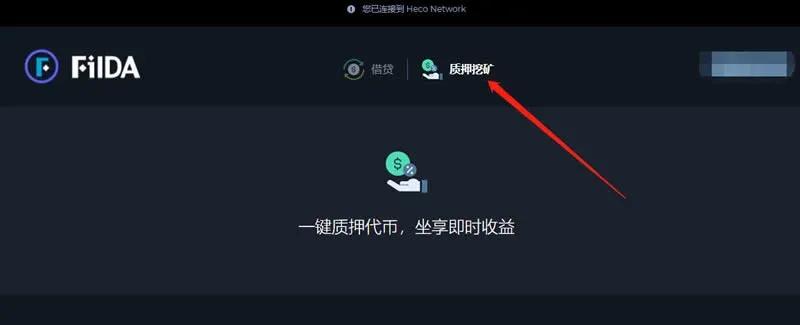
Visit https://filda.io/Staking or click Staking Mining on the main website.
1. Select a Staking Pool
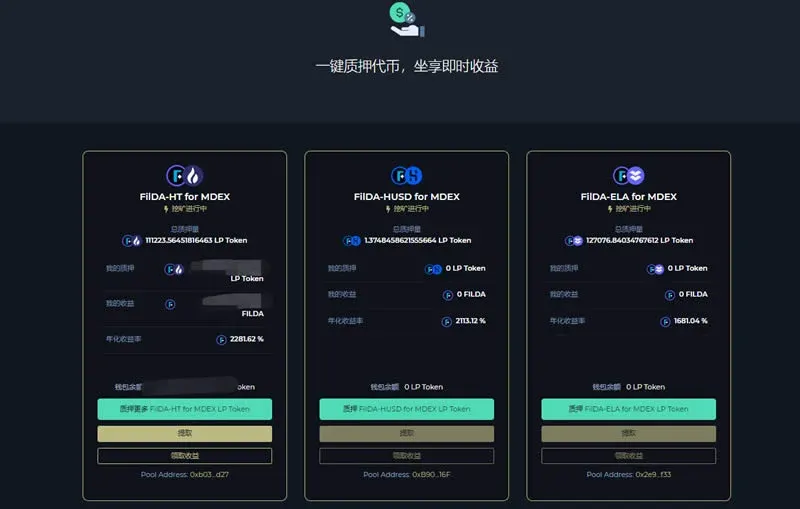
The page lists 6 staking pools, of which 2 have been closed. We will demonstrate using the FILDA/HT pool.
2. Add Liquidity on MDEX to Obtain LP Tokens
- Navigate to the MDEX pool page at https://ht.mdex.com/#/pool and click Add Liquidity.
- Choose the amount you wish to provide. Note: Keep at least 0.5‑1 HT in your wallet to cover gas fees.
- Adding liquidity carries impermanent loss risk; assess the price volatility of the two tokens involved.
- After confirming, click Supply and sign the transaction.
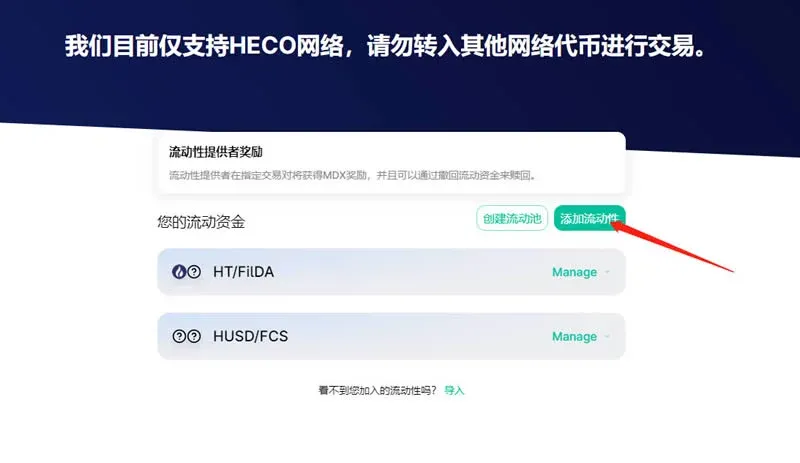
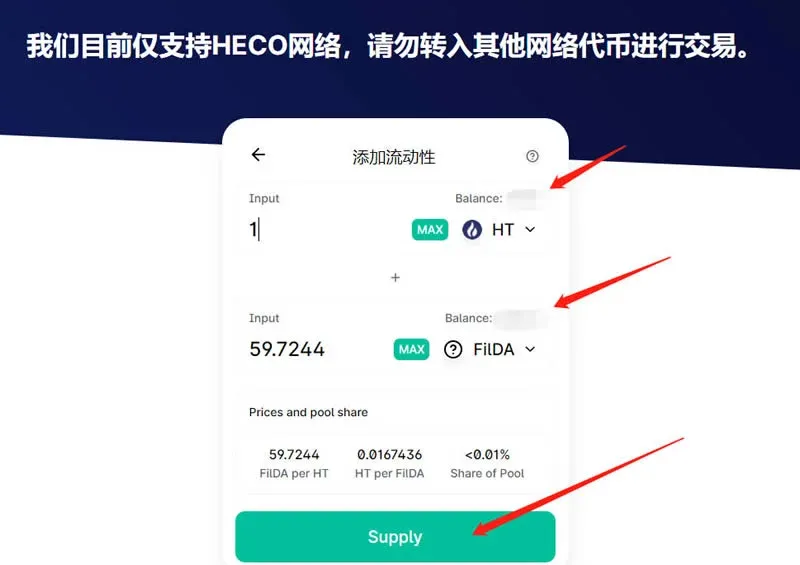
3. Stake the LP Token to Commence Mining
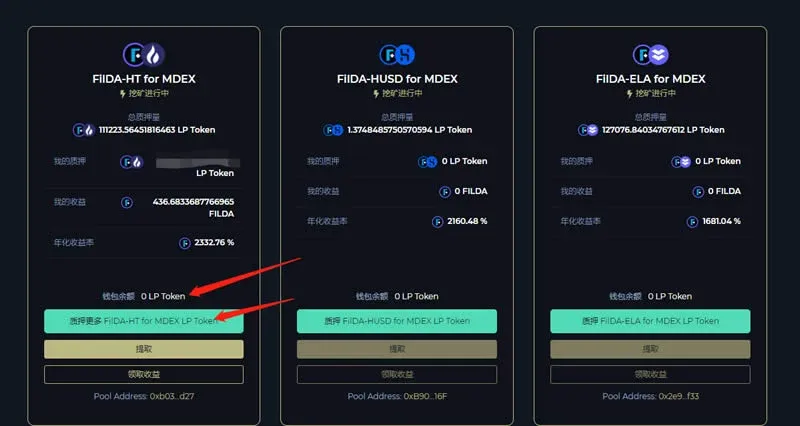
Return to the FilDA staking page (https://filda.io/Staking). Your newly‑acquired LP token will appear under Wallet Balance. Select FILDA‑HT for MDEX LP token and click Stake.
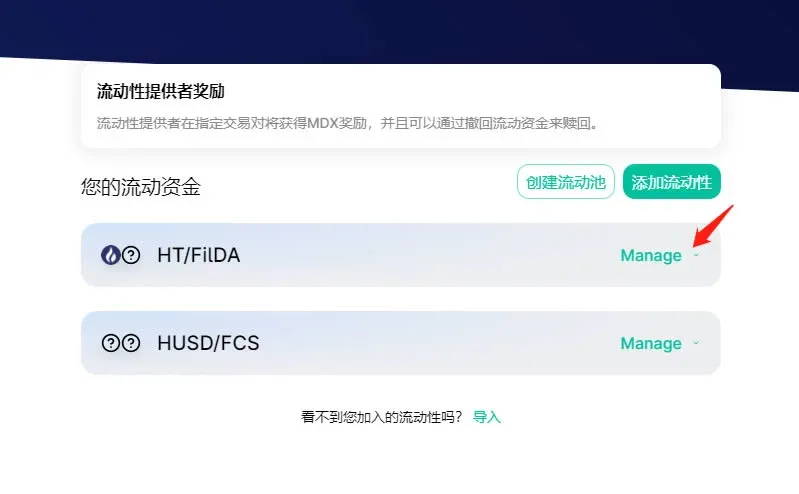
Once the stake is successful, you will begin accruing FILDA rewards. When you wish to withdraw:
- Harvest Rewards: Click the corresponding button to claim the accumulated FILDA.
- Withdraw LP Tokens: Click Withdraw, which redeems the LP tokens back to MDEX, where you can swap them for the original assets.
4. Insurance Mining & DAO
The staking page also supports single‑token FILDA staking, which constitutes insurance mining:
- DAO governance incentives represent 15 % of community rewards; participants share the pool proportionally to their stake.
- The insurance pool provides subsidies to users who suffer losses during extreme market conditions that cause liquidation and insufficient liquidity.
Key operating rules (simplified):
- The insurance pool can only be accessed after an administrator is set; each withdrawal is capped at 50 % of the pool.
- Deposits start mining immediately; earned FILDA can be harvested at any time.
- Withdrawal requests require a 72‑hour processing period before funds are released.
- The admin account is initially empty; once set, it becomes effective after 96 hours and will later be governed by DAO voting.
Project Contact Information
- Official website: https://filda.io/
- Twitter: https://twitter.com/FilDA101
The above constitutes a complete step‑by‑step tutorial for mining on Filda, the first lending project deployed on HECO. For additional content on HECO‑based lending platforms, please follow other articles from Bitaigen (比特根).
Related Reading
- MetaMask HECO 网络错误快速排除指南:更改代币符号恢复正常
- Add HECO to MetaMask: PC Wallet Setup Guide
- Launch Your Own BSC, HECO, ETH Token Using Bitpie Wallet
💡 Register on Binance with referral code B2345 for the maximum trading fee discount. See Binance complete guide.



