
 Bitaigen Research
 We have compiled in this article the most common error types encountered when importing a mnemonic phrase or a private key, analyzed the root causes, and outlined corresponding troubleshooting approaches. With a clear comparison table, readers can quickly pinpoint the issue and avoid asset loss caused by input mistakes. Subsequent sections will also remind you of critical details to watch for during actual operations, helping you restore a wallet safely and smoothly.
What to Do When Importing a Mnemonic Phrase or Private Key Returns an Error?
During the use of decentralized wallets, importing a mnemonic phrase or a private key often triggers various warning messages. The table below lists several typical error messages, their causes, and suggested remedies for quick reference.
| **Error Message** | **Cause** | **Solution** |
|---|---|---|
| Mnemonic phrase is incorrect | One or more words are not part of the BIP‑39 word list | Compare against the official list at <https://github.com/bitcoin/bips/blob/master/bip-0039/english.txt>, locate the incorrect word(s), correct them, and retry the import |
| Mnemonic phrase length is incorrect | The number of entered words does not match the standard 12, 18, or 24 | 1️⃣ Verify that the total word count meets the required length; 2️⃣ When re‑entering, ensure each word is separated by a single space |
| Mnemonic checksum is invalid | The last word does not match the checksum derived from the preceding words | Same as above—check the BIP‑39 word list, correct the final word, and import again |
| Please enter a valid private‑key format | The private‑key string is malformed or missing required prefixes | Confirm that the private key is complete and conforms to the format required by the specific blockchain; if necessary, copy‑paste the correct private key again |
Tip
If you encounter messages such as “Please enter a valid private‑key format” or “Account does not exist” while importing an EOS private key, contact the official support team for assistance.
---
Important Considerations When Importing a Mnemonic Phrase
With smartphones being upgraded at an ever‑faster pace, users frequently need to restore wallets on new devices. The following points address often‑overlooked details that can help you avoid the dreaded “zero‑balance” scenario.
1. Distinguish Between Import and Create
- Import: Use an existing mnemonic phrase to recover an old wallet; the address remains unchanged.
- Create: The system generates a brand‑new mnemonic phrase, which in turn creates a completely new address.
Many users mistakenly select “Create wallet” during the process, which generates a fresh address that naturally holds no funds. This can be misinterpreted as a loss of assets. Always double‑check that you are performing a mnemonic import operation on the interface.
2. Prevent Mnemonic Confusion
- One mnemonic phrase corresponds to a single set of addresses. If you own multiple wallets, you will have multiple distinct phrases.
- Failing to map each phrase to its respective address makes it easy to input the wrong phrase on the wrong blockchain, resulting in an empty wallet after restoration.
When backing up, consider adding numbers or descriptive tags that clearly link each phrase to its blockchain and address.
3. Common Mistakes in Mnemonic Backup
A mnemonic typically consists of 12 or 24 words, each drawn from the 2,048‑word BIP‑39 dictionary. Two frequent abnormal outcomes are:
- Import fails with the prompt “Mnemonic phrase is incorrect” – this indicates that at least one word is not in the official dictionary; simply cross‑reference the list and correct the typo.
- Import succeeds but the balance shows zero – in this case, verify whether the newly imported wallet address matches the one you previously used. A mismatch often means a transcription error where a word with a similar spelling was recorded incorrectly (e.g., `awake` vs. `aware`, `blue` vs. `blur`), leading to the generation of a different, empty derived address.
4. Impact of the Derivation Path
The mnemonic itself only provides the seed; the actual addresses are also determined by the derivation path used during import. Different wallets—or even different settings within the same wallet—may default to distinct paths, producing different addresses from the same seed.
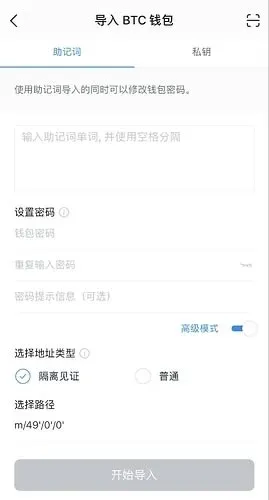
Take imToken as an example: when importing a BTC wallet, the interface presents a “Select Path” option. The concept of a path originates from BIP‑32 hierarchical deterministic (HD) wallets and works together with BIP‑39 to manage multiple child addresses from a single mnemonic. BIP‑44 standardizes the path format as follows:
```
m / purpose' / coin_type' / account' / change' / address_index'
```
| Position | Meaning |
|---|---|
| m | Master node (root) |
| purpose | Fixed to `44` for BIP‑44; SegWit uses `49` |
| coin_type | Coin identifier (0‑BTC, 1‑BTC Testnet, 2‑LTC, 60‑ETH, etc.) |
| account | Account index, starting at 0 |
| change | `0` for external receiving addresses, `1` for internal change addresses |
| address_index | Address sequence number, starting at 0 |
Most mainstream wallets adopt the same default path, but a few products modify the default internally. For instance, imToken’s BTC default path points to a SegWit address; if you previously used a legacy P2PKH address, the imported balance will appear as 0 even though the funds remain at the old address. Switching the address type within the app will reveal the assets.
Practical tip: When you back up a mnemonic, also record the full derivation path currently in use. Later, when you change wallets or devices, restoring with the identical path prevents mismatched address confusion.
---
Safe Habits to Avoid “Zero‑Balance” Situations
- Primary task: Write down the entire mnemonic accurately on a physical medium; avoid storing it in any online tool.
- Error‑prevention measure: If you worry about handwriting mistakes, consider using a dedicated mnemonic steel‑plate or fire‑proof storage device.
- Path documentation: Immediately after creating a new wallet, note the default derivation path (e.g., `m/44/60/0/0/0`) alongside the first word of the mnemonic, and keep them together.
- Cross‑verification: Once backup is complete, log out of the wallet and re‑import using the same mnemonic to confirm that the generated address matches the original one.
- Information archiving: A recommended record format (using ETH as an example) is:
```
0x123456….789 - "m/44/60/0/0/0" - "abandon"
```
Here only the first word “abandon” is stored together with the full mnemonic kept separately, enabling quick correlation when needed.
By following these steps, you can restore assets with confidence regardless of how many times you switch phones or try new wallet applications. The security of a decentralized wallet ultimately rests on disciplined user practices; a small oversight can render funds unrecoverable.
This article addresses “What to do when importing a mnemonic phrase or private key returns an error?” and “Important considerations when importing a mnemonic.” It provides an error‑lookup table, outlines four typical scenarios that can lead to a zero‑balance outcome, and offers practical backup and recovery recommendations. For further details, stay tuned to Bitaigen’s upcoming专题 (special) articles.
*Note for global users*: When converting fiat values, use USD as the reference currency and SEPA/SWIFT for cross‑border transfers. U.S. residents should use Binance.US rather than the global Binance platform. Additionally, be aware that cryptocurrency gains may be subject to taxation under the laws of your local jurisdiction.
Related Reading
- OKX On‑Chain Withdrawal: Statuses, Delays & Fixes
- Import Private Key or Mnemonic Phrase into Bitpie Wallet
- imToken Transfer Failures: Causes & Quick Fixes
💡 Register on Binance with referral code B2345 for the maximum trading fee discount. See Binance complete guide.



