
 Bitaigen Research
 We systematically outline the entire process of completing SUSHI liquidity mining with the Bitpie wallet in this article, covering everything from preparing ETH and acquiring SUSHI to adding liquidity on Uniswap. Each step is illustrated with screenshots to help beginners get started quickly while avoiding common pitfalls. Continue reading for detailed operational instructions.
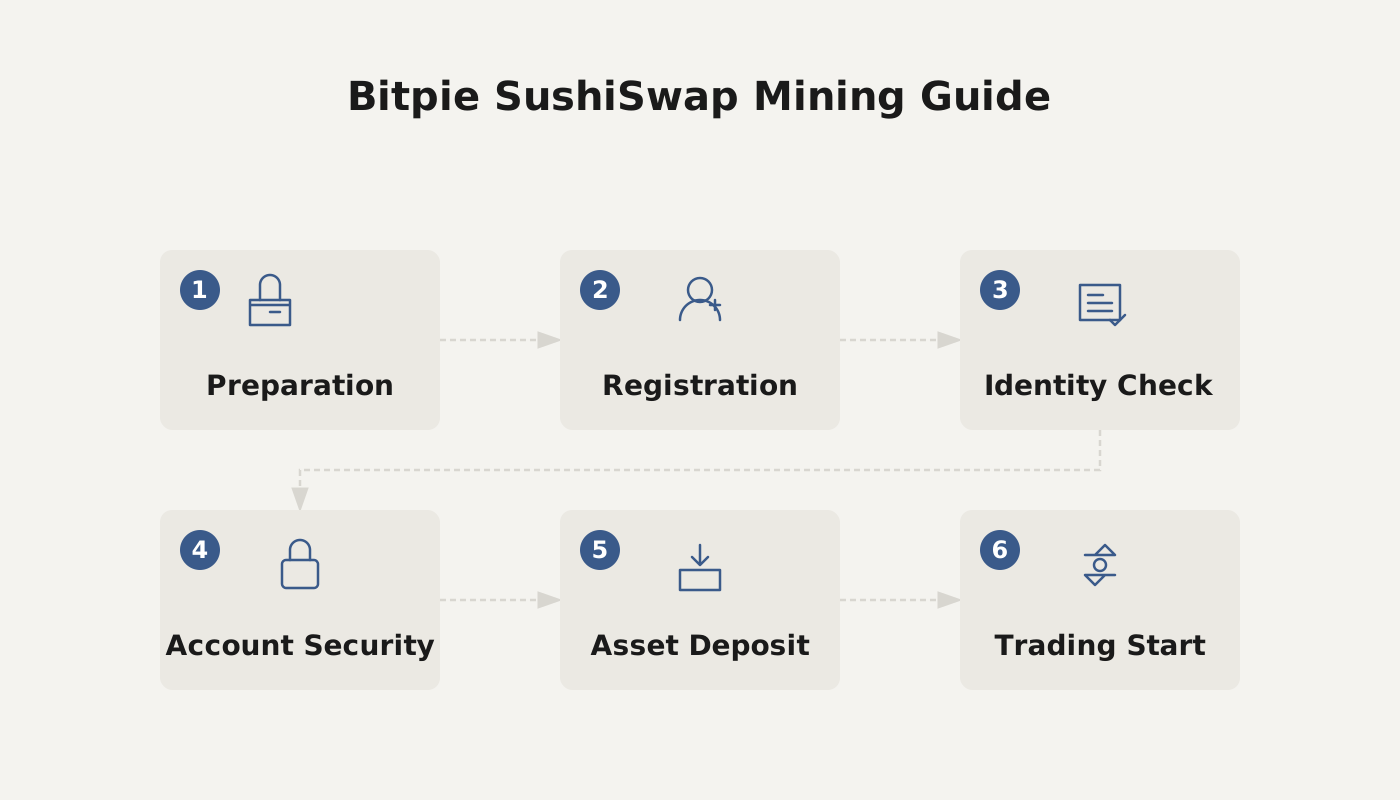
Bitpie Wallet bitpie SUSHI Mining Tutorial
This guide explains in detail how to use the Bitpie wallet (download: <http://bitpie.com>) to perform SUSHI liquidity mining on the Ethereum network. If you already hold ETH or SUSHI, you can skip the corresponding steps.
1. Prepare ETH (skip if your account already has ETH)
In the Bitpie wallet, go to One‑Click Trade or Currency Exchange, and follow the prompts to purchase the required amount of ETH. You can pay with USD via credit card, or use SEPA/SWIFT bank transfers where supported.
2. Acquire SUSHI (skip if you already have SUSHI)
- Open the Discover page in Bitpie and select Uniswap.
- In the token search box, type “sushi”. If the token does not appear, paste the contract address directly: `0x6b3595068778dd592e39a122f4f5a5cf09c90fe2`.
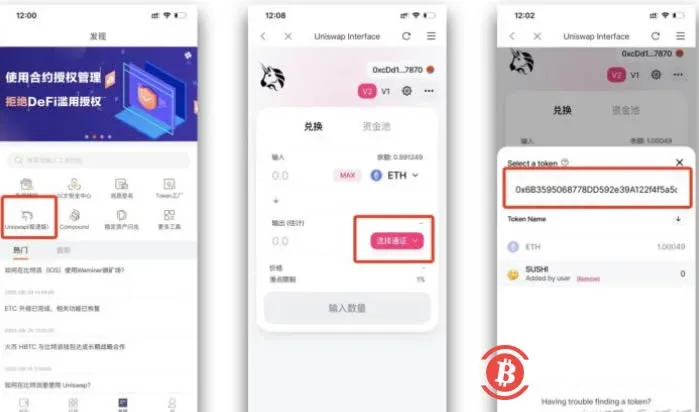
- In the trading pair window, enter the amount you wish to swap and click Swap. If the gas fee is insufficient, go to the “Ethereum Gas Station” on the Bitpie home page to top up a small amount. Because of slippage, the actual amount received may differ slightly from the quoted amount; you can set an acceptable slippage range via the gear icon in the upper‑right corner.
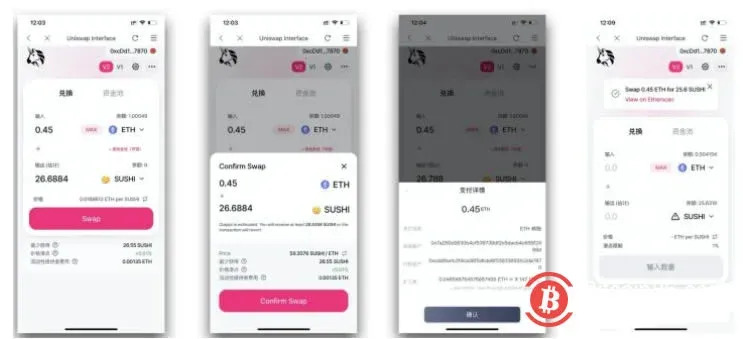
3. Add Liquidity to the SUSHI/ETH Pool and Receive LP Tokens
- On the trading pair page, tap Pools, then select Add Liquidity.
- Search for and select SUSHI.
- Provide equal‑value amounts of ETH and SUSHI (e.g., if 1 ETH ≈ 56 SUSHI, you need to deposit 1 ETH and 56 SUSHI simultaneously). The system will automatically mint the corresponding LP Token.
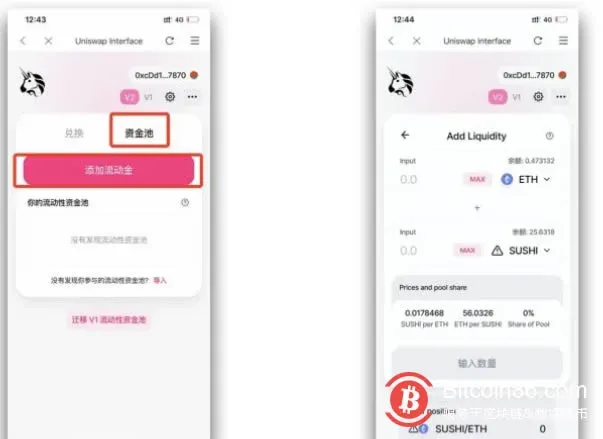
4. Stake LP Tokens to Start Mining
- Return to Bitpie’s Discover page, open Sushiswap, or directly enter `https://sushiswap.org/` in the search bar.
- After connecting your wallet, choose the SUSHI‑ETH‑V2 LP TOKEN pool.
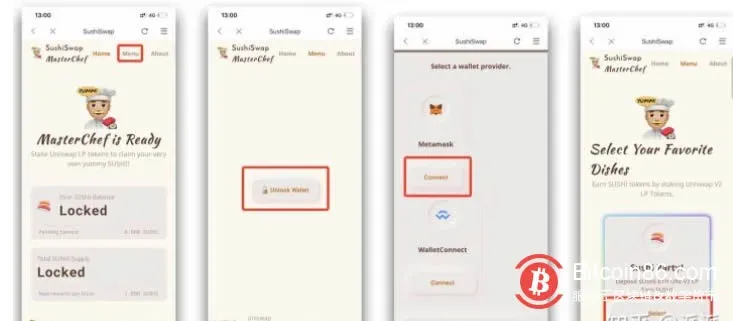
- Stake the LP Tokens you hold to activate mining.
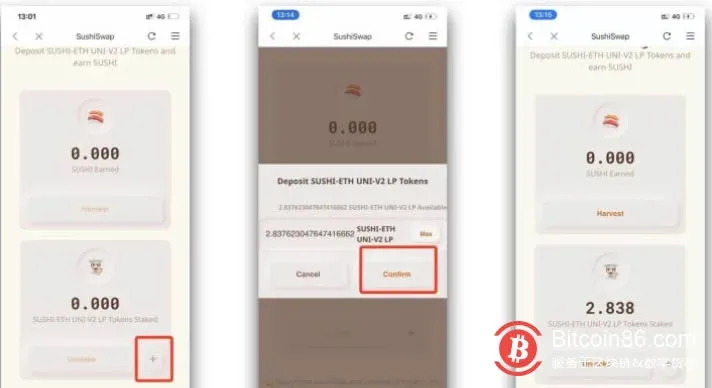
- During the harvest phase, click Harvest to transfer accumulated SUSHI rewards to your wallet; you can then trade them on Uniswap or any other exchange.
- To withdraw liquidity, click UNSTAKE, then go to Uniswap to redeem your share from the liquidity pool.
At this point, the complete workflow for participating in SUSHI mining with the Bitpie wallet has been presented. For more practical information about DeFi mining, stay tuned to Bitaigen’s upcoming专题 articles.
*Note: Cryptocurrency gains may be taxable in your jurisdiction. Please consult a tax professional to understand local tax obligations.*
Related Reading
- SUN Mining on TRON with Bitpie Wallet: DeFi Guide
- Import Private Key or Mnemonic Phrase into Bitpie Wallet
- Bitpie Wallet: Secure Non‑Custodial Web3 Asset Management
💡 Register on Binance with referral code B2345 for the maximum trading fee discount. See Binance complete guide.



